

CodeIME
Ho Lam Chung · Developer Tools
Independent analytics for this App Store listing. AppTracker is not affiliated with Ho Lam Chung.
Chart standing · US
What changed · US
Listing changes AppTracker has observed for this app in this storefront — new versions, price moves, rating shifts, and store copy.
CodeIME 1.1 adds a real Shift key and a smoother typing feel. • Shift on the letter rows and in the NAV rail: tap for one capital, double-tap for caps lock, or hold while typing • Shift-Tab, plus Shift, Ctrl, and Alt with the arrow keys for word jumps and selections in terminal apps • Hold delete or an arrow key to repeat it • Key pop-ups, press highlights, and no dead zones between keys • A second symbol page that covers every ASCII symbol • Smarter command predictions that put the most likely match first • Layouts tuned for iPhone landscape and iPad • A Try It field in the app shows exactly what each key sends
In-app purchases · US
No in-app purchases.
Screenshots
Keywords this app targets
Search terms AppTracker associates with this app — estimates, not search volume. ❝ = in the app's title; a highlighted number is its current position for that term.
Similar apps
Competitors and close alternatives, as estimated by AppTracker.
 Dev Keyboard: Code & Symbols
Anshika Maurya
1 shared topic
Dev Keyboard: Code & Symbols
Anshika Maurya
1 shared topic
 CodeMote: Mobile Vibe Coding
Salvatore Castellitti
2 shared topics
CodeMote: Mobile Vibe Coding
Salvatore Castellitti
2 shared topics
 Code - Editor Git and Terminal
Morella Folesani
2 shared topics
Code - Editor Git and Terminal
Morella Folesani
2 shared topics
 Shell Keyboard
Nguyen Nguyen
Shell Keyboard
Nguyen Nguyen
 TypeTab: Coding Keyboard
Andreu Pifarre
TypeTab: Coding Keyboard
Andreu Pifarre
 CodeMate: Code Editor & Viewer
光 李
CodeMate: Code Editor & Viewer
光 李
 Code App
thebaselab Ltd
1 shared topic
Code App
thebaselab Ltd
1 shared topic
 MTerm - SSH Terminal
kazuki oinuma
1 shared topic
MTerm - SSH Terminal
kazuki oinuma
1 shared topic
About
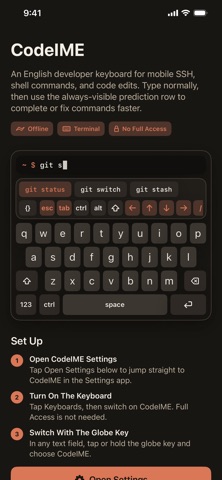
CodeIME is an iOS keyboard built for developers working from a phone. It keeps the familiar English keyboard layout, then adds fast access to terminal keys, code symbols, navigation controls, and command predictions. Use it when connecting to servers, editing files, running shell commands, or working inside terminal apps. CodeIME includes an always-visible predictive command row, quick modes for navigation and symbols, plus sticky Ctrl, Alt, and Shift modifiers for actions like Ctrl-C and Shift-Tab. Highlights: English developer keyboard with compact dark interface Terminal keys including Esc, Tab, Ctrl, Alt, Shift, arrows, slash, pipe, and tilde Sticky Ctrl, Alt, and Shift for chords such as Ctrl-C, Ctrl-D, Shift-Tab, and Ctrl-Arrow Always-visible predictive command row and code symbol panel Key pop-ups, hold-to-repeat delete and arrows, input click sounds, and modifier highlighting Privacy-friendly design with no tracking and no data collection CodeIME does not require keyboard Full Access.
What's new · 1.1
CodeIME 1.1 adds a real Shift key and a smoother typing feel. • Shift on the letter rows and in the NAV rail: tap for one capital, double-tap for caps lock, or hold while typing • Shift-Tab, plus Shift, Ctrl, and Alt with the arrow keys for word jumps and selections in terminal apps • Hold delete or an arrow key to repeat it • Key pop-ups, press highlights, and no dead zones between keys • A second symbol page that covers every ASCII symbol • Smarter command predictions that put the most likely match first • Layouts tuned for iPhone landscape and iPad • A Try It field in the app shows exactly what each key sends
Details