

CodeMate: Code Editor & Viewer
光 李 · Developer Tools
Independent analytics for this App Store listing. AppTracker is not affiliated with 光 李.
Chart standing · US
What changed · US
Listing changes AppTracker has observed for this app in this storefront — new versions, price moves, rating shifts, and store copy.
Improved menus and keyboard input for a smoother experience. Added a code information panel. Fixed several known issues.
Price & rating history · US
Reconstructed from the listing changes AppTracker has observed in this storefront. A field is charted once it has changed more than once, and each line starts at the value it moved from.
Average rating · ★ 5.00 now · 2 changes on record
Ratings breakdown · US
The star breakdown behind this app's rating in this storefront.
Screenshots



Similar apps
Competitors and close alternatives, as estimated by AppTracker.
 Visual Code Editor - vCode
Devang Samirbhai Shah
Visual Code Editor - vCode
Devang Samirbhai Shah
 Code Editor
RainbowFactory LTD
Code Editor
RainbowFactory LTD
 Code App
thebaselab Ltd
Code App
thebaselab Ltd
 Text Editor : Code Editor
Devashy Rangpariya
Text Editor : Code Editor
Devashy Rangpariya
 DraftCode: Code & Text Editor
献慧 陈
DraftCode: Code & Text Editor
献慧 陈
 Codex: HTML Editor
MD UZZAL MIA
Codex: HTML Editor
MD UZZAL MIA
 Combine - Code Editor & Git
Margins Technologies LLC
Combine - Code Editor & Git
Margins Technologies LLC
 GoCoEdit - Code & Text Editor
Christoph Gogolin
GoCoEdit - Code & Text Editor
Christoph Gogolin
About
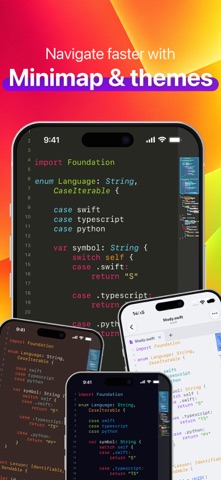
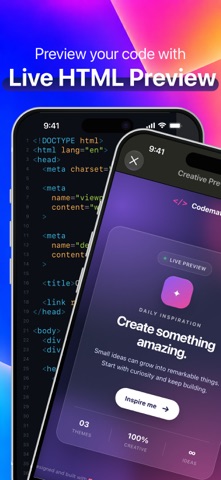
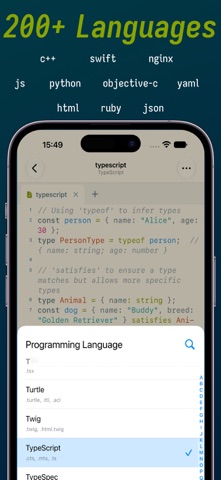
CodeMate is a native code viewer and editor for iPhone and iPad—made for reading source code, learning from real projects, and making quick edits away from your desk. No desktop IDE complexity. Just fast, focused code viewing and editing designed for touch. Open more than 200 file formats with native syntax highlighting, including Swift, Python, JavaScript, TypeScript, Java, C/C++, Go, Rust, HTML, CSS, JSON, XML, YAML, and Markdown. Access files from iCloud Drive, Dropbox, and other storage providers through the Files app. Key Features: • Native code viewing and editing on iPhone and iPad • Syntax highlighting for 200+ file formats • Multiple tabs and a minimap for navigating long files • Light and dark themes with adjustable fonts, spacing, and margins • Line numbers, current-line highlighting, word wrap, and no-word-wrap modes • Swift symbol list and jump to any line • HTML preview with linked CSS and JavaScript • Custom file extension rules • Share and print source files • Export polished code snapshots as images CodeMate is made for developers, students, and anyone who wants a focused, portable way to read, learn from, and edit code. Terms of Use (EULA) https://www.apple.com/legal/internet-services/itunes/dev/stdeula/
What's new · 2.0.5
Improved menus and keyboard input for a smoother experience. Added a code information panel. Fixed several known issues.
Details