

Shell Keyboard
Nguyen Nguyen · Developer Tools
Independent analytics for this App Store listing. AppTracker is not affiliated with Nguyen Nguyen.
Chart standing · US
What changed · US
Listing changes AppTracker has observed for this app in this storefront — new versions, price moves, rating shifts, and store copy.
Minor improvements to the Shell Keyboard app.
In-app purchases · US
No in-app purchases.
Screenshots



Similar apps
Competitors and close alternatives, as estimated by AppTracker.


About
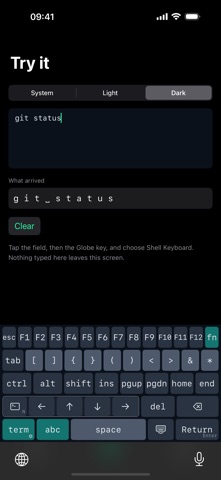
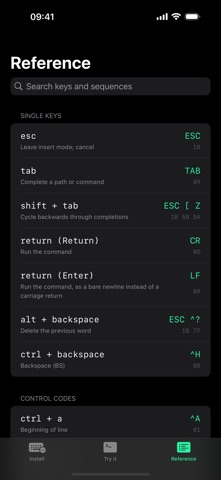
Shell Keyboard adds the keys a terminal actually needs — the ones iOS's default keyboard leaves out. Working over SSH or in a local shell needs Ctrl, Esc, Tab, arrow keys, and function keys, none of which exist on the standard iOS keyboard. Shell Keyboard is a custom keyboard built specifically for terminal apps like Blink, Termius, Prompt, a-Shell and iSH — it sends the exact ASCII control codes and ANSI/VT escape sequences your terminal expects, the same bytes a physical keyboard would send. WHAT'S INCLUDED • A dedicated terminal layer: Ctrl, Alt, Esc, Tab, arrow keys, Home/End/PgUp/PgDn, and the punctuation a shell prompt uses constantly • Ctrl and Alt as proper modifiers — latch one for a single keypress, or double-tap to lock it on, like a hardware keyboard • A full function-key layer: tap fn and the top row becomes F1 through F12, while every other row stays exactly where it was • Arrow keys that match the app you're in — Normal for shells, Application for vim, tmux, less and htop, or Move the Cursor for ordinary text fields • Return or Enter: long-press the Return key to switch between a carriage return and a line feed • A plain QWERTY layer and a complete symbols layer, for ordinary text — hostnames, paths, commit messages — without leaving the keyboard • A searchable reference inside the app, listing every key alongside the exact escape sequence and hex bytes it sends • Every key emits the exact byte sequence a real terminal expects BUILT FOR PRIVACY Shell Keyboard never asks for Full Access. It cannot reach the network. It never reads, stores, or transmits anything you type — every key it sends is decided from the key you tapped, and nothing else. No analytics, no crash reporting, no account. GOOD TO KNOW In a terminal or editor running inside a web browser — code-server, Jupyter and the like — the keys that send a multi-character escape sequence don't get through: the arrow keys, F1 through F12, Home, End, Page Up, Page Down, Shift+Tab and Alt combinations. Everything that sends a single byte works there normally, including every Ctrl combination, Esc, Tab, Return and ordinary typing. Web pages listen for key press events and iOS only lets a keyboard extension insert text, so this is an iOS limitation that applies to every third-party keyboard, not something an app can work around. WHO IT'S FOR Anyone who SSHes from an iPhone or iPad — sysadmins, developers, and anyone tired of missing Ctrl+C.
What's new · 1.1.0
Minor improvements to the Shell Keyboard app.
Details