

TypeTab: Coding Keyboard
Andreu Pifarre · Developer Tools
Independent analytics for this App Store listing. AppTracker is not affiliated with Andreu Pifarre.
Chart standing · US
What changed · US
Listing changes AppTracker has observed for this app in this storefront — new versions, price moves, rating shifts, and store copy.
TypeTab now has an eight-row coding layout with reorganized symbols, clearer Caps Lock highlighting, and more reliable Backspace behavior. This update also includes the redesigned app icon.
In-app purchases · US
What this app sells inside itself, grouped by kind and priced for this storefront.
Screenshots



Similar apps
Competitors and close alternatives, as estimated by AppTracker.


About
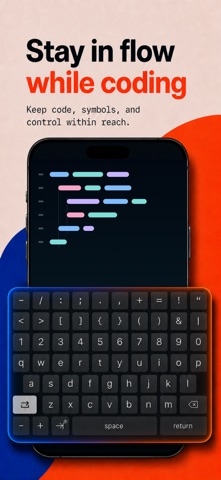
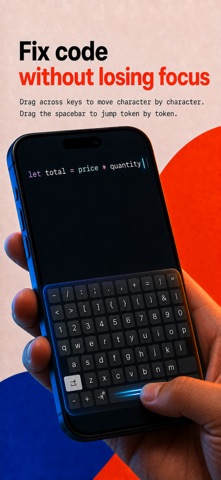
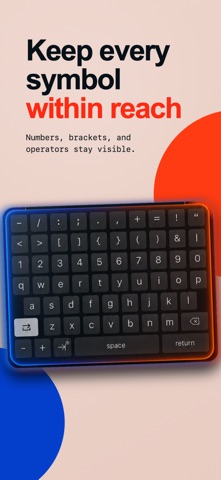
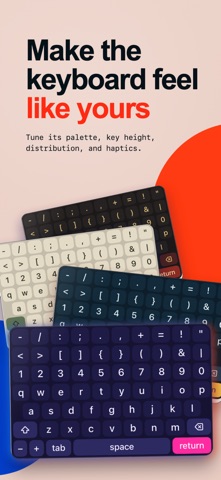
TypeTab is the developer-first iPhone keyboard that keeps letters, numbers, and common programming symbols visible in one eight-row layout. Write and edit code without bouncing between keyboard modes. Drag across the keyboard to place the cursor character by character, or drag from the spacebar to move by token. Type a short trigger to expand reusable Swift, JavaScript, and Python structures, then jump through each editable field. TYPE WITH THE KEYS YOUR CODE NEEDS • Eight-row layout with persistent number and coding-symbol rows • Auto-paired parentheses, brackets, braces, and quotes • Tabs, 2 spaces, or 4 spaces for indentation • Reusable built-in and custom snippets • Adjustable palettes, key height, and haptic feedback • Built-in Test Pad and keyboard reference WORKS WHERE YOU WRITE Use TypeTab in editors, browsers, messages, notes, and other apps that support third-party keyboards. PRIVATE BY DESIGN Full Access is not required. The keyboard does not send or collect the code or text you type. TypeTab includes a complete free keyboard with cursor controls, built-in snippets, and customization. TypeTab Pro unlocks the complete built-in snippet library, unlimited custom snippets, every palette, and all keyboard heights. Terms of Use: https://www.apple.com/legal/internet-services/itunes/dev/stdeula/ Privacy Policy: https://typetab.dev/privacy
What's new · 1.0.2
TypeTab now has an eight-row coding layout with reorganized symbols, clearer Caps Lock highlighting, and more reliable Backspace behavior. This update also includes the redesigned app icon.
Details