

Dev Keyboard: Code & Symbols
Anshika Maurya · Developer Tools
Independent analytics for this App Store listing. AppTracker is not affiliated with Anshika Maurya.
Chart standing · US
What changed · US
Listing changes AppTracker has observed for this app in this storefront — new versions, price moves, rating shifts, and store copy.
Bug fixes and performance improvements.
Ratings breakdown · US
The star breakdown behind this app's rating in this storefront.
In-app purchases · US
What this app sells inside itself, grouped by kind and priced for this storefront.
Screenshots
Keywords this app targets
Search terms AppTracker associates with this app — estimates, not search volume. ❝ = in the app's title; a highlighted number is its current position for that term.
Similar apps
Competitors and close alternatives, as estimated by AppTracker.
 CodeIME
Ho Lam Chung
1 shared topic
CodeIME
Ho Lam Chung
1 shared topic
 TypeTab: Coding Keyboard
Andreu Pifarre
TypeTab: Coding Keyboard
Andreu Pifarre
 Special Symbols: Keyboards
Marco Petrucci
1 shared title word
Special Symbols: Keyboards
Marco Petrucci
1 shared title word
 CodingKB
杰 瓮
1 shared topic
CodingKB
杰 瓮
1 shared topic
 Code App
thebaselab Ltd
2 shared topics · 1 shared title word
Code App
thebaselab Ltd
2 shared topics · 1 shared title word
 CodePad: Web IDE Client
冰 韩
1 shared topic
CodePad: Web IDE Client
冰 韩
1 shared topic
 Falconkey (developer keyboard)
葆霖 李
1 shared topic · 1 shared title word
Falconkey (developer keyboard)
葆霖 李
1 shared topic · 1 shared title word
 Shell Keyboard
Nguyen Nguyen
Shell Keyboard
Nguyen Nguyen
About
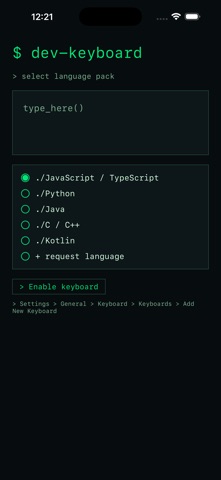
Dev Keyboard is a terminal-styled coding keyboard that puts the symbols you actually type one tap away. A PC-style layout (Esc, Ctrl, Shift, Alt, Cmd, Tab, Caps) sits above quick rows of developer symbols and brackets. FEATURES - PC-style modifier row and key layout - One-tap brackets and symbols: {} [] () => ; / \ | and more - Long-press letters for extra developer symbols - Language packs: JavaScript / TypeScript, Python, Java, C / C++, Kotlin - Terminal aesthetic: monospace, dark, distraction-free - Privacy-first: no Full Access required, nothing leaves your device Type code faster in any app - notes, chat, editors, terminals.
What's new · 2026.09.11
Bug fixes and performance improvements.
Details