

AI Cockpit: Usage & Limits
Albert Frick · Developer Tools
Independent analytics for this App Store listing. AppTracker is not affiliated with Albert Frick.
Chart standing · US
What changed · US
Listing changes AppTracker has observed for this app in this storefront — new versions, price moves, rating shifts, and store copy.
Clear and calm: every card fits its text at any text size, outages show once, and nothing fails quietly. CLEARER • Card header stays readable at every text size; the summary moves below the name when needed. • One outage bar above the cards: provider, kind of outage and every card it affects. Tap for the status page. • Header: "…" menu, Refresh, Settings. With accessibility sizes, the summary scrolls along. • Calmer cards: tips under "More", reset alarm in the context menu of a window. • iPad: independent columns instead of a grid with gaps. • Cost cards with a 30-day line and a spike note. • One format: "63%", "USD 12.40". Today's share reads "14% of the week, 0% used". • Status colors meet 4.5:1 contrast in every theme. Plan badges show only known plans. FIXED • One failed request (rate limit, server error, no network) no longer empties card, widget, watch or Live Activity — the last figures stay, marked with their age. • Watch: faster answer with Claude and ChatGPT; an older state never replaces a newer one; "iPhone not reachable" without a connection. • Reset alarm no longer fires from stale data; no double "reset" notice. • Lock screen: number first; "Claude" and "Claude 2" are told apart. • Live Activity shows its age after 15 minutes and "–" after the reset. • Complications show their age; outages reach tiles and the watch. • VoiceOver reads the whole card header.
In-app purchases · US
What this app sells inside itself, grouped by kind and priced for this storefront.
Screenshots


Similar apps
Competitors and close alternatives, as estimated by AppTracker.


About
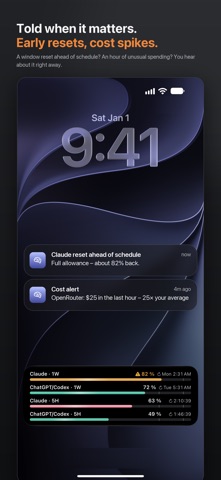
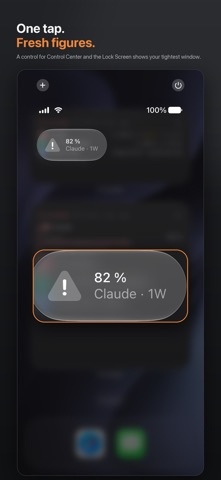
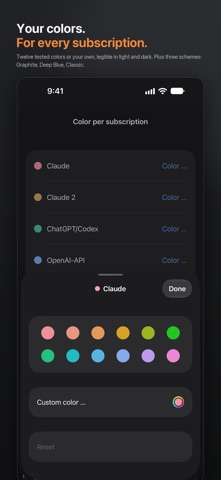
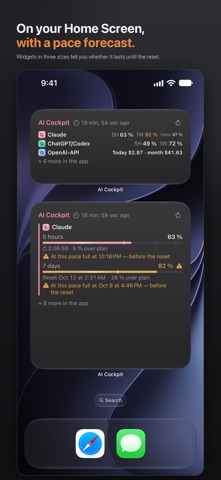
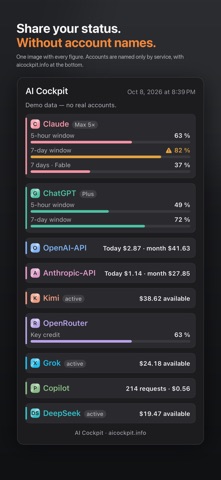
Claude, ChatGPT & Codex, Copilot and six more AI services — how much is left, and when it resets. On your iPhone, your iPad and your Apple Watch: the phone fetches everything itself, no Mac required. No browser cookies. No data collection. Your keys stay in this device's keychain and never travel to the watch. Free. No account with the publisher, no server in between. WHAT THE APP SHOWS • Claude subscription: the 5-hour, 7-day and model-scoped weekly windows, each with a percentage and a reset time • ChatGPT/Codex: the quotas of the signed-in account • OpenAI API and Anthropic API: cost today, this month and in total • Kimi: balance • OpenRouter: spend, credit and the key's cap • Grok (xAI): balance and spending cap • DeepSeek: balance per currency • GitHub Copilot: usage and quota — personal paid plans only If one service fails, the rest carry on. (i) buttons explain every term. NO SURPRISES • One sentence at the top says where you stand: "All in the green" or "Claude is getting tight today" • A forecast under every window: "full at 16:40 at this pace" — or that it lasts until the reset • A tip when a window is nearly full and another plan or account still has room • A plan check from your weekly peaks (Claude only, an estimate) • Alerts at your threshold, before a five-hour window fills, when it starts over and when it resets off schedule • A cost alert when API spend jumps or credit drains fast; a monthly budget • A Live Activity with up to four windows on the Lock Screen and in the Dynamic Island • A control for Control Center, the Lock Screen and the Action button YOUR MONEY AND YOUR TIME • Renewal dates: a note days before each plan renews, with the amount • Reset alarm: one bell, one notification when a window is free again • Today's share: "9% left for today so the week lasts" • Quiet hours and "Pause until tomorrow" — cost alerts may come through • Your AI month: on the 1st, a review of what you spent and used, to share as an image • Six shortcuts for Siri and the Shortcuts app Alerts are made on the device when the app fetches — no server. In the background, iOS decides how often. WIDGETS • One service or all, used or remaining • Three sizes for the Home Screen; the large one adds the one-sentence status and today's share • Tap a widget and the app opens that card • Three shapes for the Lock Screen with a live countdown, also in StandBy; in a Smart Stack, AI Cockpit moves up when a window gets tight APPLE WATCH • A verdict first: "Still fine", "Getting tight" or "Window full", and the window behind it • A crown turn away: every source, one line each • Complications in all four shapes The watch shows, it does not fetch: the figures come from the phone. YOUR LOOK Three color schemes — Graphite, Deep Blue, Classic — and a color per card, carried into widgets, watch and Live Activity. Share your status as an image, account names hidden. WHAT YOU NEED For each card the matching plan, API key or account. All optional: without one, only that card stays empty. Demo mode shows the whole app with sample figures. Runs on iOS 17, iPadOS 17 and watchOS 10; the control from iOS 18, on the watch from watchOS 26. WHAT THE APP DOES NOT DO No registration, no analytics, no tracking, no ads. The only in-app purchase is a voluntary tip that unlocks nothing. It never reads your chats; it fetches quotas and amounts, nothing else. Settings and figures stay on the device; every connection uses HTTPS and goes straight to the service you added. DISCLAIMER AI Cockpit is an independent tool, not affiliated with or endorsed by Anthropic, OpenAI, Moonshot AI, OpenRouter, xAI, DeepSeek or GitHub. Their names appear because their figures do.
What's new · 2.17
Clear and calm: every card fits its text at any text size, outages show once, and nothing fails quietly. CLEARER • Card header stays readable at every text size; the summary moves below the name when needed. • One outage bar above the cards: provider, kind of outage and every card it affects. Tap for the status page. • Header: "…" menu, Refresh, Settings. With accessibility sizes, the summary scrolls along. • Calmer cards: tips under "More", reset alarm in the context menu of a window. • iPad: independent columns instead of a grid with gaps. • Cost cards with a 30-day line and a spike note. • One format: "63%", "USD 12.40". Today's share reads "14% of the week, 0% used". • Status colors meet 4.5:1 contrast in every theme. Plan badges show only known plans. FIXED • One failed request (rate limit, server error, no network) no longer empties card, widget, watch or Live Activity — the last figures stay, marked with their age. • Watch: faster answer with Claude and ChatGPT; an older state never replaces a newer one; "iPhone not reachable" without a connection. • Reset alarm no longer fires from stale data; no double "reset" notice. • Lock screen: number first; "Claude" and "Claude 2" are told apart. • Live Activity shows its age after 15 minutes and "–" after the reset. • Complications show their age; outages reach tiles and the watch. • VoiceOver reads the whole card header.
Details