

Runlow: AI Usage Meter
LEON NELIO FIGUEIRA · Developer Tools
Independent analytics for this App Store listing. AppTracker is not affiliated with LEON NELIO FIGUEIRA.
Chart standing · US
What changed · US
Listing changes AppTracker has observed for this app in this storefront — new versions, price moves, rating shifts, and store copy.
Make full screen your own. Hold a tile to resize it, or choose Reorder and drag it into place. Your homepage layout stays separate. On iPhone Duo, choose one or two dashboard columns.
Ratings breakdown · US
The star breakdown behind this app's rating in this storefront.
In-app purchases · US
What this app sells inside itself, grouped by kind and priced for this storefront.
Screenshots





Keywords this app targets
Search terms AppTracker associates with this app — estimates, not search volume. ❝ = in the app's title; a highlighted number is its current position for that term.
Similar apps
Competitors and close alternatives, as estimated by AppTracker.
 Limits: AI Usage Tracker
Pranav Karthik Mruthyunjayan
1 shared topic · 3 shared title words
Limits: AI Usage Tracker
Pranav Karthik Mruthyunjayan
1 shared topic · 3 shared title words
 CUStats Go - AI Usage Tracker
Luong NGUYEN
1 shared topic · 3 shared title words
CUStats Go - AI Usage Tracker
Luong NGUYEN
1 shared topic · 3 shared title words
 Token Monitor: AI Usage
Ashok Pokharel
1 shared topic · 3 shared title words
Token Monitor: AI Usage
Ashok Pokharel
1 shared topic · 3 shared title words
 CodexBar Usage Monitor
Franz Hemmer
1 shared topic · 1 shared title word
CodexBar Usage Monitor
Franz Hemmer
1 shared topic · 1 shared title word
 AI Cockpit: Usage & Limits
Albert Frick
AI Cockpit: Usage & Limits
Albert Frick
 AI Session Meter
Yuya Otake
AI Session Meter
Yuya Otake
 LimitWatch
圣宝 蔡
1 shared topic
LimitWatch
圣宝 蔡
1 shared topic
 Runalyzer
Chad Johnson
Runalyzer
Chad Johnson
About
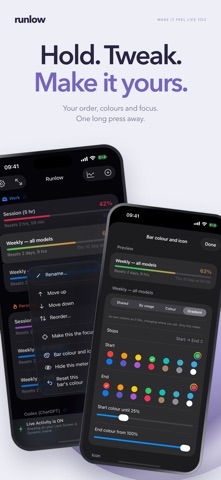
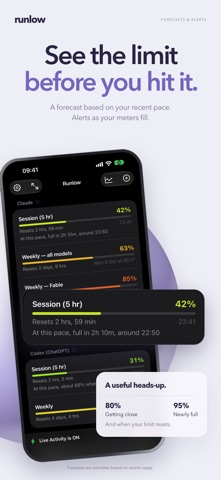
Runlow shows how much of your AI usage you have left, on your Lock Screen, in the Dynamic Island, in widgets, on your watch and in your Mac's menu bar, before you run out. Connect the services you pay for and every limit becomes a colour-coded meter that fills from green to red as you use it, with the time until it resets beside it. WHAT IT TRACKS • Claude: session and weekly limits, per-model limits, multiple accounts and extra-usage credits • Codex (ChatGPT): your plan's limits • Gemini CLI: quota for supported work or school accounts • Antigravity: Gemini and shared Claude/GPT usage limits for your plan • Cursor: plan usage • GitHub Copilot: premium requests • OpenRouter: credit balance, key spend, and spending today, this week and this month • Xiaomi MiMo: Token Plan credits used and your pay-as-you-go balance ANTIGRAVITY SETUP Set up Antigravity on your Mac with Google's command-line tool and Runlow's numbered guide. With iCloud sync enabled in Runlow, your Mac can share readings with iPhone and Apple Vision Pro. Fresh readings need Runlow running on an awake Mac. THE LOCK SCREEN CARD Pin up to eight meters to your Lock Screen as a Live Activity. Choose the headline meter, how big the top row is, how many meters fit, whether every meter gets a bar, and where the refresh button and the "updated" stamp sit. Reset times can count down live. The Dynamic Island shows the number you pick on each side, and expands to as many as six meters. A SETUP WIZARD One question at a time, with your own card in front of you the whole way: which meters, how big, the bars, the typeface, the background, how the numbers read. Cancel puts everything back. WIDGETS Small, medium and large Home Screen widgets, the large one holds up to twelve meters, each with its bar, and rectangular, circular and inline Lock Screen widgets. Long-press a widget to choose which meters it shows, and tap its refresh button for fresh numbers. MAKE IT YOURS Seven themes, one tap each, that follow light and dark on their own. Nine typefaces. Bars in one piece or in blocks like a fuel gauge. Colour bars by the theme, by usage, by usage as a gradient along the bar, or give any meter its own colour and gradient. A glass, black, light or custom-coloured background. Name any meter, hide the ones you do not need, and put the rest in your order. Numbers as used or as what is left. ON YOUR MAC Runlow lives in the menu bar: the number sits next to the clock, and a click drops down every limit. Put as many meters in the menu bar as you like, side by side or stacked, and right-click any meter to add it or take it out. The Mac has the same themes, bars and setup wizard. ON YOUR WRIST Your focus meter on Apple Watch, in your theme, with its own settings page and a live preview. THE DASHBOARD Full-screen mode turns an iPad or iPhone into a wall of live meters for the desk. Landscape lays every limit out as tiles. History charts every meter over time, with an optional forecast, "at this pace, tomorrow around 11:14", worked out from your own readings. A payments log tracks what you pay each service, with CSV export. Notifications warn you before you hit a wall and tell you the moment a limit resets, and service status flags when a provider is having an outage. ACROSS YOUR DEVICES Your settings can follow you to your other devices through your own iCloud, colours, themes, meter names and order, the Lock Screen layout, and you choose what travels. Off unless you turn it on. PRIVATE BY DESIGN Runlow has no account of its own. Saved sign-in details are stored in Keychain. Supported connections and Antigravity readings can sync through your iCloud Keychain. Your credentials and usage are not sent to us. Explore with sample data in Demo Mode. One purchase covers your iPhone, iPad, Mac, Apple Watch and Apple Vision Pro. Runlow is an independent app and is not affiliated with, endorsed by, or sponsored by Anthropic, OpenAI, Google, Cursor, GitHub, OpenRouter or Xiaomi.
What's new · 2.2.9
Make full screen your own. Hold a tile to resize it, or choose Reorder and drag it into place. Your homepage layout stays separate. On iPhone Duo, choose one or two dashboard columns.
Details