

CUStats Go - AI Usage Tracker
Luong NGUYEN · Developer Tools
Independent analytics for this App Store listing. AppTracker is not affiliated with Luong NGUYEN.
Chart standing · US
What changed · US
Listing changes AppTracker has observed for this app in this storefront — new versions, price moves, rating shifts, and store copy.
Overview charts are now more accurate. - The Week view includes today, and its stats cover the same days as the bars. - Trend lines, reset markers, and projections line up correctly, including around daylight-saving changes. - The Month view shows every day and every session, and Most Active Day shows the date. - Avg Time to Limit and Peak Hour are measured from the start of your usage window.
Ratings breakdown · US
The star breakdown behind this app's rating in this storefront.
In-app purchases · US
No in-app purchases.
Screenshots



Keywords this app targets
Search terms AppTracker associates with this app — estimates, not search volume. ❝ = in the app's title; a highlighted number is its current position for that term.
Similar apps
Competitors and close alternatives, as estimated by AppTracker.
 Limits: AI Usage Tracker
Pranav Karthik Mruthyunjayan
1 shared topic · 5 shared title words
Limits: AI Usage Tracker
Pranav Karthik Mruthyunjayan
1 shared topic · 5 shared title words
 CodexBar Usage Monitor
Franz Hemmer
1 shared topic · 1 shared title word
CodexBar Usage Monitor
Franz Hemmer
1 shared topic · 1 shared title word
 Runlow: AI Usage Meter
LEON NELIO FIGUEIRA
1 shared topic · 3 shared title words
Runlow: AI Usage Meter
LEON NELIO FIGUEIRA
1 shared topic · 3 shared title words
 Token Monitor: AI Usage
Ashok Pokharel
1 shared topic · 3 shared title words
Token Monitor: AI Usage
Ashok Pokharel
1 shared topic · 3 shared title words
 CodexBar - Usage of AI
昱晓 王
1 shared topic · 2 shared title words
CodexBar - Usage of AI
昱晓 王
1 shared topic · 2 shared title words
 AI Session Meter
Yuya Otake
AI Session Meter
Yuya Otake
 LimitWatch
圣宝 蔡
2 shared topics
LimitWatch
圣宝 蔡
2 shared topics
 Claude Counter
Robert OConnell
2 shared topics
Claude Counter
Robert OConnell
2 shared topics
About
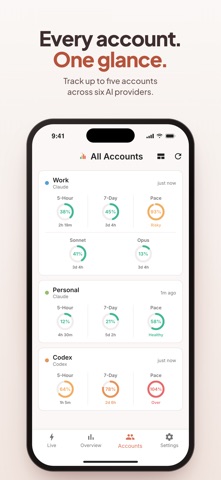
Know before you hit your Claude, Codex, Grok, Cursor, Devin, or Droid (Factory AI) limit. CUStats Go's pace metric predicts your weekly usage at reset, so you can ease off before the cutoff — not after. Privacy-first by design: your usage data stays on your device, your account credentials are stored only in the iOS Keychain, and there are no ads and no behavioral tracking. Track each provider's billing windows, monitor model-specific consumption, and stay informed with smart notifications and multi-account management. Grok uses the Weekly or Monthly window xAI reports; Cursor maps plan usage to the billing cycle and on-demand to Extra Usage when enabled; Devin covers both the app.devin.ai agent quota and the Devin IDE plan quota. Droid connects with a Factory API key and supports reported Standard/Core five-hour, weekly and monthly windows for token-rate-limit billing only. Legacy billing and Droid history charts are not supported. Droid widgets show available Standard five-hour/weekly windows; Core and monthly windows are shown in the app. Key highlights: - Home screen widgets in three sizes: small, medium, and large multi-account dashboard (widgets require iOS 17 or later). - Widgets update automatically in the background — no need to open the app. - Widgets omit usage windows a provider does not report instead of showing a misleading 0%. - Multi-account widget shows all connected accounts (up to 5) with per-account usage, pace, and reset times. - Real-time monitoring of Claude, Codex, Grok, Cursor, Devin, and Droid (Factory AI) with live progress bars. - Pace Metric predicts your weekly usage at reset time. Know before you hit the limit. - Promotion awareness: see when 2× usage windows are active with visual indicators. - 7-day trend charts for supported providers, with session-level detail, prediction lines, and weekly reset indicators. Droid history charts are unavailable. - Unified live session view with hero header and inline cumulative and peak charts. - Color-coded statuses (Good, Caution, Critical, At Limit) clarify when to pause usage. - Pace status indicators: Healthy (under 90%), Risky (90-100%), Over (above 100%). - Smart notifications for configurable thresholds, reset alerts, weekly unused-usage reminders, and service status changes — including when Claude or Codex recovers; iOS checks Claude thresholds in the background (Focus-friendly). - Extra usage (overage) credit tracking for paid plans. - Built-in multi-account flow with numbered credential how-tos and secure Keychain storage. - Width-adaptive iPad navigation (side rail at 600pt+), plus iPhone portrait and landscape. - Local-first privacy: no ads, no behavioral tracking, no cloud syncing. Your usage data stays on-device, and credentials are kept in the iOS Keychain. Perfect for developers, researchers, and busy professionals who rely on Claude, Codex, Grok, Cursor, Devin, or Droid (Factory AI) and need portable visibility.
What's new · 1.11.1
Overview charts are now more accurate. - The Week view includes today, and its stats cover the same days as the bars. - Trend lines, reset markers, and projections line up correctly, including around daylight-saving changes. - The Month view shows every day and every session, and Most Active Day shows the date. - Avg Time to Limit and Peak Hour are measured from the start of your usage window.
Details