

AIStats
Kuray OGUN · Productivity
Independent analytics for this App Store listing. AppTracker is not affiliated with Kuray OGUN.
Chart standing · US
What changed · US
Listing changes AppTracker has observed for this app in this storefront — new versions, price moves, rating shifts, and store copy.
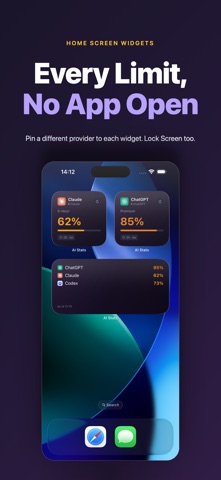
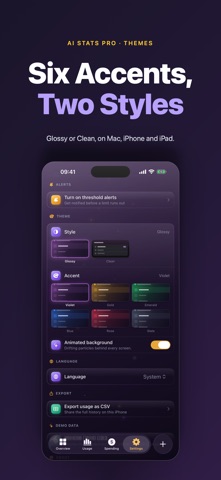
AI Stats is now free to try. Already bought AI Stats? Thank you — you keep everything, automatically. Nothing to restore, nothing to pay, no action needed. New in 2.0.0 • Track one AI account free, forever — widgets included • AI Stats Pro unlocks unlimited accounts with a one-time purchase, shared with your family through Family Sharing • No subscription. It would be a bit rich, on an app about subscription fatigue. • Now universal: Mac, iPhone and iPad, all on the same purchase • Add an account in two taps: pick a provider, then sign in or paste a key • New Clean style alongside Glossy, plus five Pro accent colours • A real iPad layout, not a stretched phone screen • Pin a different provider to each widget, now also in tinted and clear Home Screen modes • Ready for iOS 27 and iPadOS 27
In-app purchases · US
What this app sells inside itself, grouped by kind and priced for this storefront.
Screenshots


Similar apps
Competitors and close alternatives, as estimated by AppTracker.


About
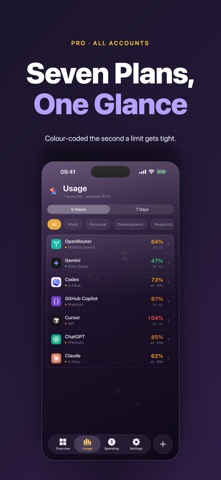
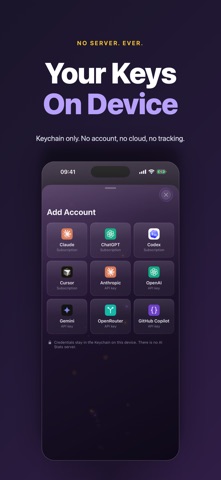
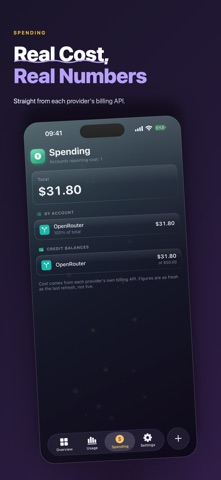
Know how much of your AI subscriptions you have left — without opening five different dashboards. AI Stats tracks the usage limits on the AI accounts you already pay for and puts them where you can actually see them: on your Home Screen, on your Lock Screen, and in a single list in the app. WIDGETS • Home Screen widgets in small and medium sizes • Lock Screen widgets, circular and rectangular • A refresh button right on the widget for when you need the number now • Reset countdowns so you know exactly when your window rolls over EVERY LIMIT IN ONE LIST • See which account is closest to its limit at a glance • Colour-coded from healthy to over limit • Tap any account for a full breakdown of each limit, with progress and reset time • Plans detected automatically — Max, Pro, Plus, Ultra and the rest CONNECT YOUR ACCOUNTS THREE WAYS • Sign in to the provider inside the app • Paste an existing session • Or use an API key Supported: Claude, ChatGPT, Codex, Google Gemini, GitHub Copilot and OpenRouter. BUILT TO STAY ON YOUR DEVICE There is no AI Stats account and no AI Stats server. Your credentials are stored in your device's Keychain and sent only to the provider they belong to. Your usage history stays on your device. Nothing is synced anywhere, because there is nowhere to sync it to. A NOTE ON REFRESHING iOS does not let apps poll continuously in the background. AI Stats updates when you open it, when the system grants background time, and when a widget reloads — and every screen tells you how old the number is, so you are never looking at a stale figure that pretends to be live. Tap refresh on the widget any time you want the latest. AI Stats is also available for Mac, where it lives in your menu bar. PRICING • Free: track one AI account, forever — widgets and menu bar included • AI Stats Pro: unlimited accounts, one-time purchase, no subscription • Already bought AI Stats before it went free? You keep everything, automatically.
What's new · 2.0.0
AI Stats is now free to try. Already bought AI Stats? Thank you — you keep everything, automatically. Nothing to restore, nothing to pay, no action needed. New in 2.0.0 • Track one AI account free, forever — widgets included • AI Stats Pro unlocks unlimited accounts with a one-time purchase, shared with your family through Family Sharing • No subscription. It would be a bit rich, on an app about subscription fatigue. • Now universal: Mac, iPhone and iPad, all on the same purchase • Add an account in two taps: pick a provider, then sign in or paste a key • New Clean style alongside Glossy, plus five Pro accent colours • A real iPad layout, not a stretched phone screen • Pin a different provider to each widget, now also in tinted and clear Home Screen modes • Ready for iOS 27 and iPadOS 27
Details