

QuackNotes – Notes & Code
JESUS SANZ PEREZ · Productivity
Independent analytics for this App Store listing. AppTracker is not affiliated with JESUS SANZ PEREZ.
Chart standing · US
What changed · US
Listing changes AppTracker has observed for this app in this storefront — new versions, price moves, rating shifts, and store copy.
Sketch with Apple Pencil. • Insert Sketch opens a full-screen canvas with Apple's drawing tools in any Markdown note. It's on the keyboard bar on iPad, and in the … menu on iPhone and iPad. • Draw with Apple Pencil, or with your finger when there's no Pencil. • Sketches appear right in the note, in Paper and the preview, and adapt to light and dark mode. Tap one to keep drawing. • Paper now shows pictures that sit on a line of their own. Each sketch is saved as a PNG next to your note and linked with ordinary Markdown, so your notes stay plain files that open anywhere.
In-app purchases · US
No in-app purchases.
Screenshots


Keywords this app targets
Search terms AppTracker associates with this app — estimates, not search volume. ❝ = in the app's title; a highlighted number is its current position for that term.
Similar apps
Competitors and close alternatives, as estimated by AppTracker.
 DraftCode: Code & Text Editor
献慧 陈
2 shared topics · 1 shared title word
DraftCode: Code & Text Editor
献慧 陈
2 shared topics · 1 shared title word
 Text Editor : Code Editor
Devashy Rangpariya
2 shared topics · 1 shared title word
Text Editor : Code Editor
Devashy Rangpariya
2 shared topics · 1 shared title word
 Notes — Markdown Editor
Nhat Dinh
1 shared topic · 1 shared title word
Notes — Markdown Editor
Nhat Dinh
1 shared topic · 1 shared title word
 Neon Vision Editor
Hilthart Pedersen
2 shared topics
Neon Vision Editor
Hilthart Pedersen
2 shared topics
 GoCoEdit - Code & Text Editor
Christoph Gogolin
2 shared topics · 1 shared title word
GoCoEdit - Code & Text Editor
Christoph Gogolin
2 shared topics · 1 shared title word
 Notes - Professional
LiveBird Technologies Private Limited
1 shared topic · 1 shared title word
Notes - Professional
LiveBird Technologies Private Limited
1 shared topic · 1 shared title word
 RetroNotes Markdown
谐 和
2 shared topics
RetroNotes Markdown
谐 和
2 shared topics
 dotMD
Luis Torres
dotMD
Luis Torres
About
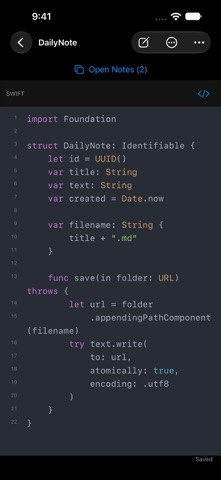
QuackNotes is a notes and code-snippet editor for Mac, iPhone, iPad, and Apple Vision Pro. Every note is a real text file. Write in plain text, Markdown, or your favorite programming language, with automatic saving and no proprietary format. YOUR FILES, YOUR WORKSPACE Use the built-in library or choose a folder of your own. Browse folders and subfolders, drag notes between them, pin favorites, and search by title or content. Open supported files directly from Finder or Files, or import a copy into your library. WRITE AND CODE • Syntax highlighting for Swift, Python, JavaScript, TypeScript, Java, Kotlin, C/C++, C#, Go, Rust, Ruby, PHP, Shell, SQL, JSON, YAML, HTML, CSS, and more. • Choose from over 90 editor themes and customize your font, size, and line spacing. • Preview Markdown with headings, lists, interactive task checkboxes, tables, blockquotes, links, and fenced code blocks. • Edit and preview together on Mac and iPad. On iPhone, switch between writing and preview. PICK UP WHERE YOU LEFT OFF Keep independent tabs in each window. Reorder tabs and reopen a closed tab. Open notes retain their cursor, scroll position, and undo history when you switch between them. iPhone offers a compact Open Notes menu; iPad supports hardware-keyboard shortcuts and an adjustable preview split. WRITE WITH CONFIDENCE See your save status, retry a failed save, or save a recovery copy. External file changes refresh automatically, and conflicting edits are protected from being overwritten. Restore deleted notes and folders from Recently Deleted. MADE FOR YOUR DEVICE On Mac, capture ideas from the menu bar or with a global shortcut. Choose opaque, translucent, or Liquid Glass window backgrounds and keep your window above other apps. On iPhone and iPad, use the editing toolbar for lists, tasks, bold text, links, and hiding the keyboard. Larger tab controls, Dynamic Type in the iOS editor, and support for Reduce Motion and Reduce Transparency help you make the workspace comfortable. Available in English, Spanish, French, German, Italian, Portuguese (Brazil), Japanese, Simplified Chinese, and Korean.
What's new · 1.7
Sketch with Apple Pencil. • Insert Sketch opens a full-screen canvas with Apple's drawing tools in any Markdown note. It's on the keyboard bar on iPad, and in the … menu on iPhone and iPad. • Draw with Apple Pencil, or with your finger when there's no Pencil. • Sketches appear right in the note, in Paper and the preview, and adapt to light and dark mode. Tap one to keep drawing. • Paper now shows pictures that sit on a line of their own. Each sketch is saved as a PNG next to your note and linked with ordinary Markdown, so your notes stay plain files that open anywhere.
Details