

DraftCode: Code & Text Editor
献慧 陈 · Developer Tools
Independent analytics for this App Store listing. AppTracker is not affiliated with 献慧 陈.
Chart standing · US
What changed · US
Listing changes AppTracker has observed for this app in this storefront — new versions, price moves, rating shifts, and store copy.
This app is independently developed and maintained by an indie developer. Feedback and bug reports are always welcome. For collaboration inquiries, please contact me by email. Enjoy the app. Email: yemaozi2026@outlook.com • HTML and XML tags now pair up: put the cursor on an opening or closing tag to highlight its partner, and fold multi-line elements from the line-number gutter. • Layouts adapt to iPhone Duo's inner and outer displays and to resizable windows; changing the window size keeps your cursor where it was. • The code-key row above the keyboard now has its own backdrop, so it stays readable over the sidebar.
Price & rating history · US
Reconstructed from the listing changes AppTracker has observed in this storefront. A field is charted once it has changed more than once, and each line starts at the value it moved from.
Average rating · ★ 4.50 now · 2 changes on record
Ratings breakdown · US
The star breakdown behind this app's rating in this storefront.
In-app purchases · US
No in-app purchases.
Screenshots



Keywords this app targets
Search terms AppTracker associates with this app — estimates, not search volume. ❝ = in the app's title; a highlighted number is its current position for that term.
Similar apps
Competitors and close alternatives, as estimated by AppTracker.
 Text Editor : Code Editor
Devashy Rangpariya
3 shared topics · 4 shared title words
Text Editor : Code Editor
Devashy Rangpariya
3 shared topics · 4 shared title words
 Tidytext - Text Editor
Ayman Hunjol
3 shared topics · 3 shared title words
Tidytext - Text Editor
Ayman Hunjol
3 shared topics · 3 shared title words
 GoCoEdit - Code & Text Editor
Christoph Gogolin
2 shared topics · 4 shared title words
GoCoEdit - Code & Text Editor
Christoph Gogolin
2 shared topics · 4 shared title words
 Textastic Code Editor
Alexander Blach
3 shared topics · 2 shared title words
Textastic Code Editor
Alexander Blach
3 shared topics · 2 shared title words
 Markdown+ Text & Code Editor
Zetegy LLC
3 shared topics · 3 shared title words
Markdown+ Text & Code Editor
Zetegy LLC
3 shared topics · 3 shared title words
 txt.edit - Simple Text Editor
Titans of Industry
2 shared topics · 3 shared title words
txt.edit - Simple Text Editor
Titans of Industry
2 shared topics · 3 shared title words
 Text Editor - HTML Code Editor
Rajalben Vavadiya
2 shared topics · 4 shared title words
Text Editor - HTML Code Editor
Rajalben Vavadiya
2 shared topics · 4 shared title words
 Visual Code Editor - vCode
Devang Samirbhai Shah
2 shared topics · 2 shared title words
Visual Code Editor - vCode
Devang Samirbhai Shah
2 shared topics · 2 shared title words
About
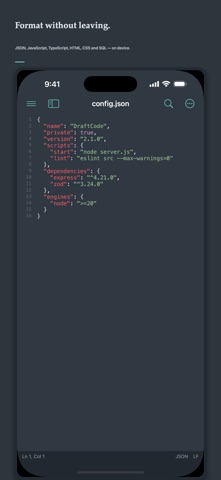
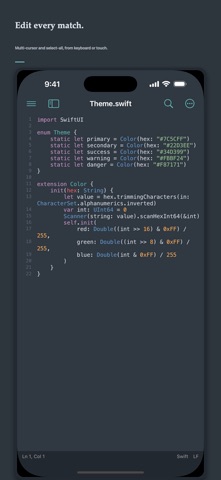
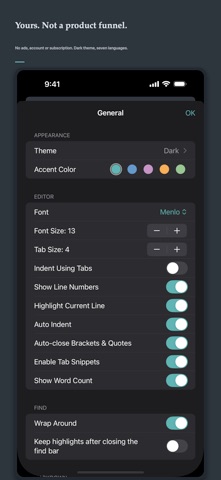
DraftCode is a private code, text and Markdown editor for Mac, iPhone and iPad. Open local files or folders, start typing immediately and keep your work in standard file formats. One-time purchase: no ads, account, tracking, subscription or in-app purchase. EDIT CODE AND TEXT • Syntax highlighting and language detection for 57 languages • Tabs, split editing, line numbers, minimap, bookmarks and code snippets • Multi-cursor editing and select next or all matching occurrences • Auto-indent, bracket pairing, comments and a scrollable code-key toolbar • Code folding with bracket and HTML/XML tag matching • Open files and project folders through Apple system pickers LANGUAGES AND THEMES • Built-in engines for Swift, Python, JavaScript, TypeScript, Go, Rust and more • Import TextMate grammars, language configuration, syntax themes and file-icon themes • Enable, disable, replace or remove packs, with a safe return to built-in defaults SEARCH AND NAVIGATE • Plain text, escaped and regular-expression search • Find and replace across a selected project folder • Command palette, quick open, outline and TODO navigation FORMAT LOCALLY • JSON, JSON5, HTML, CSS, SVG, SQL, YAML, TOML and plist • JavaScript, TypeScript, JSX and TSX format and compress on device • Full file or selection, with undo, error locations and large-file protection REMOTE WORKSPACES • Connect to FTP, explicit FTPS and SFTP servers • Browse folders, download text files on demand and upload saved changes • Keep passwords in Keychain, detect server-side conflicts and reconnect automatically SOURCE CONTROL • Clone Git repositories over HTTPS or SSH into a folder you choose • Stage, commit, branch, merge, fetch, pull and push on this device • Store passwords, tokens and pasted SSH private keys in Keychain; confirm the host fingerprint before saving it. On Mac, authorize local SSH files instead — those private keys are not copied into Keychain OPTIONAL AI EDITING • Off by default. Prefers on-device Apple models; otherwise your HTTPS endpoint receives only the current selection when you invoke it • Failures never change the document MARKDOWN • Local preview with tables, task lists, code, Mermaid and math • Side-by-side editing on supported layouts • HTML export on Apple platforms and PDF export on Mac Local documents are never uploaded automatically. Remote transfers go only to a server you explicitly configure. DraftCode does not collect personal data.
What's new · 2.5
This app is independently developed and maintained by an indie developer. Feedback and bug reports are always welcome. For collaboration inquiries, please contact me by email. Enjoy the app. Email: yemaozi2026@outlook.com • HTML and XML tags now pair up: put the cursor on an opening or closing tag to highlight its partner, and fold multi-line elements from the line-number gutter. • Layouts adapt to iPhone Duo's inner and outer displays and to resizable windows; changing the window size keeps your cursor where it was. • The code-key row above the keyboard now has its own backdrop, so it stays readable over the sidebar.
Details