

Notes — Markdown Editor
Nhat Dinh · Productivity
Independent analytics for this App Store listing. AppTracker is not affiliated with Nhat Dinh.
Chart standing · US
What changed · US
Listing changes AppTracker has observed for this app in this storefront — new versions, price moves, rating shifts, and store copy.
v1.16.0 - Deleting a note while you had it open could freeze the app. Fixed. - Delete a note from the sidebar and the editor lets go of it instead of sitting on "Opening…". - Adding a vault now leads the Vaults screen, and more of the app reads in Japanese.
In-app purchases · US
No in-app purchases.
Screenshots



Keywords this app targets
Search terms AppTracker associates with this app — estimates, not search volume. ❝ = in the app's title; a highlighted number is its current position for that term.
Similar apps
Competitors and close alternatives, as estimated by AppTracker.
 MarkText - Markdown Editor
刘生 林
3 shared topics · 3 shared title words
MarkText - Markdown Editor
刘生 林
3 shared topics · 3 shared title words
 Markdown Viewer Editor
Hefei Yunyilian Intelligent Technology Co., Ltd
1 shared topic · 2 shared title words
Markdown Viewer Editor
Hefei Yunyilian Intelligent Technology Co., Ltd
1 shared topic · 2 shared title words
 Markdown Viewer & Editor
Masamichi Ueta
Markdown Viewer & Editor
Masamichi Ueta
 RetroNotes Markdown
谐 和
2 shared topics · 1 shared title word
RetroNotes Markdown
谐 和
2 shared topics · 1 shared title word
 Markdown+ Text & Code Editor
Zetegy LLC
2 shared topics · 2 shared title words
Markdown+ Text & Code Editor
Zetegy LLC
2 shared topics · 2 shared title words
 MarkPad – Markdown Editor
kenta yamamoto
1 shared topic · 3 shared title words
MarkPad – Markdown Editor
kenta yamamoto
1 shared topic · 3 shared title words
 Hashy - AI Markdown Editor
Mushroom DAO Holdings Corp.
1 shared topic · 3 shared title words
Hashy - AI Markdown Editor
Mushroom DAO Holdings Corp.
1 shared topic · 3 shared title words
 1Writer - Markdown Text Editor
Ngoc Luu
1 shared topic · 2 shared title words
1Writer - Markdown Text Editor
Ngoc Luu
1 shared topic · 2 shared title words
About
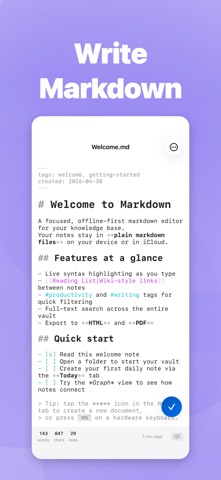
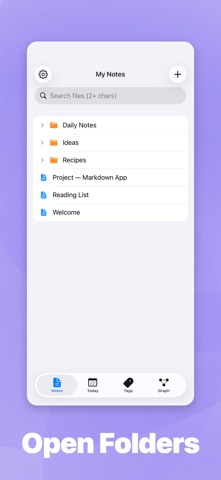
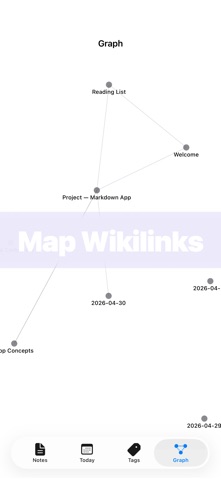
Markdown is a fast, native iOS editor for plain‑text .md notes. Point it at a folder you already use — in the Files app, iCloud Drive, or a provider that allows folder access in Files (Dropbox, OneDrive, Working Copy) — and start writing. No account. No proprietary database. Your notes stay as plain Markdown files on your own drive. WHY THIS APP • Local‑first by design. Files live where you put them. Open them in any other editor on any other device, any time. • Privacy first. No sign‑up, no telemetry of your content, no cloud account required. • Designed for iPhone and iPad. Side‑by‑side editor and preview on iPad. Optimized touch and Apple Pencil layouts. • Built in SwiftUI for iOS 18. EDITOR • Live syntax highlighting for headings, bold, italic, code, links, wikilinks, tags, and YAML frontmatter • Markdown toolbar with 15 actions for fast formatting on iPhone • Hardware keyboard shortcuts (Cmd+B / I / K, headings, lists, indent) • Find and replace inside the current document • Auto‑pairing for (), [], {}, backticks, quotes, ** and __ • Focus mode dims everything except the current line • Typewriter mode keeps the cursor centered • Six fonts, adjustable size and line spacing • Live word, character, line counts and reading time • Auto‑save every 30 seconds; cursor position remembered per file PREVIEW • Full GitHub Flavored Markdown: tables, task lists, strikethrough, footnotes • Math and formulas with KaTeX (inline $...$ and display $$...$$) • Image embeds, wikilink rendering, tag highlighting • YAML frontmatter rendered as a metadata table • Four reading themes: Default, Sepia, Nord, Solarized Dark • Side‑by‑side editor and preview on iPad WIKILINKS, TAGS AND DAILY NOTES • [[Wikilinks]] with autocomplete and one‑tap navigation • Backlinks panel shows every note that points to the current file • #tag indexing with a dedicated tag browser • Daily notes with templates for journaling and logs • Force‑directed graph view of how your notes connect FILE HANDLING • Open from Files, iCloud Drive, Dropbox, OneDrive or any document provider • Google Drive: its iOS Files integration does not allow folder access, so a notes folder cannot live there — open its files one at a time, or sync with iCloud Drive, Dropbox, OneDrive or Syncthing • Drag and drop files in to open them • Multi‑file selection in the file browser • External change detection: edit a file in another app and it reloads here • Recent files with timestamps • Export to PDF, HTML or Markdown • Security‑scoped bookmarks for persistent folder access • Registered as a Markdown document handler so .md files can open here from anywhere iOS INTEGRATION • CoreSpotlight indexing — search your notes from the iOS home screen • Share Extension — receive text and URLs from any app and save them as a note • Quick Capture home‑screen widget for instant new notes • App Shortcuts for "Create Note" and "Open Daily Note" • Open In support so other apps can hand markdown files to this app WHO IT'S FOR • Writers and journalers who want a clean iOS app with their files in their own folder • Obsidian and Bear users who want a lighter, more native iPhone and iPad experience • Developers and tech writers who edit READMEs, docs and notes on the go • Students and researchers using a personal wiki or zettelkasten on iPad • Anyone who prefers plain text they fully own to a closed note database NO LOCK‑IN The app reads and writes ordinary .md files. There is no proprietary format, no required account, and no cloud service in the middle. If you stop using the app tomorrow, every note you made is still there, in the folder you chose, in plain Markdown. Requires iOS 18 or later. iPhone and iPad supported.
What's new · 1.16.0
v1.16.0 - Deleting a note while you had it open could freeze the app. Fixed. - Delete a note from the sidebar and the editor lets go of it instead of sitting on "Opening…". - Adding a vault now leads the Vaults screen, and more of the app reads in Japanese.
Details