

dotMD
Luis Torres · Productivity
Independent analytics for this App Store listing. AppTracker is not affiliated with Luis Torres.
Chart standing · US
What changed · US
Listing changes AppTracker has observed for this app in this storefront — new versions, price moves, rating shifts, and store copy.
A new icon, with dark and tinted versions for the Home Screen. Prefer the old one? On iPhone and iPad it's still there as Classic, in Settings › Appearance › App Icon. The open-notes list also reads better: each note's preview line is now plain words instead of Markdown symbols.
In-app purchases · US
No in-app purchases.
Screenshots



Similar apps
Competitors and close alternatives, as estimated by AppTracker.
 Notes — Markdown Editor
Nhat Dinh
Notes — Markdown Editor
Nhat Dinh
 cyberWriter - Markdown Studio
John Taverna
cyberWriter - Markdown Studio
John Taverna
 Markdown Viewer Editor
Hefei Yunyilian Intelligent Technology Co., Ltd
Markdown Viewer Editor
Hefei Yunyilian Intelligent Technology Co., Ltd
 MarkPad – Markdown Editor
kenta yamamoto
MarkPad – Markdown Editor
kenta yamamoto
 Markdown Viewer & Editor
Masamichi Ueta
Markdown Viewer & Editor
Masamichi Ueta
 MarkText - Markdown Editor
刘生 林
MarkText - Markdown Editor
刘生 林
 OpenMark
Rotate, LLC.
OpenMark
Rotate, LLC.
 Wander: Markdown Editor
System Operator LLC
Wander: Markdown Editor
System Operator LLC
About
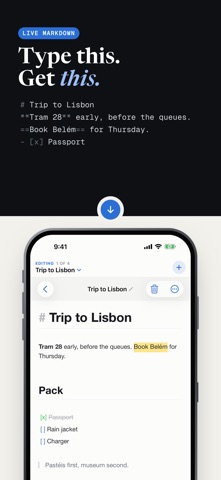
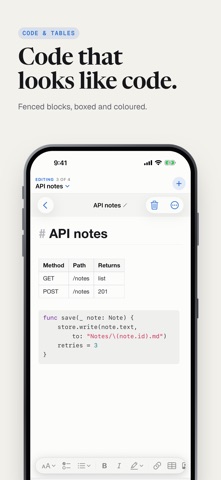
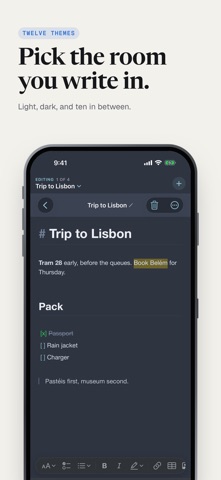
dotMD is a Markdown editor that shows your formatting as you type. Headings grow, bold turns bold, tables and images draw themselves in place and the syntax markers only appear on the line you're editing. No split-screen preview, no switching modes. Just writing that looks like what it means. Your notes are ordinary .md files. Open them in any other app, back them up, move them anywhere. Nothing is locked in a database you can't reach. WRITE - Live inline formatting - headings, bold, italic, highlight, quotes, code - Tappable checklists, tables and images rendered right in the text - Maths with $…$ and $$…$$ in Reading View - Find & replace, heading outline, live word and character count ORGANISE - Browser-style tabs - keep everything open, reordered by dragging - Tags, Recents and search across your library - Twelve templates: meeting notes, project README, weekly plan, journal… - Open any folder as a workspace and edit in place BRING THINGS IN - One tap to turn a copied AI answer into a formatted note - Paste rich text from anywhere and keep the structure - Import Markdown and text files TAKE THINGS OUT - Export to Markdown, PDF, HTML, Rich Text or plain text EVERYWHERE - iPhone, iPad and Mac, tuned for each - Sync through a folder in iCloud Drive, Dropbox or similar works on a free Apple ID, no subscription PRIVATE - No account, no analytics, no tracking, no ads - Your notes never leave your device unless you sync them yourself - Optional Face ID, Touch ID or passcode lock - Notes hidden from the App Switcher MAKE IT YOURS - Nine accent colours, seven app icons, light and dark - Menlo by default, or system, serif or mono - Focus mode, typewriter mode, adjustable width and spacing
What's new · 1.3.1
A new icon, with dark and tinted versions for the Home Screen. Prefer the old one? On iPhone and iPad it's still there as Classic, in Settings › Appearance › App Icon. The open-notes list also reads better: each note's preview line is now plain words instead of Markdown symbols.
Details