

Timecode Tool App
llcheesell Inc. · Music
Independent analytics for this App Store listing. AppTracker is not affiliated with llcheesell Inc.
Chart standing · US
What changed · US
Listing changes AppTracker has observed for this app in this storefront — new versions, price moves, rating shifts, and store copy.
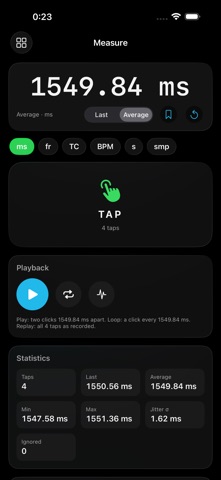
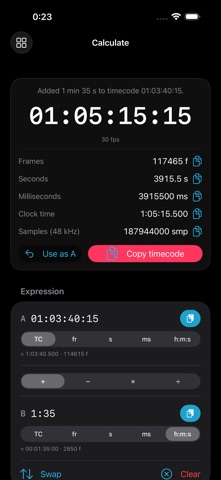
• New: Measure — a tap delay checker. Tap twice and read the interval in milliseconds, frames, timecode, BPM, seconds or samples, then hear it back as two sample-accurate clicks, a click loop, or your taps replayed. A tap far from the rest is flagged as it lands and left out of the statistics; measurements can be saved and brought back later. • New: Calculate — a timecode calculator. Add, subtract, scale and divide timecode, frames, seconds, milliseconds and clock time in any mix, with the unit chosen on a sliding switch under each field. A sentence above the result says what was done; the result shows in every form with Copy, and any field takes a paste. • 59.94 and 60 fps in Measure and Calculate. • The app now speaks Japanese, Korean, Simplified Chinese, French and German as well as English.
In-app purchases · US
No in-app purchases.
Screenshots


Similar apps
Competitors and close alternatives, as estimated by AppTracker.
 TimeCode Generator
Haute Technique b.v.
TimeCode Generator
Haute Technique b.v.
 tcCalc - timecode & frame calc
RYUICHIROU SHIMONO
tcCalc - timecode & frame calc
RYUICHIROU SHIMONO
 4:20
Upload Studio Ltd
4:20
Upload Studio Ltd
 TIMECODE READER Pocket
Hidetoshi Umeki
TIMECODE READER Pocket
Hidetoshi Umeki
 PostCode - timecode calculator
Martin McLean
PostCode - timecode calculator
Martin McLean
 Simple Timecode Calculator
Daan van de Westelaken
Simple Timecode Calculator
Daan van de Westelaken
 Timecode+
Daniel Ricciotti
Timecode+
Daniel Ricciotti
 Timecode Stamper
Alastair Bor
Timecode Stamper
Alastair Bor
About
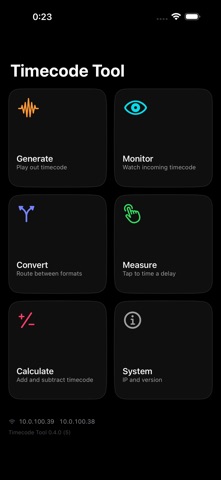
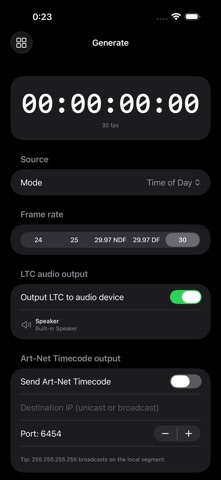
Timecode Tool is a focused utility for live-show technicians who need to generate, monitor, convert, measure or calculate SMPTE timecode on iPad, iPhone, and Apple Silicon Mac. Five tools: GENERATE • Output LTC audio and Art-Net Timecode driven by system time-of-day, a free-running 1-hour block, or a custom Start Timecode you type in (e.g. 02:03:20:15) that free-runs from that point. • A media-player transport while running — previous block, back to start of block, play/pause, next block. (Hidden for time-of-day, which follows the wall clock instead of a block you can skip through.) • Pick FPS (24, 25, 29.97 NDF, 29.97 DF, 30) including correct SMPTE drop-frame counting. • Send to a specific Art-Net destination IP (unicast or broadcast). MONITOR • A large, glanceable timecode readout for monitoring. • Choose the source: decode LTC from an audio input, or receive Art-Net Timecode over the network. Frame rate and lock state are shown live. CONVERT • Route one timecode input to up to two simultaneous outputs, freely chosen: input is LTC audio, Art-Net, or MTC; each output is LTC audio, Art-Net, or MTC. • MTC: Timecode Tool publishes a virtual MIDI port, "Timecode Tool", that shows up as a MIDI input in every other app on your device — your DAW can chase it with no cable or MIDI interface. Output can also go to a real MIDI destination, and input can come from any MIDI source. • Warns up front about setups that would misbehave: Art-Net in and out sharing a UDP port, LTC in and out on the built-in speaker and mic, and MTC feeding back into itself. • Latency compensation per output, with drift tracking and a re-sync control. Auto-detects the source frame rate and the drop-frame flag, with an override for 29.97 non-drop versus 30 fps. MEASURE • A delay checker. Tap the pad twice — or keep tapping along to a beat — and read the interval in milliseconds, frames at the rate you choose, timecode, BPM, seconds, or audio samples. • Then hear it: two clicks exactly that far apart, a click every interval, or your own taps replayed, placed on the audio clock to the sample. • A tap far from the others — a double tap, a missed beat — is flagged as it lands and left out of the statistics. Save a measurement with its taps, rate and statistic, and bring it back later. • Last, average, min, max and jitter at a glance; every unit has Copy. CALCULATE • A timecode calculator. Add, subtract, multiply and divide timecode, frames, seconds, milliseconds and h:mm:ss clock time in any mix — for example "01:03:40:15, one minute thirty-five later". • Pick each operand's unit on a sliding switch under the field. Shorthand accepted: 95s, 1500ms, 1m35s, 40f, or just digits into a timecode field. Paste into any field; the unit follows the text. • A sentence above the result says what was done — "Added 1 min 35 s to timecode 01:03:40:15" — and the result appears in every form at once, each with its own Copy, chaining back into the next calculation. Drop-frame arithmetic uses the same frame counting as the generator. • Measure and Calculate also work at 59.94 and 60 fps. Cross-cutting features: • Background audio — keeps generating / decoding when the screen is locked or another app is foreground. • Phone calls and Siri don't break the timecode stream; it resumes. • Shows your device's IP addresses. Works with Class-Compliant USB audio interfaces. Available in English, Japanese, Korean, Simplified Chinese, French and German. Timecode Tool does not collect, store, or transmit any personal data.
What's new · 0.4.0
• New: Measure — a tap delay checker. Tap twice and read the interval in milliseconds, frames, timecode, BPM, seconds or samples, then hear it back as two sample-accurate clicks, a click loop, or your taps replayed. A tap far from the rest is flagged as it lands and left out of the statistics; measurements can be saved and brought back later. • New: Calculate — a timecode calculator. Add, subtract, scale and divide timecode, frames, seconds, milliseconds and clock time in any mix, with the unit chosen on a sliding switch under each field. A sentence above the result says what was done; the result shows in every form with Copy, and any field takes a paste. • 59.94 and 60 fps in Measure and Calculate. • The app now speaks Japanese, Korean, Simplified Chinese, French and German as well as English.
Details