

Timecode+
Daniel Ricciotti · Photo & Video
Independent analytics for this App Store listing. AppTracker is not affiliated with Daniel Ricciotti.
Chart standing · US
What changed · US
Listing changes AppTracker has observed for this app in this storefront — new versions, price moves, rating shifts, and store copy.
- Fixed exporting on iPad: the share sheet could silently fail to appear - Fixed a stuck navigation bar on iPad when opening a note - Premiere Pro XML export: markers now import as timeline markers on the ruler, not clip markers - CSV export: renamed the Colour column to Color for compatibility with marker conversion tools
Ratings breakdown · US
The star breakdown behind this app's rating in this storefront.
In-app purchases · US
No in-app purchases.
Screenshots




Keywords this app targets
Search terms AppTracker associates with this app — estimates, not search volume. ❝ = in the app's title; a highlighted number is its current position for that term.
Similar apps
Competitors and close alternatives, as estimated by AppTracker.
 Timecode Stamper
Alastair Bor
1 shared title word
Timecode Stamper
Alastair Bor
1 shared title word
 Dropcode
Stefan Kubicki
Dropcode
Stefan Kubicki
 Timecode Tool App
llcheesell Inc.
Timecode Tool App
llcheesell Inc.
 tcCalc - timecode & frame calc
RYUICHIROU SHIMONO
1 shared topic · 1 shared title word
tcCalc - timecode & frame calc
RYUICHIROU SHIMONO
1 shared topic · 1 shared title word
 Timecode Marker
BIG STORY FILMMAKING SERVICE
Timecode Marker
BIG STORY FILMMAKING SERVICE
 True-Slate
ANDREW KARL DODD
True-Slate
ANDREW KARL DODD
 PostCode - timecode calculator
Martin McLean
1 shared title word
PostCode - timecode calculator
Martin McLean
1 shared title word
 Timecode Logs
Greg Burks
1 shared topic · 1 shared title word
Timecode Logs
Greg Burks
1 shared topic · 1 shared title word
About
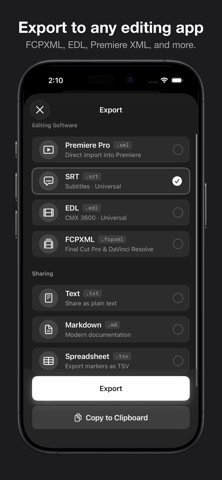
Drop time-stamped markers while you shoot. Timecode+ is production logging for crews who move fast. One tap creates a marker at the exact timecode, so you never lose track of a good take. Used by camera operators, DITs, producers, and script supervisors on sets worldwide since 2012. WHAT IT DOES Start a session, name your scene, and tap to mark moments as they happen. Each marker stores the precise timecode. Good takes, mistakes, boom in frame, great performances - whatever your crew needs to remember. One note holds dozens of markers. When the scene wraps, export your log directly to Final Cut Pro, DaVinci Resolve, Premiere Pro, or Avid. KEY FEATURES - One-tap markers with custom Quick Labels - Time-of-day or manual timecode source - On-device voice transcription (no internet needed) - Full-screen slate display your whole crew can read - Designed for iOS 26 EXPORT FORMATS - FCPXML for Final Cut Pro - EDL for DaVinci Resolve - Premiere XML for Adobe Premiere Pro - CSV and TSV for spreadsheets - Markdown and plain text for sharing - SRT for subtitles BUILT FOR THE SET No accounts. No cloud. No internet required. Everything stays on your device. Open the app, start logging, export when you wrap. TRUSTED BY PROFESSIONALS 12+ years on the App Store. Used on TV productions, film sets, live events, and corporate shoots around the world. Questions? support@timecodeplus.com More at timecodeplus.com
What's new · 5.6
- Fixed exporting on iPad: the share sheet could silently fail to appear - Fixed a stuck navigation bar on iPad when opening a note - Premiere Pro XML export: markers now import as timeline markers on the ruler, not clip markers - CSV export: renamed the Colour column to Color for compatibility with marker conversion tools
Details