

tcCalc - timecode & frame calc
RYUICHIROU SHIMONO · Photo & Video
Independent analytics for this App Store listing. AppTracker is not affiliated with RYUICHIROU SHIMONO.
Chart standing · US
What changed · US
Listing changes AppTracker has observed for this app in this storefront — new versions, price moves, rating shifts, and store copy.
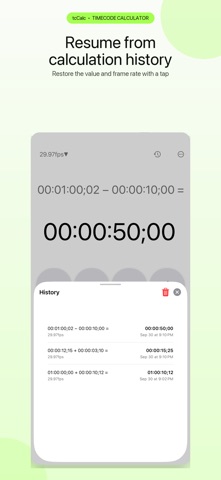
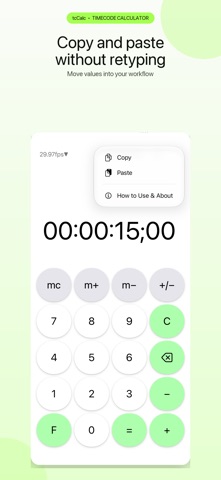
Version 3.8 makes features easier to find and the screen easier to read. New • History and a ••• menu (Copy, Paste, How to Use & About) are now always available at the top of the screen. The swipe-up and touch-and-hold shortcuts still work. • Added How to Use, which explains the F / T / S keys, memory, history, and copy and paste. • Each history entry now shows its frame rate and date. Swipe left on an entry to delete it. • When an entry was recorded at a different frame rate, the history shows which rate restoring it will switch to. Improvements • If the clipboard contents can't be pasted, an alert now explains what can be pasted. • Improved contrast, including the operator keys in dark mode. • At accessibility text sizes, touch and hold a key or a button at the top of the screen to see it enlarged. • Improved VoiceOver descriptions for the F / T / S keys and history. • Fixed the top row being cut off at the top of the screen in landscape.
Ratings breakdown · US
The star breakdown behind this app's rating in this storefront.
In-app purchases · US
No in-app purchases.
Screenshots



Keywords this app targets
Search terms AppTracker associates with this app — estimates, not search volume. ❝ = in the app's title; a highlighted number is its current position for that term.
Similar apps
Competitors and close alternatives, as estimated by AppTracker.
 Simple Timecode Calculator
Daan van de Westelaken
1 shared topic · 1 shared title word
Simple Timecode Calculator
Daan van de Westelaken
1 shared topic · 1 shared title word
 PostCode - timecode calculator
Martin McLean
1 shared topic · 1 shared title word
PostCode - timecode calculator
Martin McLean
1 shared topic · 1 shared title word
 TimecodeCalc
Netmedia
1 shared topic
TimecodeCalc
Netmedia
1 shared topic
 Timecode Tool App
llcheesell Inc.
Timecode Tool App
llcheesell Inc.
 Time-lapse Calculator
Dax Mackenzie Roggio
1 shared topic
Time-lapse Calculator
Dax Mackenzie Roggio
1 shared topic
 CalcTape Paper Tape Calculator
schoettler Software GmbH
1 shared topic
CalcTape Paper Tape Calculator
schoettler Software GmbH
1 shared topic
 Timecode+
Daniel Ricciotti
1 shared topic · 1 shared title word
Timecode+
Daniel Ricciotti
1 shared topic · 1 shared title word
 Time.Calc
Baliza GmbH
1 shared title word
Time.Calc
Baliza GmbH
1 shared title word
About
tcCalc is a calculator built for one job: timecode math for video production. Add and subtract timecode, let it handle drop frame for you, and switch to a frame count with a single tap, all with the feel of an ordinary calculator. Time bases 23.98 / 24 / 25 / 29.97 / 30 / 50 / 59.94 / 60 fps, plus hh:mm:ss for working without frames. Drop frame is applied automatically at 29.97 and 59.94 fps. Features - Add and subtract timecode - One-tap switching between timecode and frame count (seconds in hh:mm:ss mode) - Automatic drop frame handling (29.97 / 59.94 fps) - Constant calculation: press = again to repeat the last operation - Memory: add, subtract, recall, and clear - Calculation history: up to 20 entries with frame rate and date; tap to restore, swipe to delete - Open history with the clock button or by swiping up on the display - Copy and paste from the ••• menu or by touching and holding the result - Built-in How to Use guide Easy to read - Large keys, color-coded by role - Dark mode - iPhone and iPad, in all four orientations - Dynamic Type and VoiceOver support Simple by design - No ads - No in-app purchases - No account or sign-in - The app itself makes no network connections and works offline - No analytics and no tracking Whether you are timing a shoot, finding an edit point, or adding up the length of your footage, tcCalc keeps the math out of your way.
What's new · 3.8
Version 3.8 makes features easier to find and the screen easier to read. New • History and a ••• menu (Copy, Paste, How to Use & About) are now always available at the top of the screen. The swipe-up and touch-and-hold shortcuts still work. • Added How to Use, which explains the F / T / S keys, memory, history, and copy and paste. • Each history entry now shows its frame rate and date. Swipe left on an entry to delete it. • When an entry was recorded at a different frame rate, the history shows which rate restoring it will switch to. Improvements • If the clipboard contents can't be pasted, an alert now explains what can be pasted. • Improved contrast, including the operator keys in dark mode. • At accessibility text sizes, touch and hold a key or a button at the top of the screen to see it enlarged. • Improved VoiceOver descriptions for the F / T / S keys and history. • Fixed the top row being cut off at the top of the screen in landscape.
Details