

Photo to PDF Converter&Scanner
Beijing iDOTOOLS Technology Co., Ltd · Productivity
Independent analytics for this App Store listing. AppTracker is not affiliated with Beijing iDOTOOLS Technology Co., Ltd.
Chart standing · US
What changed · US
Listing changes AppTracker has observed for this app in this storefront — new versions, price moves, rating shifts, and store copy.
Fixed known issues
Ratings breakdown · US
The star breakdown behind this app's rating in this storefront.
In-app purchases · US
What this app sells inside itself, grouped by kind and priced for this storefront.
Screenshots


Keywords this app targets
Search terms AppTracker associates with this app — estimates, not search volume. ❝ = in the app's title; a highlighted number is its current position for that term.
Similar apps
Competitors and close alternatives, as estimated by AppTracker.
 PDF Reader - Editor & Scanner
DAOWEI NETWORK TECHNOLOGY PTE. LTD.
PDF Reader - Editor & Scanner
DAOWEI NETWORK TECHNOLOGY PTE. LTD.
 PDFMagic: PDF Editor & Scanner
iCubemedia Inc.
PDFMagic: PDF Editor & Scanner
iCubemedia Inc.
 PDF Editor & Files Converter.
Sofiya Pliskun
PDF Editor & Files Converter.
Sofiya Pliskun
 Converter & Editor: PDF Expert
The Last Sunrise LLC
Converter & Editor: PDF Expert
The Last Sunrise LLC
 ScanWritr Pro
Vanaia LLC
ScanWritr Pro
Vanaia LLC
 Do Scan: PDF Scanner & OCR
Ammar Ahmad
Do Scan: PDF Scanner & OCR
Ammar Ahmad
 PDF Expert: Editor & Reader
Readdle Technologies Limited
PDF Expert: Editor & Reader
Readdle Technologies Limited
 PDF Converter - PDF Editor・
Techgear Inc
PDF Converter - PDF Editor・
Techgear Inc
About
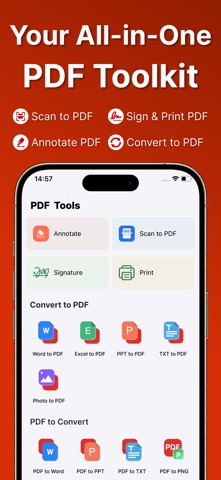
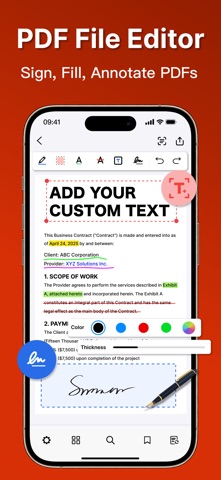
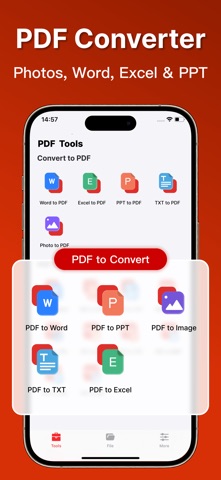
Meet your all-in-one PDF editor — one app to sign, fill, annotate, scan, convert, and print, so you never have to juggle separate tools to finish your paperwork. Whether you’re a student marking up class notes or a professional signing contracts and archiving receipts, this PDF editor takes you from paper to finished PDF in just a few taps — fast, clean, and effortless. PDF Editor — Sign & Fill - Add handwritten or electronic signatures to any PDF - Fill in forms and insert text anywhere on the page - Place, resize, and reposition signatures freely - Save signatures for fast, one-tap reuse Smart Document Scanner - Auto-detect document edges for precise, clean scans - OCR technology extracts searchable text from images - Turn receipts, notes, and paper files into digital PDFs - Clarity enhancement for crisp, readable output Photo & Image to PDF - Convert JPG, PNG, and any photo to PDF instantly - Batch-convert multiple images into a single PDF - Word, Excel, PPT, TXT, and images to PDF - PDF to Word, PPT, TXT, JPG, and PNG PDF Annotation and Markup - Highlight, underline, and strikethrough text - Sticky notes, comments, and custom text insertion - Area highlight with fully customizable colors - Professional markup tools for study and work PDF Reading Experience - Vertical, continuous, and two-page view modes - Adjustable brightness and independent cover mode - Fast text search to jump to any position instantly - Tag important pages for quick reference Efficient PDF File Management - Thumbnail view for fast page navigation - Filter by All, Annotated, or Tagged Pages - One-tap import from iPhone Files, Photos, or other apps - Print PDFs directly via AirPrint to any compatible printer From class notes to contracts and receipts — the all-in-one PDF editor that makes every task fast, clean, and effortless. Sign, fill, annotate, scan, convert, and print, all in one place. * In order to use PDF Editor App you need to purchase the PDF Editor App which is an subscription. Payment will be charged to iTunes Account at confirmation of purchase and auto-renews at the same price unless disabled in iTunes Account Settings at least 24 hours before the end of the current period. Your subscription can be managed in your iTunes Account Settings. Any unused portion of a free trial period, if offered, will be forfeited when you purchase a subscription. Links: Terms of Service: https://10d7baee.pdf-7mv.pages.dev/PDFTermsConditions_en.html Privacy: https://pdf-7mv.pages.dev/pdfPrivacyPolicy_en
What's new · 1.0.7
Fixed known issues
Details