

PDF Converter - PDF Editor・
Techgear Inc · Business
Independent analytics for this App Store listing. AppTracker is not affiliated with Techgear Inc.
Chart standing · US
What changed · US
Listing changes AppTracker has observed for this app in this storefront — new versions, price moves, rating shifts, and store copy.
- Bug Fixes & Performance Improvement
Ratings breakdown · US
The star breakdown behind this app's rating in this storefront.
In-app purchases · US
What this app sells inside itself, grouped by kind and priced for this storefront.
Screenshots






Keywords this app targets
Search terms AppTracker associates with this app — estimates, not search volume. ❝ = in the app's title; a highlighted number is its current position for that term.
Similar apps
Competitors and close alternatives, as estimated by AppTracker.
 PDF Converter ‧
CodeEx Technology
2 shared topics · 3 shared title words
PDF Converter ‧
CodeEx Technology
2 shared topics · 3 shared title words
 PDF Editor - Convert File
Wellresion Limited
1 shared topic · 3 shared title words
PDF Editor - Convert File
Wellresion Limited
1 shared topic · 3 shared title words
 PDF Editor & Files Converter.
Sofiya Pliskun
1 shared topic · 4 shared title words
PDF Editor & Files Converter.
Sofiya Pliskun
1 shared topic · 4 shared title words
 PDFelement: PDF Editor, Viewer
Wondershare Technology Group Co.,LTD
1 shared topic · 3 shared title words
PDFelement: PDF Editor, Viewer
Wondershare Technology Group Co.,LTD
1 shared topic · 3 shared title words
 iLovePDF - PDF Editor & Scan
ILOVEPDF S.L.
1 shared topic · 3 shared title words
iLovePDF - PDF Editor & Scan
ILOVEPDF S.L.
1 shared topic · 3 shared title words
 PDF Converter - Word to PDF
Minimodev Technologies LTD
2 shared topics · 3 shared title words
PDF Converter - Word to PDF
Minimodev Technologies LTD
2 shared topics · 3 shared title words
 Converter & Editor: PDF Expert
The Last Sunrise LLC
2 shared topics · 3 shared title words
Converter & Editor: PDF Expert
The Last Sunrise LLC
2 shared topics · 3 shared title words
 PDF Converter - OCR Reader
Hitek Limited
1 shared topic · 3 shared title words
PDF Converter - OCR Reader
Hitek Limited
1 shared topic · 3 shared title words
About
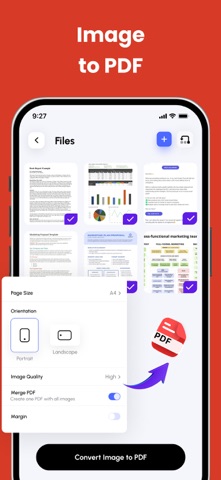
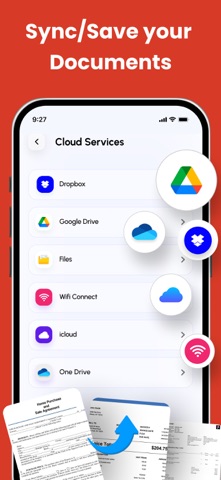
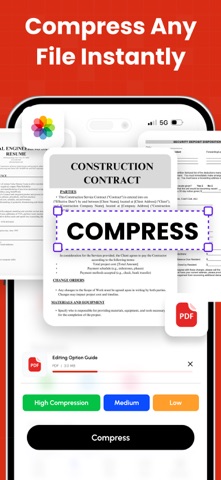
PDF Converter & Editor: Your Complete PDF Toolkit File Management: Every tool you need to use PDFs, at your fingertips. Merge, split, compress, convert, rotate, unlock, and watermark PDFs with ease. Import files from cloud services like Drive, Box, and OneDrive. PDF Editor: Edit PDFs by adding text, shapes, comments, and highlights. A secure and simple tool for all your PDF editing needs. Enhance your PDF experience with our comprehensive PDF Annotation and Reader app. Whether you need to annotate documents for work, study, or personal use, or simply read PDFs with ease, our app has you covered. Key Features: * Annotation Tools: Highlight important text, add comments, draw shapes, and underline or strike through text to mark up your PDFs effectively. * Reader Mode: Switch to Reader Mode for a distraction-free reading experience. Adjust settings such as font size, background color, and brightness to suit your preferences. * Advanced Annotation: Use advanced tools like text box, sticky notes, and freehand drawing to customise your annotations and make your PDFs more interactive. * Document Management: Organise your PDF library with ease. Create folders, rename files, and move documents between folders for efficient file management. * Search and Navigation: Find specific content within your PDFs quickly using the search feature. Navigate through documents easily with page thumbnails and bookmarks. Additional Features: * PDF Form Filling: Fill out PDF forms directly within the app, saving time and paper. * Digital Signatures: Sign documents electronically with ease. Add, edit, or remove digital signatures as needed. * File Protection: Keep your PDFs secure with password protection and encryption. Key Features: Merge PDF: Combine multiple PDF files into one. Split PDF: Divide PDFs into smaller files. Compress PDF: Reduce PDF file size for easy sharing. CONVERT TO PDF JPG to PDF WORD to PDF POWERPOINT to PDF EXCEL to PDF HTML to PDF Additional Features: Invoice maker CV Maker AI PDF Summary CONVERT FROM PDF PDF to JPG PDF to WORD PDF to POWERPOINT PDF to EXCEL Experience the convenience of managing and editing PDFs with our comprehensive PDF Converter and Editor app. Easily merge, split, compress, and convert PDF files, and edit them with our intuitive PDF editor. Download now and unlock the full potential of your PDF files! Subscription Terms & Details Enjoy unlimited access to all features for $29.99/year, with a 3-day free trial. Payment will be charged to your iTunes account once the purchase is confirmed. Your subscription will automatically renew unless auto-renew is turned off at least 24 hours before the end of the current period. You can manage your subscription and disable auto-renewal at any time via your Account Settings. Your account will be charged for renewal within 24 hours prior to the end of the current subscription period. If you start a free trial and decide to subscribe, any remaining trial time will be forfeited. Privacy Policy: https://thepdfedit.com/privacy-policy Terms of Use: https://thepdfedit.com/terms-and-conditions
What's new · 4.4.6
- Bug Fixes & Performance Improvement
Details