

MDash - MD & Mermaid Editor
Artur Gorbaczewski · Productivity
Independent analytics for this App Store listing. AppTracker is not affiliated with Artur Gorbaczewski.
Chart standing · US
What changed · US
Listing changes AppTracker has observed for this app in this storefront — new versions, price moves, rating shifts, and store copy.
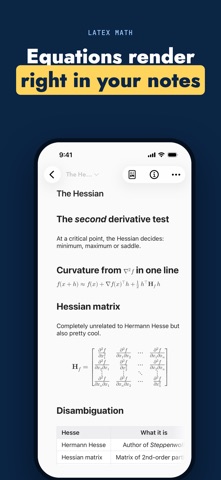
MDash 6.2 brings templates for new notes, your notes in Spotlight search, drag and drop for photos, and version history that follows you across devices. • Start notes from templates: begin with Daily Note, To-Do List or Idea, or save any note as a template; a template can fill in today’s date and put the new note in a folder with tags, and your favorites wait on a long press of the compose button, in the Home Screen quick actions and under New from Template in the menu bar on Mac and iPad • Find notes in Spotlight on iPhone, iPad, Mac and Apple Vision Pro: a word from a note’s title, text or tags brings it up and a tap opens it; locked notes never appear, and Settings ▸ Privacy ▸ Show Notes in Search turns it off • Drag photos from Photos, Safari, Files or Finder into a note, drop them on a folder to start a new note, or drag a photo out of a note into another app; photos now paste in both editing modes too • With iCloud Sync (Pro), Version History now syncs too: restore a version saved on another device and see which device saved each one • Thanks to your feedback, swiping the sidebar closed no longer drags the note under your finger, tools you add in Settings ▸ Keyboard Tools can be removed and reordered, and a swipe from the left edge goes back on every Settings page • Formulas now show Chinese, Japanese and Korean characters, a sketch you make bigger can be drawn on all the way down, and exports keep photos upright and sketches at their size in the note • Update MDash on all your devices, Apple TV included, so templates stay out of their note lists
Ratings breakdown · US
The star breakdown behind this app's rating in this storefront.
In-app purchases · US
What this app sells inside itself, grouped by kind and priced for this storefront.
Screenshots




Keywords this app targets
Search terms AppTracker associates with this app — estimates, not search volume. ❝ = in the app's title; a highlighted number is its current position for that term.
Similar apps
Competitors and close alternatives, as estimated by AppTracker.



About
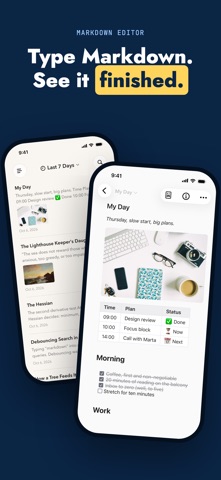
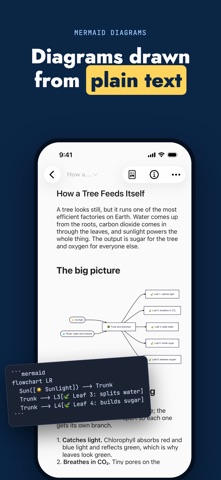
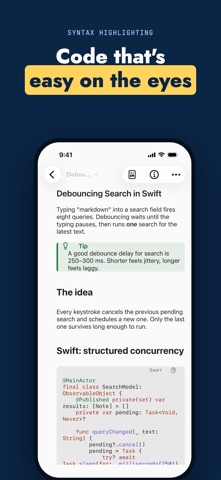
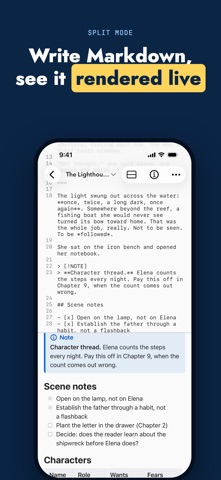
MDash is a Markdown editor that keeps your notes as plain text on your device. No lock-in, no account, no sync you did not ask for. Write on iPhone, iPad and now Mac — the full workspace on every screen. MARKDOWN, RENDERED LIVE Type plain Markdown and watch the preview update as you type: headings, lists, task checkboxes, tables, code blocks with syntax awareness, links and images. Show the text, the preview, or both side by side. MERMAID DIAGRAMS — FREE FOR EVERYONE Describe a flowchart, sequence diagram, Gantt chart, class diagram or state machine in plain text and MDash draws it instantly. Rendering is built into the app: no network, nothing leaves your device. ON MAC AND APPLE WATCH The complete MDash workspace runs on macOS — a three-column library, keyboard-first editing and the same live preview and Mermaid rendering. On Apple Watch, browse your library and read any note on your wrist. One purchase covers iPhone, iPad, Mac and Watch. YOUR LIBRARY, ORGANIZED • Pinned notes, Last 7 Days, and Trash with restore • Full-text search across every note, with jump to match • In-document find and replace with match highlighting • Attach photos to notes; files stay ordinary Markdown • Folders keep related notes together; create one right from the sidebar • Tags under the title, a Tags section in the sidebar, and search by tag • Smart folders collect notes automatically from the tags you choose • Scan documents into a note, and search the text inside photos and scans — on device, free • Import from Obsidian, Bear, Apple Notes, TextBundle or any folder of Markdown files — free • Version History keeps earlier versions of every note on device, ready to restore — free EXPORT AND SHARE • Export Markdown and plain text — free • Copy as rich text for mail and documents • PDF, HTML, Word (DOCX), ePub, RTF, JPG and TextBundle export with MDash Pro MDASH PRO — LIFETIME OR MONTHLY MDash Pro unlocks iCloud sync across your devices, export to PDF, HTML, Word, ePub and more, and watermark-free Mermaid diagrams. Choose a one-time lifetime purchase or a monthly subscription — both unlock exactly the same features. The monthly subscription renews automatically until cancelled; manage or cancel it anytime in your App Store account settings. PRIVATE BY DESIGN Notes are stored on device; sync is optional and uses your iCloud. Mermaid rendering is local. There is no tracking and no account. Questions or ideas? Leave a review or reach out through the App Store page — MDash is built by an independent developer and shaped by user feedback. Terms of Use: https://nightcodeapps.com/apps/markdown-editor/terms/ Privacy Policy: https://nightcodeapps.com/apps/markdown-editor/privacy/
What's new · 6.2
MDash 6.2 brings templates for new notes, your notes in Spotlight search, drag and drop for photos, and version history that follows you across devices. • Start notes from templates: begin with Daily Note, To-Do List or Idea, or save any note as a template; a template can fill in today’s date and put the new note in a folder with tags, and your favorites wait on a long press of the compose button, in the Home Screen quick actions and under New from Template in the menu bar on Mac and iPad • Find notes in Spotlight on iPhone, iPad, Mac and Apple Vision Pro: a word from a note’s title, text or tags brings it up and a tap opens it; locked notes never appear, and Settings ▸ Privacy ▸ Show Notes in Search turns it off • Drag photos from Photos, Safari, Files or Finder into a note, drop them on a folder to start a new note, or drag a photo out of a note into another app; photos now paste in both editing modes too • With iCloud Sync (Pro), Version History now syncs too: restore a version saved on another device and see which device saved each one • Thanks to your feedback, swiping the sidebar closed no longer drags the note under your finger, tools you add in Settings ▸ Keyboard Tools can be removed and reordered, and a swipe from the left edge goes back on every Settings page • Formulas now show Chinese, Japanese and Korean characters, a sketch you make bigger can be drawn on all the way down, and exports keep photos upright and sketches at their size in the note • Update MDash on all your devices, Apple TV included, so templates stay out of their note lists
Details