

iWriter 2
Sergey Zorin · Productivity
Independent analytics for this App Store listing. AppTracker is not affiliated with Sergey Zorin.
Chart standing · US
What changed · US
Listing changes AppTracker has observed for this app in this storefront — new versions, price moves, rating shifts, and store copy.
- iPhone Duo support. - Mermaid updated(12.1.0). Added support for the latest themes. - Fixed a bug in EPUB export. - Images in Preview are now centered. - Various UI bug fixes. If you like iWriter, please rate it in the App Store every time the update goes live. Your ratings and great reviews help us a lot!
Price & rating history · US
Reconstructed from the listing changes AppTracker has observed in this storefront. A field is charted once it has changed more than once, and each line starts at the value it moved from.
Price · 9.99 USD now · 2 changes on record
Average rating · ★ 4.50 now · 7 changes on record
Ratings breakdown · US
The star breakdown behind this app's rating in this storefront.
In-app purchases · US
No in-app purchases.
Screenshots


Keywords this app targets
Search terms AppTracker associates with this app — estimates, not search volume. ❝ = in the app's title; a highlighted number is its current position for that term.
Similar apps
Competitors and close alternatives, as estimated by AppTracker.
 1Writer - Markdown Text Editor
Ngoc Luu
1 shared topic
1Writer - Markdown Text Editor
Ngoc Luu
1 shared topic
 iA Writer
Information Architects AG
1 shared topic
iA Writer
Information Architects AG
1 shared topic
 Writemator - Plain Text Editor
AMIT CHAUDHARY
Writemator - Plain Text Editor
AMIT CHAUDHARY
 Byword
Metaclassy, Lda
1 shared topic
Byword
Metaclassy, Lda
1 shared topic
 Markdown Viewer Editor
Hefei Yunyilian Intelligent Technology Co., Ltd
Markdown Viewer Editor
Hefei Yunyilian Intelligent Technology Co., Ltd
 MarkText - Markdown Editor
刘生 林
1 shared topic
MarkText - Markdown Editor
刘生 林
1 shared topic
 GTW - Markdown & Text Editor
Christoph Gogolin
1 shared topic
GTW - Markdown & Text Editor
Christoph Gogolin
1 shared topic
 txt.edit - Simple Text Editor
Titans of Industry
1 shared topic
txt.edit - Simple Text Editor
Titans of Industry
1 shared topic
About
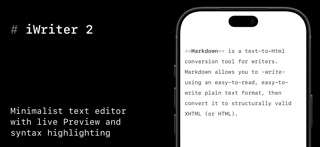
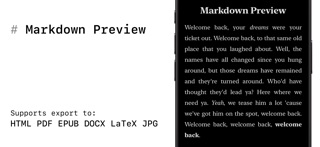
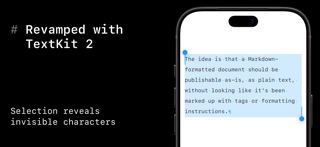
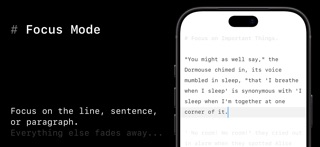
iWriter 2 is an elegant and minimalist Markdown text editor designed for distraction-free writing. # iWriter 2 is the next generation of the beloved iWriter text editor. "Simple & beautiful" App Store Review, 2019 "Terrific Writing and Notes App" App Store Review, 2015 "Great simple text editor" App Store Review, 2014 Immerse yourself in a minimalist writing environment designed to enhance focus and productivity. Say hello to structured, professional documents that effortlessly transform your ideas. ## MultiMarkdown Support iWriter 2 is a full-featured Markdown editor built for precision and flexibility. - MultiMarkdown support with live preview and syntax highlighting. - Wikilinks and Wiki-Embeds for connected notes. - Task lists and code blocks made simple. - Keyboard shortcuts for fast inline formatting. ## Built-in Document Manager A built-in document manager that lets you easily organize, browse, and manage all your files in one place — complete with powerful document search to quickly find exactly what you need. ## Rebuilt with TextKit 2 iWriter 2 has been completely rebuilt from the ground up using Apple’s modern TextKit 2 framework, delivering faster performance, smoother scrolling, and a more responsive writing experience. ## Multiple Export Options A refined, user-friendly interface designed for focus and productivity, offering intuitive formatting options and seamless export to multiple formats including HTML, PDF, EPUB, DOCX (Microsoft Word), and LaTeX. ## LaTeX and Mermaid Diagrams iWriter 2 offers LaTeX syntax highlighting, making complex math expressions easy to read and edit as you write. It also supports Mermaid diagrams, letting you create flowcharts, sequence diagrams, and more using simple text-based syntax. Both integrate seamlessly into your Markdown workflow, keeping technical writing and visual documentation in one place. --- Terms of Use: http://www.apple.com/legal/itunes/appstore/dev/stdeula Privacy Policy: https://serpensoft.com/privacy-policy/
What's new · 16
- iPhone Duo support. - Mermaid updated(12.1.0). Added support for the latest themes. - Fixed a bug in EPUB export. - Images in Preview are now centered. - Various UI bug fixes. If you like iWriter, please rate it in the App Store every time the update goes live. Your ratings and great reviews help us a lot!
Details