

MD Cast
Jaehyung Choi · Productivity
Independent analytics for this App Store listing. AppTracker is not affiliated with Jaehyung Choi.
Chart standing · US
In-app purchases · US
No in-app purchases.
Screenshots


Keywords this app targets
Search terms AppTracker associates with this app — estimates, not search volume. ❝ = in the app's title; a highlighted number is its current position for that term.
Similar apps
Competitors and close alternatives, as estimated by AppTracker.
 Notes — Markdown Editor
Nhat Dinh
2 shared topics
Notes — Markdown Editor
Nhat Dinh
2 shared topics
 Markdown+ Text & Code Editor
Zetegy LLC
3 shared topics
Markdown+ Text & Code Editor
Zetegy LLC
3 shared topics
 MarkText - Markdown Editor
刘生 林
2 shared topics
MarkText - Markdown Editor
刘生 林
2 shared topics
 Markdown Viewer Editor
Hefei Yunyilian Intelligent Technology Co., Ltd
1 shared topic
Markdown Viewer Editor
Hefei Yunyilian Intelligent Technology Co., Ltd
1 shared topic
 Md Preview - Markdown Viewer
CyberGame Limited
1 shared title word
Md Preview - Markdown Viewer
CyberGame Limited
1 shared title word
 Markdown Viewer & Editor
Masamichi Ueta
Markdown Viewer & Editor
Masamichi Ueta
 OpenMark
Rotate, LLC.
1 shared topic
OpenMark
Rotate, LLC.
1 shared topic
 MarkPad – Markdown Editor
kenta yamamoto
1 shared topic
MarkPad – Markdown Editor
kenta yamamoto
1 shared topic
About
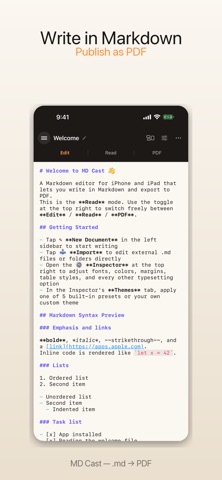
MD Cast is a focused Markdown editor for iPad and iPhone that lets you apply your own style and export to PDF. Customize fonts, colors, line spacing, table styles, and paper settings — then save the whole look as your own theme. Open another Markdown file later and apply the same theme with a single tap. ■ Your style, all the way to PDF - Edit: Syntax-highlighted Markdown editor. - Read: Live preview with your typography, margins, and table styles applied. - PDF: Page-accurate paginated preview, ready to share. Three modes in one screen. Write, preview, and export without leaving the flow. ■ Save your own theme + 5 business presets Save fonts, margins, tables, headers and footers — every formatting choice — as your own theme, then apply it to any future Markdown file with one tap. Need a starting point? Pick from 5 presets (Business Report · Academic Paper · Technical Doc · Casual Article · Minimal Memo) and customize from there. ■ Automatic Korean / English / Japanese / Chinese font matching The renderer detects the language of each glyph (via Unicode ranges) and picks the right font automatically. Korean mixed with English stays balanced; Japanese kanji uses a Japanese font; Chinese hanzi uses a Chinese font. ■ Seven bundled OFL fonts (no install required) - Pretendard, Noto Sans KR, Noto Serif KR, Source Han Sans KR - D2 Coding (monospace) - Inter (English body) - Nanum Gothic System fonts and user-imported fonts (.ttf, .otf) are also fully supported. ■ Full Markdown Extended Syntax - GFM tables (with alignment colons) - Task list checkboxes (- [x] / - [ ]) - Strikethrough (~~text~~) - Footnotes ([^label]) - Definition lists (Term :\\n Definition) - KaTeX math (inline $...$, display $$...$$, multi-line environments like \begin{aligned}) ■ Live inspector Adjust typography, font sizes, line height, colors, table headers and borders, paragraph alignment, indentation, quote styles, paper size, margins, headers and footers — every change reflects in under 0.3 seconds. ■ Edit external vault folders directly (NEW in v1.1) Register your Obsidian, iA Writer, or Files-app Markdown folders in the sidebar and edit them directly — no copies. Changes you save in MD Cast appear instantly at the external location and across other apps and devices. The vault stays in the sidebar after the app is restarted. ■ Localized UI in Korean / English / Japanese / Chinese (NEW in v1.1) All UI text follows your iOS system language automatically. Korean experience remains identical to v1.0. ■ Welcome file on first launch (NEW in v1.1) A welcome Markdown file with rich samples (tables, KaTeX math, task lists) appears on the first launch, letting you experience Markdown rendering immediately — no onboarding overhead. ■ Files app integration + iCloud Drive auto-sync Documents created in the app live in your iCloud Drive "MD Cast" folder, so they sync automatically across iPad, iPhone, and Mac. Use the "Export to External…" menu to send a copy from the MD Cast folder to other Markdown or text editors as-is. ■ Fully offline All fonts and the KaTeX math library are bundled inside the app. Every feature works without an internet connection. ■ No ads, no tracking One-time purchase. Your data never leaves your device. —————————— Markdown your way, all the way to PDF. Try MD Cast today.
What's new · 1.1.4
- Refresh a document edited in another app or on another device — tap the refresh button to load the latest content. The button highlights when an external change is detected. - Improved bold (**bold**) rendering — bold now applies even when quotation marks or trailing characters are attached, and bold text looks crisper. - The keyboard now dismisses automatically when you switch to the Read or PDF tab. - Localization refinements and minor fixes.
Details