

Receipt Tracker - Receiptix
Reciptix LLP · Finance
Independent analytics for this App Store listing. AppTracker is not affiliated with Reciptix LLP.
Chart standing · US
What changed · US
Listing changes AppTracker has observed for this app in this storefront — new versions, price moves, rating shifts, and store copy.
• Find Telegram, WhatsApp, email and Chrome together under Integrations in Settings • Sending receipts through WhatsApp is more reliable • Better duplicate detection after you edit a merchant • Stability and performance improvements
Price & rating history · US
Reconstructed from the listing changes AppTracker has observed in this storefront. A field is charted once it has changed more than once, and each line starts at the value it moved from.
Average rating · ★ 4.74 now · 2 changes on record
Ratings breakdown · US
The star breakdown behind this app's rating in this storefront.
In-app purchases · US
What this app sells inside itself, grouped by kind and priced for this storefront.
Screenshots





Keywords this app targets
Search terms AppTracker associates with this app — estimates, not search volume. ❝ = in the app's title; a highlighted number is its current position for that term.
Similar apps
Competitors and close alternatives, as estimated by AppTracker.
 Smart Receipt: Scan & Track
Glayzer LLC
3 shared topics · 1 shared title word
Smart Receipt: Scan & Track
Glayzer LLC
3 shared topics · 1 shared title word
 Receipt Lens - Expense Tracker
Glority Global Group Ltd.
3 shared topics · 2 shared title words
Receipt Lens - Expense Tracker
Glority Global Group Ltd.
3 shared topics · 2 shared title words
 Smart Receipts: Scan & Track
Ramkumar Vellaisamy
3 shared topics
Smart Receipts: Scan & Track
Ramkumar Vellaisamy
3 shared topics
 SparkReceipt: Receipt Scanner
SparkReceipt Oy
3 shared topics · 1 shared title word
SparkReceipt: Receipt Scanner
SparkReceipt Oy
3 shared topics · 1 shared title word
 Smart Receipt Scan: Receiptly
Karmjit Singh
2 shared topics · 1 shared title word
Smart Receipt Scan: Receiptly
Karmjit Singh
2 shared topics · 1 shared title word
 Receipt Vault: Expense Scanner
Rafal Zbikowski
3 shared topics · 1 shared title word
Receipt Vault: Expense Scanner
Rafal Zbikowski
3 shared topics · 1 shared title word
 Receipt Organizer・ReceiptGenie
Botisan AI Pte. Ltd.
2 shared topics · 1 shared title word
Receipt Organizer・ReceiptGenie
Botisan AI Pte. Ltd.
2 shared topics · 1 shared title word
 Smart Receipts: Expenses & Tax
REACTIVE APPS CORP.
3 shared topics
Smart Receipts: Expenses & Tax
REACTIVE APPS CORP.
3 shared topics
About
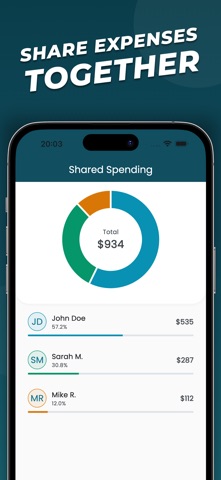
Receiptix — Expense Tracker & Receipt Scanner Track what you spend. Split costs with others. Know where your money goes. Receiptix helps you stay on top of personal expenses without spreadsheets or manual bookkeeping. Snap a receipt, say it out loud, or type it in — your spending is organized automatically. SHARED PROJECTS Track expenses together. Create a project, invite people, and everyone's receipts land in one place. Great for couples managing a household budget, shared apartments, group trips, team budgets, or any situation where multiple people spend from the same pot. APPLE WATCH Track expenses right from your wrist. Log a quick expense, dictate a receipt by voice, or check your monthly spending — all without reaching for your phone. Your Watch stays in sync with your iPhone automatically. SIRI SHORTCUTS "Hey Siri, log an expense in Receiptix." Add expenses hands-free using Siri — at home, in the car, or on the go. CHAT Send receipts to Receiptix on WhatsApp or Telegram. Snap a photo, forward a PDF, or just type the amount — it lands in your spending automatically. EMAIL FORWARDING Got a receipt in your inbox? Forward it to your personal Receiptix email address and it gets processed automatically. Images, PDFs, and text-based digital receipts are all supported. HOW IT WORKS Add an expense however you prefer: take a photo of a receipt, use voice input, or enter it manually. Receiptix reads the receipt, pulls out the merchant, amount, date, and items, then files everything into the right category. You get clear charts and reports showing exactly where your money is going. FREE TO START Add your first expenses free — scan them, speak them, or type them. Included from day one: - Automatic categorization - Spending charts and breakdowns - PDF spending summaries - Multi-currency tracking with conversion - Light and dark mode - Multiple languages PREMIUM - Unlimited expenses — keep scanning, speaking, and typing with no limit - AI receipt scanning — photograph any receipt and let Receiptix extract the details - Voice input & Siri — speak your expenses hands-free, on your iPhone or Apple Watch - Shared projects — collaborate on expenses with others - Custom tags — organize beyond categories (by client, trip, event, or anything else) - Full expense reports with receipts attached — ready for reimbursement or accounting - Data export for spreadsheets and accounting - Email forwarding — forward receipts from your inbox and they're processed automatically - Chrome extension for online receipts - Chat bots on WhatsApp and Telegram — log expenses through chat BUILT FOR REAL LIFE - Works with receipts in any language or currency - Tracks recurring and one-time expenses alike - Syncs across devices - No accounting knowledge needed Privacy Policy: https://receiptix.io/privacy-policy.html Terms of Use: https://receiptix.io/terms-of-use.html
What's new · 2.15.0
• Find Telegram, WhatsApp, email and Chrome together under Integrations in Settings • Sending receipts through WhatsApp is more reliable • Better duplicate detection after you edit a merchant • Stability and performance improvements
Details