

Smart Receipts: Scan & Track
Ramkumar Vellaisamy · Finance
Independent analytics for this App Store listing. AppTracker is not affiliated with Ramkumar Vellaisamy.
Chart standing · US
What changed · US
Listing changes AppTracker has observed for this app in this storefront — new versions, price moves, rating shifts, and store copy.
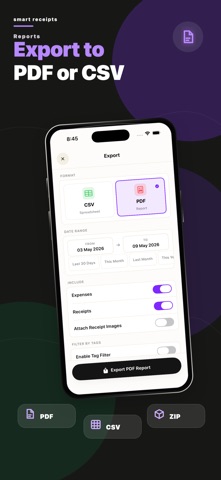
Work with your team • Join your company's workspace and switch between it and your personal one. • Create expense reports, add expenses and send them to an approver. • Approvers can approve or return reports right from the app. See more at a glance • New expense and receipt pages show every detail, including the full merchant name. • See which report an expense belongs to and its status. Faster scanning • Receipts are read in the background, so you can keep scanning. • Get a notification when a receipt is added. Tap it to check the details. • If a receipt can't be read, it's still saved so you can fill it in. • The app tells you when a receipt is already saved. Better exports • Export reports as PDF, CSV or Excel. • Files are named after the report or the dates you chose. • PDFs show Arabic, Hebrew, Japanese and other scripts correctly. Other improvements • Sign up with email using a 6-digit code. • Swipe back from the left edge on detail pages. • Clearer messages and many small fixes.
Price & rating history · US
Reconstructed from the listing changes AppTracker has observed in this storefront. A field is charted once it has changed more than once, and each line starts at the value it moved from.
Average rating · ★ 4.33 now · 8 changes on record
Ratings breakdown · US
The star breakdown behind this app's rating in this storefront.
In-app purchases · US
What this app sells inside itself, grouped by kind and priced for this storefront.
Screenshots





Keywords this app targets
Search terms AppTracker associates with this app — estimates, not search volume. ❝ = in the app's title; a highlighted number is its current position for that term.
Similar apps
Competitors and close alternatives, as estimated by AppTracker.
 Smart Receipts: Expenses & Tax
REACTIVE APPS CORP.
2 shared topics · 3 shared title words
Smart Receipts: Expenses & Tax
REACTIVE APPS CORP.
2 shared topics · 3 shared title words
 Smart Receipt Scan: Receiptly
Karmjit Singh
2 shared topics · 2 shared title words
Smart Receipt Scan: Receiptly
Karmjit Singh
2 shared topics · 2 shared title words
 Smart Receipt: Scan & Track
Glayzer LLC
2 shared topics · 3 shared title words
Smart Receipt: Scan & Track
Glayzer LLC
2 shared topics · 3 shared title words
 Receipt Tracker - Receiptix
Reciptix LLP
3 shared topics
Receipt Tracker - Receiptix
Reciptix LLP
3 shared topics
 Receipt Scanner・Track Expenses
Saldo Apps Inc.
2 shared topics · 1 shared title word
Receipt Scanner・Track Expenses
Saldo Apps Inc.
2 shared topics · 1 shared title word
 Receipt Scanner: Snap & Save
Cathal MORRISON
2 shared topics
Receipt Scanner: Snap & Save
Cathal MORRISON
2 shared topics
 ScanarX Smart Receipt Scanner
Efthymios Tampouris
2 shared topics · 1 shared title word
ScanarX Smart Receipt Scanner
Efthymios Tampouris
2 shared topics · 1 shared title word
 Receipt Organizer・ReceiptGenie
Botisan AI Pte. Ltd.
1 shared topic
Receipt Organizer・ReceiptGenie
Botisan AI Pte. Ltd.
1 shared topic
About
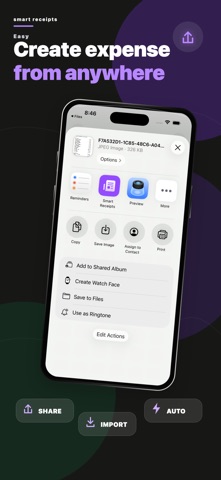
Scan receipts, track expenses and export clean reports for taxes, reimbursements and budgets. Smart Receipts reads the shop, date, total and tax from a receipt in seconds, keeps every receipt safe in your account, and turns them into reports your accountant or employer can use. SCAN IN SECONDS • Point the camera at a receipt, or pick several photos at once. Each one becomes its own expense. • AI reads the merchant, date, total and every tax line for you. • Share PDFs and photos from Mail, Files or Photos straight into the app. FORWARD RECEIPTS, WE SCAN THEM • Forward order confirmations, invoices and e-receipts to your private Smart Receipts email address. • Each one is scanned automatically: merchant, date, total and tax are read and filed as an expense, with the receipt attached. • Works with PDF and photo attachments and with plain receipt emails. Set up automatic forwarding in Gmail or Outlook and receipts arrive on their own. STAY ORGANIZED • Categories, tags, payment methods, customers, projects and notes. • Amounts with or without tax, in any currency, with your own exchange rates. • Smart predictions fill in details from your past receipts. REPORTS THAT GET YOU REIMBURSED • See where your money went, by category. • Export any date range as a PDF with the receipts attached, or as a CSV spreadsheet. • Get a monthly spending summary by email. SAFE ON EVERY DEVICE • Sign in with Apple or Google and your receipts follow you to every device you use. • Add encrypted backup to Dropbox or OneDrive for extra peace of mind. • Use Siri and Shortcuts to scan a receipt or check your spending hands-free. PERFECT FOR • Tax season, self-employed people and freelancers • Small businesses and employee expense reports • Personal budgets and household spending • Proof of purchase and warranties SMART RECEIPTS PRO Unlimited AI receipt scans and expenses, receipts by email, PDF and CSV reports, encrypted Dropbox and OneDrive backup, Siri and Shortcuts without limits, and Pro on all your devices. Subscriptions renew automatically unless cancelled at least 24 hours before the end of the current period. Manage or cancel them anytime in your Apple Account settings. Support: support@reku.dev Privacy Policy: https://smart-receipts.com/privacy.html Terms of Service: https://smart-receipts.com/terms.html
What's new · 1.4.0
Work with your team • Join your company's workspace and switch between it and your personal one. • Create expense reports, add expenses and send them to an approver. • Approvers can approve or return reports right from the app. See more at a glance • New expense and receipt pages show every detail, including the full merchant name. • See which report an expense belongs to and its status. Faster scanning • Receipts are read in the background, so you can keep scanning. • Get a notification when a receipt is added. Tap it to check the details. • If a receipt can't be read, it's still saved so you can fill it in. • The app tells you when a receipt is already saved. Better exports • Export reports as PDF, CSV or Excel. • Files are named after the report or the dates you chose. • PDFs show Arabic, Hebrew, Japanese and other scripts correctly. Other improvements • Sign up with email using a 6-digit code. • Swipe back from the left edge on detail pages. • Clearer messages and many small fixes.
Details