

SparkReceipt: Receipt Scanner
SparkReceipt Oy · Business
Independent analytics for this App Store listing. AppTracker is not affiliated with SparkReceipt Oy.
Chart standing · US
What changed · US
Listing changes AppTracker has observed for this app in this storefront — new versions, price moves, rating shifts, and store copy.
- AI review: after each scan, see what it fixed, undo it, or answer a quick question such as which Category fits - Document view: switch between Details and Comments - Merchants & Payers: manage them in the app and set a Category rule per Merchant - Pick Categories from the tree in filters, automations and rules - Reports: filter by status and run a report again - Numbers and dates follow your language and region - Smoother animations and many small fixes
Price & rating history · US
Reconstructed from the listing changes AppTracker has observed in this storefront. A field is charted once it has changed more than once, and each line starts at the value it moved from.
Average rating · ★ 4.77 now · 4 changes on record
Ratings breakdown · US
The star breakdown behind this app's rating in this storefront.
In-app purchases · US
What this app sells inside itself, grouped by kind and priced for this storefront.
Screenshots




Keywords this app targets
Search terms AppTracker associates with this app — estimates, not search volume. ❝ = in the app's title; a highlighted number is its current position for that term.
Similar apps
Competitors and close alternatives, as estimated by AppTracker.
 Smart Receipt: Scan & Track
Glayzer LLC
3 shared topics · 1 shared title word
Smart Receipt: Scan & Track
Glayzer LLC
3 shared topics · 1 shared title word
 Receipt Vault: Expense Scanner
Rafal Zbikowski
3 shared topics · 2 shared title words
Receipt Vault: Expense Scanner
Rafal Zbikowski
3 shared topics · 2 shared title words
 Receipt Scanner: Easy Expense
Easy Expense Tracker LLC
2 shared topics · 3 shared title words
Receipt Scanner: Easy Expense
Easy Expense Tracker LLC
2 shared topics · 3 shared title words
 Receipt Tracker - Receiptix
Reciptix LLP
3 shared topics · 1 shared title word
Receipt Tracker - Receiptix
Reciptix LLP
3 shared topics · 1 shared title word
 Smart Receipts: Expenses & Tax
REACTIVE APPS CORP.
3 shared topics
Smart Receipts: Expenses & Tax
REACTIVE APPS CORP.
3 shared topics
 Receeto: AI Receipt Scanner
Mohit Gaddam
1 shared topic · 3 shared title words
Receeto: AI Receipt Scanner
Mohit Gaddam
1 shared topic · 3 shared title words
 Receipt Organizer・ReceiptGenie
Botisan AI Pte. Ltd.
2 shared topics · 1 shared title word
Receipt Organizer・ReceiptGenie
Botisan AI Pte. Ltd.
2 shared topics · 1 shared title word
 Smart Receipt Scan: Receiptly
Karmjit Singh
2 shared topics · 1 shared title word
Smart Receipt Scan: Receiptly
Karmjit Singh
2 shared topics · 1 shared title word
About
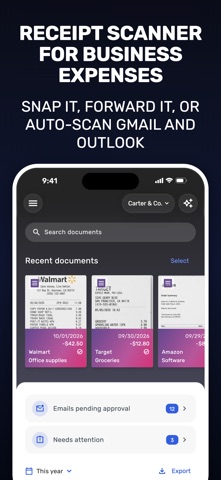
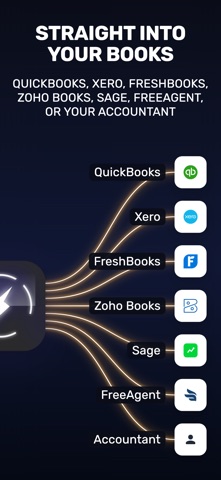
SparkReceipt is an AI receipt scanner and expense tracker app for freelancers, self-employed professionals, and small business owners. Snap any receipt and SparkReceipt extracts the merchant, amount, date, category and line items in seconds. Connect your inbox, forward email receipts, or upload PDFs and the app handles the rest. EMAIL INBOX AUTO-SCANNING Connect Gmail or Outlook and SparkReceipt automatically finds and imports email receipts as they arrive. You stay in control: review, approve, and exclude senders any time. EMAIL RECEIPT FORWARDING Prefer to file receipts manually? Forward eReceipts to your personal SparkReceipt address and the AI files them for you. AI RECEIPT SCANNING (OCR) The OCR receipt scanner reads paper receipts, PDF invoices, and forwarded email receipts in any language and currency. Smart categorization is based on the products on the receipt, not just the merchant name, so business expenses end up in the right account. INCOME, EXPENSES, AND PROFIT/LOSS TRACKING Track income alongside expenses for real-time profit and loss across your business. Tag expenses by client, project, or trip. Convert any currency at accurate historical daily rates for clean tax reporting. MILEAGE TRACKER Log business trips and claim every mile at tax time. Start a GPS-tracked drive with one tap or add trips by hand, assign each to a vehicle, client, or project, and SparkReceipt works out the reimbursement. Group trips into a trip report or export your mileage log with your receipts for deduction-ready records. ACCOUNTING INTEGRATIONS Push categorized receipts straight into QuickBooks Online, Xero, or Zoho Books, or export reports as PDF, Excel, or CSV when your accountant asks. FreshBooks is in early access. Webhooks and a public API are included. BANK FEEDS Connect your bank account and SparkReceipt imports transactions and matches them to your receipts, so missing ones stand out before tax time. Bank feeds are in beta and currently available for US banks. PDF bank statements can be uploaded too. SHARE WITH YOUR ACCOUNTANT Invite your accountant directly into SparkReceipt or share a secure link. No more emailing receipts as attachments. Set time limits to auto-hide shared receipts after tax season. TEAM COLLABORATION Invite teammates and keep everyone's receipts and expenses organized in one secure place. Sort by category, tag, or user, and approve expense reports together. CLOUD STORAGE THAT WORKS EVERYWHERE Documents are encrypted and backed up in the cloud. Access them from iPhone, iPad, or any browser via the SparkReceipt web app at no extra cost. SPARKAGENT AI ASSISTANT Ask SparkAgent about your spending, or have it categorize new expenses and tag last month's travel receipts. It asks before anything that can't be undone. KEY FEATURES - AI receipt scanner with automatic data extraction (OCR) - Email inbox auto-scanning for Gmail, Outlook and IMAP - Smart categorization based on products on the receipt - Income and expense tracking in any currency - Real-time profit and loss reports - GPS mileage tracker with automatic reimbursement - QuickBooks Online, Xero, and Zoho Books integrations - SparkAgent AI assistant for questions and bulk edits - Search by merchant, amount, tag, or text inside the image - PDF, Excel, and CSV exports for accountants - Bank feeds (beta) for US banks with automatic receipt matching - No ads - Bank-level security and encryption WHO USES SPARKRECEIPT Freelancers tracking project expenses. Self-employed consultants managing multiple income streams. Real estate investors tracking property costs. Small business owners preparing for tax season. Accountants who want their clients to send tidy, categorized receipts instead of shoeboxes. Every receipt is captured the day you get it and ready for your accountant in one export. Terms of Use: https://www.apple.com/legal/internet-services/itunes/dev/stdeula/ Privacy Policy: https://www.sparkreceipt.com/privacy-policy
What's new · 2.3.25
- AI review: after each scan, see what it fixed, undo it, or answer a quick question such as which Category fits - Document view: switch between Details and Comments - Merchants & Payers: manage them in the app and set a Category rule per Merchant - Pick Categories from the tree in filters, automations and rules - Reports: filter by status and run a report again - Numbers and dates follow your language and region - Smoother animations and many small fixes
Details