

Smart Receipt Scan: Receiptly
Karmjit Singh · Finance
Independent analytics for this App Store listing. AppTracker is not affiliated with Karmjit Singh.
Chart standing · US
What changed · US
Listing changes AppTracker has observed for this app in this storefront — new versions, price moves, rating shifts, and store copy.
• Redesigned from top to bottom. Ready for iPhone Duo, folded or open. • New Tax summary and Spending calendar reports, plus custom date ranges. • Export rebuilt: PDF, Excel and CSV from one place, with tax-year periods, category and tag filters, receipt photos and line items. • Pin the categories, tags and receipts you use most. Reach out to support if you see any issues.
Price & rating history · US
Reconstructed from the listing changes AppTracker has observed in this storefront. A field is charted once it has changed more than once, and each line starts at the value it moved from.
Average rating · ★ 4.54 now · 5 changes on record
Ratings breakdown · US
The star breakdown behind this app's rating in this storefront.
In-app purchases · US
What this app sells inside itself, grouped by kind and priced for this storefront.
Screenshots




Keywords this app targets
Search terms AppTracker associates with this app — estimates, not search volume. ❝ = in the app's title; a highlighted number is its current position for that term.
Similar apps
Competitors and close alternatives, as estimated by AppTracker.
 Smart Receipts: Scan & Track
Ramkumar Vellaisamy
2 shared topics · 2 shared title words
Smart Receipts: Scan & Track
Ramkumar Vellaisamy
2 shared topics · 2 shared title words
 Smart Receipt: Scan & Track
Glayzer LLC
2 shared topics · 4 shared title words
Smart Receipt: Scan & Track
Glayzer LLC
2 shared topics · 4 shared title words
 Smart Receipts: Expenses & Tax
REACTIVE APPS CORP.
2 shared topics · 1 shared title word
Smart Receipts: Expenses & Tax
REACTIVE APPS CORP.
2 shared topics · 1 shared title word
 Grocery Tracker: Receipt Scan
Nemanja Pecanin
2 shared topics · 3 shared title words
Grocery Tracker: Receipt Scan
Nemanja Pecanin
2 shared topics · 3 shared title words
 Receipt Scanner: Snap & Save
Cathal MORRISON
2 shared topics · 1 shared title word
Receipt Scanner: Snap & Save
Cathal MORRISON
2 shared topics · 1 shared title word
 Receipt Lens - Expense Tracker
Glority Global Group Ltd.
2 shared topics · 1 shared title word
Receipt Lens - Expense Tracker
Glority Global Group Ltd.
2 shared topics · 1 shared title word
 Receipt Organizer・ReceiptGenie
Botisan AI Pte. Ltd.
1 shared topic · 1 shared title word
Receipt Organizer・ReceiptGenie
Botisan AI Pte. Ltd.
1 shared topic · 1 shared title word
 Foreceipt Receipt Tracker App
Relayin Corporation
2 shared topics · 1 shared title word
Foreceipt Receipt Tracker App
Relayin Corporation
2 shared topics · 1 shared title word
About
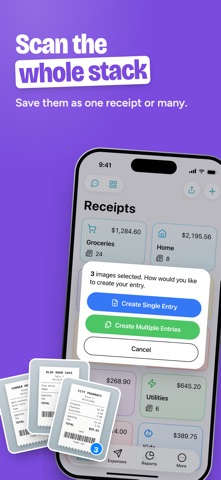
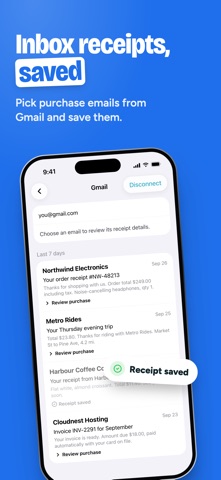
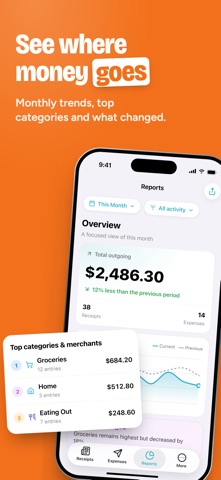
Smart receipt scanner and expense tracker in one easy app. Scan several receipts in one go or import photos and PDFs, and Receiptly reads the store, date, total, tax and line items for you. With Receiptly Pro, you can also connect Gmail to import receipts from your emails, see where your money goes in spending reports, and export to PDF, Excel or CSV. Keep every receipt, invoice and warranty organized and ready for tax time, budgets, refunds and reimbursements. RECEIPTLY: YOUR RECEIPT KEEPER FOR HOME AND BUSINESS Track groceries and household spending, keep proof of purchase for returns and warranties, or log business costs, mileage and travel for your accountant. Receiptly works for families, freelancers, landlords and small businesses, and syncs with iCloud across your iPhone and iPad. Features: > Smart Scan: scan paper receipts with the camera or import photos and PDFs. On-device AI fills in the details where available, and you check them before saving. > Quick capture: share a receipt from any app to Receiptly, or drag and drop images and PDFs on iPad. > Expense tracker: log expenses, income and reimbursements to see what comes in and what goes out. > Mileage tracker: log trips in miles or kilometers with your own rate, and Receiptly works out the amount. > Warranty tracker: add a warranty end date to any product and get a reminder before it expires. > Receipt organizer: categories, tags, pins and archive, plus search by store, item, amount or date. > Duplicate check: get a warning before you save the same receipt twice. > Siri and Shortcuts: scan receipts, find them and log expenses or mileage by voice, or add an expense automatically each time you pay with Apple Wallet. > Widgets and Spotlight: see a category's receipts or warranty countdowns on your Home Screen, and find receipts in Spotlight search. Receiptly Pro, an auto-renewable subscription, adds: > Unlimited receipts, expenses and categories (the free version includes 10 of each). > Reports: spending trends, categories, calendar, forecast, price watch, tax summary, and a business report with mileage. > Export receipts, expenses and tax reports to PDF, Excel or CSV for your accountant. > Travel currencies: set the currency and your own exchange rate on each receipt. > Import receipts from Gmail. Emails are read on your device. > Bulk import from CSV, save receipt images to Files, and get a spending summary from Siri. For support and suggestions, email karm.singh@outlook.com • Auto-renewable subscription • Payment is charged to your Apple Account when you confirm the purchase. The subscription renews automatically for the same period unless auto-renew is turned off at least 24 hours before the end of the current period. • You can manage your subscription or turn off auto-renew in your Apple Account settings after purchase. • Privacy Policy: https://receipttrackerapp.com/privacypolicy/ • Terms of Use: https://receipttrackerapp.com/termsofuse/
What's new · 7.2.4
• Redesigned from top to bottom. Ready for iPhone Duo, folded or open. • New Tax summary and Spending calendar reports, plus custom date ranges. • Export rebuilt: PDF, Excel and CSV from one place, with tax-year periods, category and tag filters, receipt photos and line items. • Pin the categories, tags and receipts you use most. Reach out to support if you see any issues.
Details