

LeadNav GPS
LeadNav Systems LLC · Navigation
Independent analytics for this App Store listing. AppTracker is not affiliated with LeadNav Systems LLC.
Chart standing · US
What changed · US
Listing changes AppTracker has observed for this app in this storefront — new versions, price moves, rating shifts, and store copy.
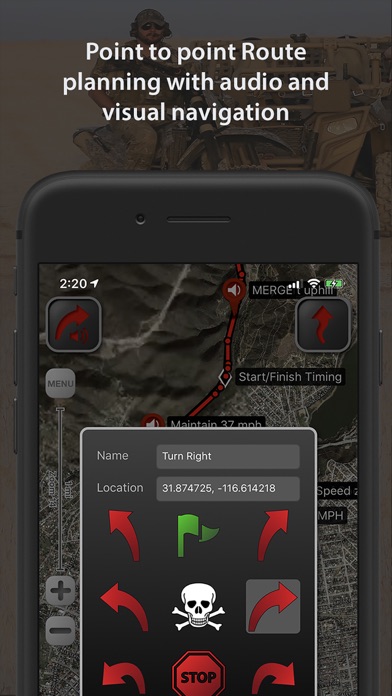
Welcome to Phase 2 - Introducing NEW powerful capabilities for our PreRunners Home Zone. Keeps your exact position private near home. Teammates see a shaded area your home is inside, never at the center of. Off unless you turn it on. Settings > Tracking & Comms. Customize Waypoints. Rename any waypoint symbol, choose from new symbols including turn severity L1 to R6, Caution, Fence, Cattle Guard, Whoops and G-Out, and drag them where you want them. Names are spoken as written. iPad Side Panels keep your symbols beside the waypoint window. Share a layout to another device as a file. Reversing a route mirrors the turn symbols. KeyPad (Beta). A Bluetooth keypad becomes a multi-button pad: one key per waypoint symbol, plus Speed Dot, zoom, track, undo and talk, set on a drawing of the pad in Settings > Buttons. Pro. Buttons. Settings > Buttons now explains what the buttons do and how several systems run together, with a card for each. The mic learns your fixes. Correct a name the Waypoint Mic typed and this device remembers it. Say turn codes the way you call them and they save as L4 or Right 3+. The shared word list updates on its own. Trigger Word (Beta). The Waypoint Mic waits until it hears LEADNAV, for shared mics and intercoms. Pro, off by default.
Price & rating history · US
Reconstructed from the listing changes AppTracker has observed in this storefront. A field is charted once it has changed more than once, and each line starts at the value it moved from.
Average rating · ★ 3.88 now · 13 changes on record
Ratings breakdown · US
The star breakdown behind this app's rating in this storefront.
In-app purchases · US
What this app sells inside itself, grouped by kind and priced for this storefront.
Screenshots




Keywords this app targets
Search terms AppTracker associates with this app — estimates, not search volume. ❝ = in the app's title; a highlighted number is its current position for that term.
Similar apps
Competitors and close alternatives, as estimated by AppTracker.
 MGRS GPS: Grid & Land Nav
Dajiale
1 shared topic · 1 shared title word
MGRS GPS: Grid & Land Nav
Dajiale
1 shared topic · 1 shared title word
 Tactical GPS - MGRS Land Nav
Ivan Blajic
Tactical GPS - MGRS Land Nav
Ivan Blajic
 Guru Maps - Offline Navigation
Evgen Bodunov
1 shared topic
Guru Maps - Offline Navigation
Evgen Bodunov
1 shared topic
 FieldNav: MGRS & UTM GPS
PAWEŁ KANDYBOWICZ
1 shared topic · 1 shared title word
FieldNav: MGRS & UTM GPS
PAWEŁ KANDYBOWICZ
1 shared topic · 1 shared title word
 Alpine Quest Nav PRO
Dogukan ERDAGI
Alpine Quest Nav PRO
Dogukan ERDAGI
 MilGPS+
mustafa pistofoglu
1 shared topic
MilGPS+
mustafa pistofoglu
1 shared topic
 Tactical MAP PRO : Navigation
mustafa pistofoglu
1 shared topic
Tactical MAP PRO : Navigation
mustafa pistofoglu
1 shared topic
 Compass 55. Map & GPS kit.
Kalimex-Consulting s.r.o.
Compass 55. Map & GPS kit.
Kalimex-Consulting s.r.o.
About
LEADNAV GPS is the professional off-road GPS for iPhone and iPad. Plan the route at home, run it with turn-by-turn voice guidance where there are no roads, and put your whole team on one map. Built for teams that work and travel off the grid: search and rescue, security details, expeditions, hunting camps, work crews, race teams and their chase crews. NAVIGATE WHERE THERE ARE NO ROADS • Turn-by-turn voice guidance from routes you build or import. Waypoints speak by name as you approach them. • Red warning rings and blue proximity rings that adjust to your speed, so the call comes when you need it. • Any ring you cross alerts, on the route or off it. Serpentine points keep you on the line without a word. • Works with no signal at all. Navigation never needs a connection. • Record tracks, convert them to routes, reverse a route to come back the way you went. • Drop markers for anything you want to find again. Recon, Aviation and Hunting marker sets are included for everyone. • Compatible with Bluetooth headsets, helmet intercoms and speakers for eyes-free navigation. TRIP PACKAGES • One file per trip, event or property: routes, tracks and markers together, with categories and Recently Deleted. • Built on the GPX standard. Import from and export to any GPS device or planning software. • Share a whole Trip Package with your team by AirDrop, Messages or email. • Route Editor with Undo, Join Multiple Routes, Convert Markers to Audio Waypoints, Export to GPS Unit for Garmin, Lowrance and other units. YOUR WHOLE TEAM ON ONE MAP • Group tracking is included with the app. One Team Code, a QR or an invite link builds the team. Teammates join in seconds and see each other live. • Runs over any internet connection: cellular, Wi-Fi at camp, or vehicle-mounted satellite internet such as Starlink. • Keeps sharing with the screen locked when you turn on background tracking. • No account, no login, nothing to sign up for. Your team identity is a random code you can reset any time. COMMS (PRO LICENSE) • Hold to talk with your teams from the pad on the map or from a wireless button. Release to send. • Every message is written out as text in the team thread, so a call you missed at speed is still there when you look down. • Several teams at once, each with its own channel and switch. Faster updates, teammate speed, off-screen arrows and breadcrumb trails. PRERUNNING TOOLS (PRO LICENSE) • PreRunner Bar and Pocket PreRunner: one-tap waypoint drops at speed, with a wipe-safe screen lock. • Wireless buttons: drop waypoints, record tracks, zoom and talk with your hands on the wheel. Part of our patent-pending prerunning system. • Waypoint Mic: hands-free voice notes at speed through your helmet comms. • Speed Highlighter: paint the route green, yellow and red as you run it. • Package Rules: proximity rings and marker symbols by name, saved in the file for everyone you share it with. • Off Route Alert: hear it the moment you leave the line, and which side the route is on. • Edit at speed: tap any waypoint in run mode to edit or delete it. OFFLINE MAPS • Free online map sources include USGS Satellite, USGS Topo and OpenStreetMap. • The Entry and Pro Licenses add offline map imagery for every map type, MBTiles import and overlays, and custom map URLs. Select areas and store them before you go. Maps are provided by outside services and are subject to change. LICENSES The app is a one-time purchase. Entry and Pro are auto-renewing licenses, managed in your Apple account. Details at leadnavgps.com/pricing. NOTES • This is a high-powered GPS and needs power for prolonged use in the field. Continued background GPS use can dramatically decrease battery life. • Wi-Fi-only iPads have no internal GPS chip. Use a cellular model, or an external GPS receiver with the app. • Group tracking and Comms need an internet connection. Navigation does not.
What's new · 6.50
Welcome to Phase 2 - Introducing NEW powerful capabilities for our PreRunners Home Zone. Keeps your exact position private near home. Teammates see a shaded area your home is inside, never at the center of. Off unless you turn it on. Settings > Tracking & Comms. Customize Waypoints. Rename any waypoint symbol, choose from new symbols including turn severity L1 to R6, Caution, Fence, Cattle Guard, Whoops and G-Out, and drag them where you want them. Names are spoken as written. iPad Side Panels keep your symbols beside the waypoint window. Share a layout to another device as a file. Reversing a route mirrors the turn symbols. KeyPad (Beta). A Bluetooth keypad becomes a multi-button pad: one key per waypoint symbol, plus Speed Dot, zoom, track, undo and talk, set on a drawing of the pad in Settings > Buttons. Pro. Buttons. Settings > Buttons now explains what the buttons do and how several systems run together, with a card for each. The mic learns your fixes. Correct a name the Waypoint Mic typed and this device remembers it. Say turn codes the way you call them and they save as L4 or Right 3+. The shared word list updates on its own. Trigger Word (Beta). The Waypoint Mic waits until it hears LEADNAV, for shared mics and intercoms. Pro, off by default.
Details