Chart standing · US
What changed · US
Listing changes AppTracker has observed for this app in this storefront — new versions, price moves, rating shifts, and store copy.
Version 1.2 introduced LexShell Pro. But you couldn't successfully sign up for the lifetime subscription. Now you can. Previously: Bug fixes and a whole new thing: LexShell Pro. LexShell Pro: 1Password Integration Fetch SSH keys from 1Password when you connect. Your keys can stay where your keys live. SFTP File Browser Browse remote files right inside LexShell. Upload, download, rename, delete, and create folders without fleeing to another app. Files App Integration Your saved remote servers can now appear as locations in the iOS Files app. The Files app: now with files from even farther away. Snippets Save frequently used commands and run them straight from the terminal key bar. Less typing, fewer opportunities to typo sudo. Support an Indie Developer Not technically a feature. Still pretty great. Meanwhile, for everyone: SSH connections got a little less fussy Paste in an SSH destination however you’ve got it. LexShell is now much better at figuring out what you meant: * example.com:2222 or even 10.0.0.5#2222 → host + port. We speak weird. * root@example.com:2200 → username + host + port. * ssh:// and sftp:// prefixes → politely removed. * IPv6 → handled without losing our minds over all those colons. Bare addresses like fe80::1 stay intact, while [::1]:2222 works exactly as it should. * Bogus ports — too big, not numbers, mysteriously empty — are rejected rather than treated as exciting new networking standards. Also: If you try to connect without entering a username, LexShell now warns you instead of letting you boldly march toward failure. Hardened SSH servers now like us Some hardened servers only allow OpenSSH’s ETM MAC algorithms. Previously, LexShell would attempt to connect, receive an extremely helpful "End of file", and give up before authentication. LexShell now supports hmac-sha2-256/512-etm@openssh.com, so those connections work normally. Also, server login banners now actually appear in the terminal instead of being quietly tossed into the void. New preference: Double-tap for tab completion If one tap is good and two taps are somehow more Tab, this setting is for you. VoiceOver support went from middling to very good in this release, too. And pasting is easier, especially via the keyboard or the new Paste button the virtual keyboard.
Price & rating history · US
Reconstructed from the listing changes AppTracker has observed in this storefront, so each line starts at the first change on record.
Average rating
Ratings breakdown · US
The star breakdown behind this app's rating in this storefront.
Screenshots
Keywords this app targets
Search terms AppTracker associates with this app — estimates, not search volume. ❝ = in the app's title; a highlighted number is its current position for that term.
Similar apps
Competitors and close alternatives, as estimated by AppTracker.
About
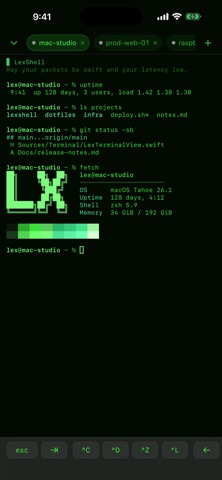
Sometimes you need to SSH into a server. This app helps you do exactly that. Remote servers, Bonjour servers — we welcome them all. We'll optionally remember the servers you frequently access from a given spot, too; so if you're always connecting to one network from the coffeeshop and another from home, we've got you covered. With built-in support for the keyboard keys that iOS forgot (Esc, Tab, and Control-combos), a slew of themes, and a ton of functionality included for free. Need Pro features like 1Password keys, SFTP support throughout iOS, and Snippets? Take a look at a Pro subscription. EULA: https://www.apple.com/legal/internet-services/itunes/dev/stdeula/
What's new · 1.3
Version 1.2 introduced LexShell Pro. But you couldn't successfully sign up for the lifetime subscription. Now you can. Previously: Bug fixes and a whole new thing: LexShell Pro. LexShell Pro: 1Password Integration Fetch SSH keys from 1Password when you connect. Your keys can stay where your keys live. SFTP File Browser Browse remote files right inside LexShell. Upload, download, rename, delete, and create folders without fleeing to another app. Files App Integration Your saved remote servers can now appear as locations in the iOS Files app. The Files app: now with files from even farther away. Snippets Save frequently used commands and run them straight from the terminal key bar. Less typing, fewer opportunities to typo sudo. Support an Indie Developer Not technically a feature. Still pretty great. Meanwhile, for everyone: SSH connections got a little less fussy Paste in an SSH destination however you’ve got it. LexShell is now much better at figuring out what you meant: * example.com:2222 or even 10.0.0.5#2222 → host + port. We speak weird. * root@example.com:2200 → username + host + port. * ssh:// and sftp:// prefixes → politely removed. * IPv6 → handled without losing our minds over all those colons. Bare addresses like fe80::1 stay intact, while [::1]:2222 works exactly as it should. * Bogus ports — too big, not numbers, mysteriously empty — are rejected rather than treated as exciting new networking standards. Also: If you try to connect without entering a username, LexShell now warns you instead of letting you boldly march toward failure. Hardened SSH servers now like us Some hardened servers only allow OpenSSH’s ETM MAC algorithms. Previously, LexShell would attempt to connect, receive an extremely helpful "End of file", and give up before authentication. LexShell now supports hmac-sha2-256/512-etm@openssh.com, so those connections work normally. Also, server login banners now actually appear in the terminal instead of being quietly tossed into the void. New preference: Double-tap for tab completion If one tap is good and two taps are somehow more Tab, this setting is for you. VoiceOver support went from middling to very good in this release, too. And pasting is easier, especially via the keyboard or the new Paste button the virtual keyboard.
Details