

Document Scanner: PDF OCR Tool
MOCHA, LIMITED LIABILITY CO. · Utilities
Independent analytics for this App Store listing. AppTracker is not affiliated with MOCHA, LIMITED LIABILITY CO.
Chart standing · US
Screenshots
Similar apps
Competitors and close alternatives, as estimated by AppTracker.
 PDF Scanner | Document Scan
Rashed Obaid
PDF Scanner | Document Scan
Rashed Obaid
 PDF Scanner AI: Scan Documents
Cacao Mobile
PDF Scanner AI: Scan Documents
Cacao Mobile
 PDF Scanner App, OCR: Docutain
INFOSOFT Informations- und Dokumentationssysteme GmbH
PDF Scanner App, OCR: Docutain
INFOSOFT Informations- und Dokumentationssysteme GmbH
 ProScan: PDF Scanner & OCR
bitrzr, LDA
ProScan: PDF Scanner & OCR
bitrzr, LDA
 PDF Scanner・Document Scanner
Games Wing
PDF Scanner・Document Scanner
Games Wing
 PDF Scanner · Document Scan
Shenzhen Mengmi Technology Co., Ltd.
PDF Scanner · Document Scan
Shenzhen Mengmi Technology Co., Ltd.
 PDF Scanner:Scan for Documents
Quke Technology
PDF Scanner:Scan for Documents
Quke Technology
 PDF Reader&Scanner
Fuzhou Tufei Technology Co., Ltd.
PDF Reader&Scanner
Fuzhou Tufei Technology Co., Ltd.
About
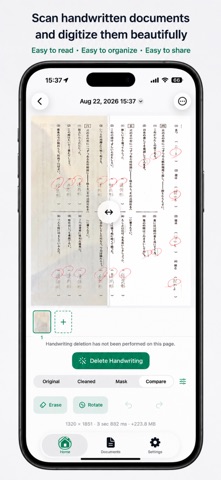
Turn paper into clean, searchable digital documents. Document Scanner helps you capture paper, import photos or PDFs, correct uneven lighting and perspective, recognize text, and export the result. Keep multi-page documents organized without sending your files to an external processing server. KEY FEATURES • Scan single-page or multi-page documents with the camera • Import multiple images from your photo library • Import PDFs and edit their pages • Automatically detect document edges and correct crop, perspective, and skew • Reduce shadows and uneven lighting for a clearer paper background • Choose Original, Document, Color, Grayscale, or B&W filters • Adjust brightness and contrast, or rotate pages in 90-degree steps • Compare the original and processed page with a slider • Recognize Japanese or English text, with automatic language selection • Run OCR on one page or the full document, copy results, and search recognized text • Remove handwriting on demand and refine the affected area with Erase and Restore brushes • Undo, redo, reset, resize the brush, zoom, and pan while editing • Add, delete, reorder, and save pages as one document • Search saved documents by title or recognized text • Select and delete multiple documents at once • Export and share PDF, PNG, JPEG, TXT, or Markdown files • Choose original size, A4, or Letter for PDFs, plus standard or high quality • Set the appearance, default filter, OCR language, export format, and JPEG quality GREAT FOR • Class handouts, worksheets, and study materials • Receipts, forms, meeting notes, and business documents • Converting multi-page paper documents into PDFs • Copying Japanese or English text from an image • Cleaning up written-on worksheets when you choose to • Finding a saved document from words inside it BUILT AROUND YOUR ORIGINAL The Document filter is applied to new imports to improve readability. Your original image remains available, so you can revisit filter, brightness, contrast, rotation, and handwriting-removal edits. Handwriting removal runs only when you request it. Results depend on the source, and Erase and Restore tools let you adjust the removal area. Documents are stored on your device. After importing or scanning, cleanup, OCR, editing, search, and export work offline. No account, sync feature, or in-app purchase is included. PRIVACY Image processing, handwriting detection, and OCR run locally on your device. Imported images, PDFs, and recognized text are not uploaded to an external server for processing. The app does not include tracking or analytics.
Details