

KIZUNA Sampler & Beat Maker
Code and DESIGN inc · Music
Independent analytics for this App Store listing. AppTracker is not affiliated with Code and DESIGN inc.
Chart standing · US
What changed · US
Listing changes AppTracker has observed for this app in this storefront — new versions, price moves, rating shifts, and store copy.
Project renaming is now easier and more reliable. - Fixed a layout issue that could interrupt project renaming when the keyboard appeared. - Edit project names in a dedicated dialog with Rename and Cancel buttons. - Cancel keeps the original name, and blank names cannot be confirmed. Thank you for your feedback and for making music with KIZUNA!
Ratings breakdown · US
The star breakdown behind this app's rating in this storefront.
Screenshots



Keywords this app targets
Search terms AppTracker associates with this app — estimates, not search volume. ❝ = in the app's title; a highlighted number is its current position for that term.
Similar apps
Competitors and close alternatives, as estimated by AppTracker.





About
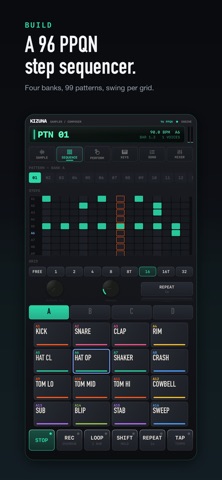
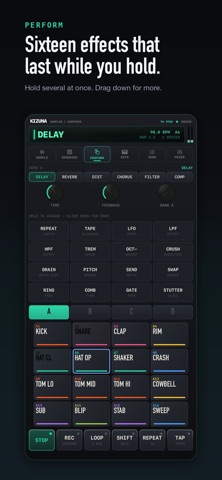
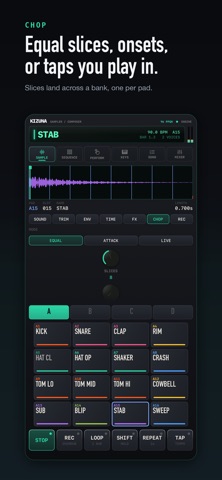
It records for exactly as long as you hold the pad. Open a record screen, record, then decide which pad the sound belongs on — and by the time you have done all that, the sound you wanted has already happened. In KIZUNA you hold a pad, it records while you hold it, and when you let go the sound is already there, on that pad. One decision instead of three. From the thing you caught to the finished track, on an iPhone or an iPad. The sampler, the sequencer, the effects and the export all live in the same place. CAPTURE - Record from the microphone, a line input, or KIZUNA's own output (resample) - Threshold auto-start waits for the sound and begins on its own - A short pre-roll is kept, so the transient itself is never clipped - Import from the Files app, iCloud Drive, or any other cloud provider CHOP - EQUAL by division, ATTACK by detected onsets, or LIVE by tapping while it plays - Slices land straight across a bank, one per pad - A share of them can come out reversed, so the loop stops sounding like the record it came from SO IT DOESN'T SOUND PROGRAMMED - DRIFT moves the pitch and level a little on every hit - VEL > FILTER makes softer hits darker, not merely quieter - FEEL adds timing and velocity looseness, seeded from the pattern itself — the same groove plays back the same way every time, and a bounce matches what you heard - LO-FI KIT: dusty drums, a Rhodes, an upright bass, a vinyl bed, a tape stop BUILD - A 96 PPQN sequencer, 1 to 99 bars, 99 patterns per bank - Swing is stored separately for eighths, sixteenths and thirty-seconds, so dialling one in never disturbs another - Each bank can run its own pattern length — two bars of drums under four bars of chords - 99 scenes and a 99-position song chain - Knob movements are written into the pattern, so a filter sweep follows the part it was written for SHAPE IT — 41 EFFECTS - Per-pad inserts: 19 types across 2 slots (filters, drive, crush, phaser, flanger, ring mod and more) - Send effects: 6 types on 2 buses, so delay and reverb can run at once - Performance effects: 16 momentary types, held down, several at a time, with a downward drag for pressure - A four-slot master chain: VINYL, TAPE, SHELF EQ, LIMITER - Four time-stretch algorithms, chosen per pad: REPITCH, BEATS, TONAL, TEXTURE GRAB A BAR - Capture the last quarter-bar to four bars of the output and hold it, tempo-locked - Not a sample loop — whatever the machine just played - Length and position can both be moved while it runs EXPORT - Ableton Live Set (.als) - DAWproject for Bitwig Studio, Studio One and Cubase - Tempo-correct stems, MIDI for the parts, and written import steps for FL Studio, Logic Pro and GarageBand - WAV of a single pad, of the mix, or per-bank stems — all the same length, all starting at the same instant - Bounces run the same engine as playback, offline. There is no separate render path to drift away from what you heard CONNECT - Includes a KIZUNA AUv3 instrument. Installing the app registers it with Logic Pro, GarageBand, AUM, Cubasis and other hosts on the same device - Core MIDI in and out over USB, Bluetooth and network, plus KIZUNA's own virtual port - MIDI clock received and sent, with start and stop PRIVACY No account. No ads, no analytics, no tracking. The app contains no networking code at all, so your recordings and projects stay on your device — or in your own iCloud Drive, if you put them there. SPECIFICATION - 4 banks of 16 pads (switchable to a 3x4 grid), 24 voices, choke groups - 48 kHz, 32-bit float internally, 24-bit WAV on export - Recording capped at 40 seconds mono, 20 seconds stereo - Both starter kits are synthesised inside the app, so nothing you release from them carries a sample licence - iPhone and iPad, iOS 18.0 or later The interface is currently in English; other languages are planned.
What's new · 1.1
Project renaming is now easier and more reliable. - Fixed a layout issue that could interrupt project renaming when the keyboard appeared. - Edit project names in a dedicated dialog with Rename and Cancel buttons. - Cancel keeps the original name, and blank names cannot be confirmed. Thank you for your feedback and for making music with KIZUNA!
Details