

When'd I
HyunWoo Lee · Productivity
Independent analytics for this App Store listing. AppTracker is not affiliated with HyunWoo Lee.
Chart standing · US
What changed · US
Listing changes AppTracker has observed for this app in this storefront — new versions, price moves, rating shifts, and store copy.
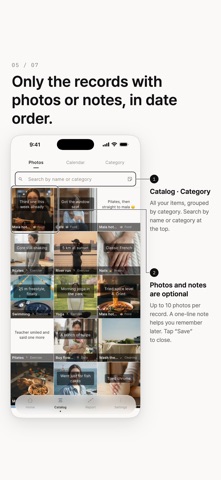
Use "Export" to turn your records into images to share. Choose "Year", "Calendar" or "Day"; in "Day", put text on the photo with "Overlay" or use "Polaroid", and pick the text design and colors (from ⋮ in an item's details, from each record, or from "Photos" and "Calendar" in "Catalog"). 11 color themes were added under "Settings" > "Theme". In "Catalog", drag the screen left or right to switch between "Photos", "Calendar" and "Category". If you use several devices with iCloud, per-item thresholds, each item's category, and category order, names and deletions now carry over to your other devices too (when "Import from iCloud automatically" is on). After updating all your devices, open the app once on each.
In-app purchases · US
No in-app purchases.
Screenshots



Similar apps
Competitors and close alternatives, as estimated by AppTracker.


About
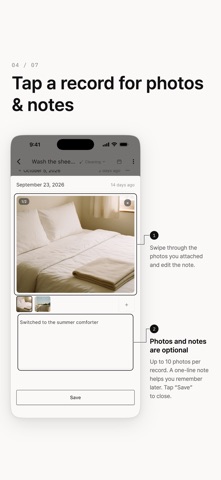
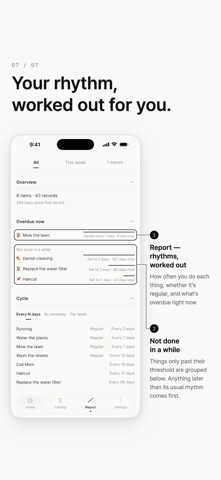
Stop managing to-dos. Just remember when you last did it. "When did I last wash the sheets?" "When did I change the water filter?" "When did I last call my parents?" Some things you can never remember. When'd I records just the date you did them. No goals, no nagging notifications, no checklists. Tap once and it's logged as today. ■ See how long it's been Every item shows the days since you last did it. The longer it's been, the more it stands out. ■ A timeline where distance means time The space between dots is the actual gap between dates. Busy stretches look dense. The months you skipped show up as empty space. ■ Photos and notes Attach one photo and a short note to any record. ■ Widgets and Lock Screen Check what's overdue from your Home Screen, and log without opening the app. You can even record straight from the Lock Screen. (iOS 16.4+) ■ An optional evening nudge Once a day, if you want it. Off by default. ■ Entirely on your device No account, no server, no ads. Your records stay on your phone. Export and import backup files yourself, and an automatic iCloud copy brings everything back if you switch phones or reinstall. ■ Buy once One purchase unlocks everything. No in-app purchases, no subscriptions, no ads.
What's new · 4.2.0
Use "Export" to turn your records into images to share. Choose "Year", "Calendar" or "Day"; in "Day", put text on the photo with "Overlay" or use "Polaroid", and pick the text design and colors (from ⋮ in an item's details, from each record, or from "Photos" and "Calendar" in "Catalog"). 11 color themes were added under "Settings" > "Theme". In "Catalog", drag the screen left or right to switch between "Photos", "Calendar" and "Category". If you use several devices with iCloud, per-item thresholds, each item's category, and category order, names and deletions now carry over to your other devices too (when "Import from iCloud automatically" is on). After updating all your devices, open the app once on each.
Details