

Trackalot
JASON PETER DEFILLIPPO · Utilities
Independent analytics for this App Store listing. AppTracker is not affiliated with JASON PETER DEFILLIPPO.
Chart standing · US
What changed · US
Listing changes AppTracker has observed for this app in this storefront — new versions, price moves, rating shifts, and store copy.
Introducing Done-Did tracking: a timestamped history of the things you've done, built one tap at a time. Version 1.6 brings a clearer, five-page introduction and refreshed branding. Your existing history and the tracking features you already use stay the same.
In-app purchases · US
No in-app purchases.
Screenshots




Keywords this app targets
Search terms AppTracker associates with this app — estimates, not search volume. ❝ = in the app's title; a highlighted number is its current position for that term.
Similar apps
Competitors and close alternatives, as estimated by AppTracker.
 Last Time Tracker
Sarun Wongpatcharapakorn
2 shared topics
Last Time Tracker
Sarun Wongpatcharapakorn
2 shared topics
 HabitTap Daily Tracker
SHOTA MIYAHIRA
2 shared topics
HabitTap Daily Tracker
SHOTA MIYAHIRA
2 shared topics
 When Did I…?
Heidi Pilypas
2 shared topics
When Did I…?
Heidi Pilypas
2 shared topics
 ATracker PRO Time Tracker
WonderApps AB
2 shared topics
ATracker PRO Time Tracker
WonderApps AB
2 shared topics
 4ToDo
Robert Poetzsch
2 shared topics
4ToDo
Robert Poetzsch
2 shared topics
 Simple Tracker: Goals
Michael Neal
2 shared topics
Simple Tracker: Goals
Michael Neal
2 shared topics
 つづくToDo 習慣化・タスク管理・ルーティン記録
Daisuke Yamaguchi
1 shared topic
つづくToDo 習慣化・タスク管理・ルーティン記録
Daisuke Yamaguchi
1 shared topic
 Did I Do It
Daniel Simonson
1 shared topic
Did I Do It
Daniel Simonson
1 shared topic
About
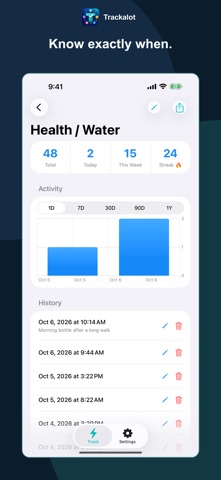
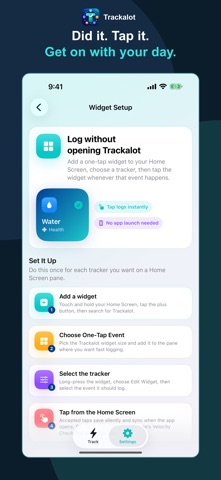
INTRODUCING DONE-DID TRACKING To-Do is a plan. Done-Did is a memory. A to-do list tells you what's next. But life has another question: "When did we last do that?" The snack you handed over. The filter you replaced. The dog you already fed. We call it Done-Did tracking. A timestamped history of the things you've done, built one tap at a time. So the next time somebody asks, your answer is right there. "Did the kids get their snack?" "Yeah, hon. They got their snack at 1:43 on the nose." One little tap. One less thing to keep in your head. DID IT. TAP IT. KNOW WHEN. Create a tracker for something you want to remember. Tap when you do it. Look back when you need an answer. Start with a Health, Habits, or Pets TrackPack, or build your own. Group trackers into folders and arrange them the way you use them. WANT TO REMEMBER MORE? "Apples and peanut butter." "Took the long route." "Changed the upstairs filter." Add an optional note when the details matter. Adjust a timestamp if you're logging something after the fact. Your history is editable, because real life includes the occasional wrong tap. WHEN DID I LAST DO THAT? ANSWERED. Review one tracker, a whole folder, or everything together. Find timestamps and notes, check totals, and explore charts and streaks across views from one day to one year. Wondering how many times today? Set optional Count Warnings for a heads-up as you approach a limit you choose. DONE HAPPENS EVERYWHERE Log from iPhone, iPad, a Home Screen widget, or Apple Watch. Use Siri and Shortcuts to log through your own automations. Just finished the dog walk? Give it a tap from your wrist. Get on with your day. YOU TOOK CARE OF IT. KEEP THE HISTORY. Automatic and manual backups help protect your history. Restore a backup when you need it. Export reports as CSV or PDF, or your complete archive as CSV or JSON. No account. No ads. No subscription. No user tracking. Your history stays in storage controlled through your Apple devices and iCloud. The developer never receives your tracking data. Kids' snacks. Pet care. Chores. Workouts. Watered plants. Your own completely specific thing. If you've ever asked, "Did I do that?" or "When was the last time?", give it a tracker. Did it? Tap it. Done-Did!
What's new · 1.6
Introducing Done-Did tracking: a timestamped history of the things you've done, built one tap at a time. Version 1.6 brings a clearer, five-page introduction and refreshed branding. Your existing history and the tracking features you already use stay the same.
Details