

Local Pro PDF
Rafael Figueredo · Productivity
Independent analytics for this App Store listing. AppTracker is not affiliated with Rafael Figueredo.
Chart standing · US
What changed · US
Listing changes AppTracker has observed for this app in this storefront — new versions, price moves, rating shifts, and store copy.
New tools on a PDF you already picked: find a word, copy a scale, snap a measurement, assemble and stamp pages, shrink, watermark, badge, cover a word, insert, split, and rename the file.
In-app purchases · US
No in-app purchases.
Screenshots


Similar apps
Competitors and close alternatives, as estimated by AppTracker.
 PDF Scanner - File Reader
Fuzhou Xuanlong Technology Co., Ltd.
PDF Scanner - File Reader
Fuzhou Xuanlong Technology Co., Ltd.
 Smallpdf: Scanner & PDF Editor
Smallpdf GmbH
Smallpdf: Scanner & PDF Editor
Smallpdf GmbH
 Do Scan: PDF Scanner & OCR
Ammar Ahmad
Do Scan: PDF Scanner & OCR
Ammar Ahmad
 PDF Export Pro - PDF Editor
LiveBird Technologies Private Limited
PDF Export Pro - PDF Editor
LiveBird Technologies Private Limited
 ProScan: PDF Scanner & OCR
bitrzr, LDA
ProScan: PDF Scanner & OCR
bitrzr, LDA
 PDFMagic: PDF Editor & Scanner
iCubemedia Inc.
PDFMagic: PDF Editor & Scanner
iCubemedia Inc.
 PDF Scanner · Document Scan
Shenzhen Mengmi Technology Co., Ltd.
PDF Scanner · Document Scan
Shenzhen Mengmi Technology Co., Ltd.
 PDF Editor: Private & Offline
大鹏 张
PDF Editor: Private & Offline
大鹏 张
About
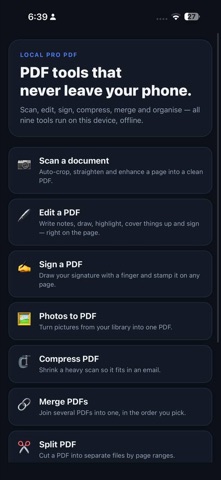
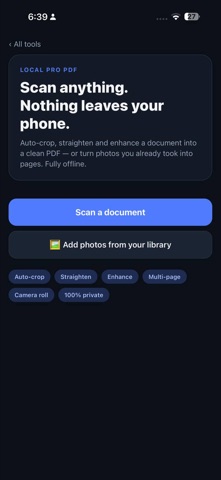
Local Pro PDF is a complete PDF toolbox that never sends your documents anywhere. Scan, edit, sign, merge, split, organise, compress and convert — nine tools, all of them running on this phone. No account, no upload, no server. Turn on airplane mode and everything still works. THE TOOLS • Scan a document — automatic edge detection, perspective correction and clean filters turn a photo of a page into a sharp PDF. • Edit a PDF — write notes, draw, highlight, add shapes and pictures, cover things up. • Sign a PDF — draw your signature with a finger and stamp it on any page. • Photos to PDF — turn pictures from your library into a single PDF. • Compress PDF — shrink a heavy scan so it fits in an email. • Merge PDFs — join several files into one, in the order you pick. • Split PDF — cut a PDF into separate files by page ranges. • Organise pages — reorder, rotate and delete pages visually. • Protect a PDF — add a password so only people with it can open the file. WHY IT IS DIFFERENT Most scanner and PDF apps upload your page to a server to process it. Contracts, IDs, medical forms, invoices, pay stubs — all of it leaves your phone and lands on somebody else's computer. Local Pro PDF does the edge detection, the perspective correction, the enhancement, the editing and the PDF assembly on the device itself. Nothing is transmitted, because there is nowhere for it to go. • No account, no sign-up • No analytics, no tracking, no data collected • Works with no signal at all • Save to Files, or share straight to Mail, Messages or any app One purchase. No subscription, no ads, no upsell.
What's new · 1.6.1
New tools on a PDF you already picked: find a word, copy a scale, snap a measurement, assemble and stamp pages, shrink, watermark, badge, cover a word, insert, split, and rename the file.
Details