

Wander: Markdown Editor
System Operator LLC · Productivity
Independent analytics for this App Store listing. AppTracker is not affiliated with System Operator LLC.
Chart standing · US
What changed · US
Listing changes AppTracker has observed for this app in this storefront — new versions, price moves, rating shifts, and store copy.
Choose your username in Settings, right in Wander. Also in this release: - Code blocks have a Copy button that copies exactly the code. - Tab in a table's last cell adds a row. - Hide Folder: touch and hold a folder to take it out of the sidebar. Its notes still show in search.
Price & rating history · US
Reconstructed from the listing changes AppTracker has observed in this storefront. A field is charted once it has changed more than once, and each line starts at the value it moved from.
Average rating · ★ 4.00 now · 6 changes on record
Ratings breakdown · US
The star breakdown behind this app's rating in this storefront.
In-app purchases · US
What this app sells inside itself, grouped by kind and priced for this storefront.
Screenshots



Keywords this app targets
Search terms AppTracker associates with this app — estimates, not search volume. ❝ = in the app's title; a highlighted number is its current position for that term.
Similar apps
Competitors and close alternatives, as estimated by AppTracker.
 Notes — Markdown Editor
Nhat Dinh
Notes — Markdown Editor
Nhat Dinh
 cyberWriter - Markdown Studio
John Taverna
cyberWriter - Markdown Studio
John Taverna
 dotMD
Luis Torres
dotMD
Luis Torres
 Markdown Viewer & Editor
Masamichi Ueta
Markdown Viewer & Editor
Masamichi Ueta
 Markview: Markdown Workspace
Ali Bakhshoude
Markview: Markdown Workspace
Ali Bakhshoude
 PlainMark Editor
Commerce Beacon, Inc
PlainMark Editor
Commerce Beacon, Inc
 Markdown Viewer Editor
Hefei Yunyilian Intelligent Technology Co., Ltd
Markdown Viewer Editor
Hefei Yunyilian Intelligent Technology Co., Ltd
 Raven - Markdown Notes
MATOYA CO.
Raven - Markdown Notes
MATOYA CO.
About
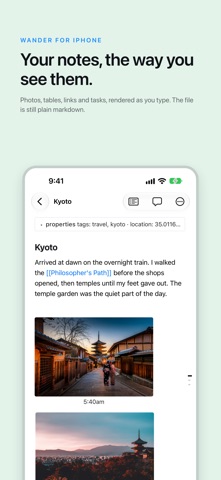
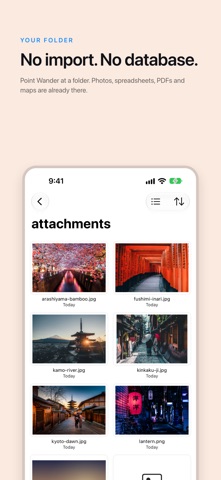
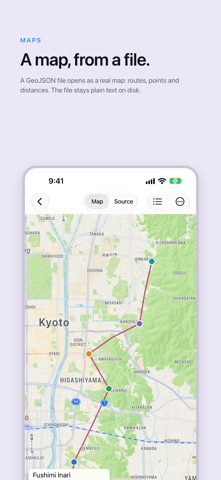
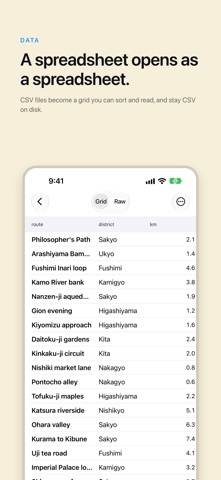
Wander is a markdown editor that respects your files. Your notes stay plain markdown in folders you control: no account, no lock-in, no cloud required. What you see is what lands on disk, byte for byte. Write in a clean WYSIWYG editor, where bold looks bold and headings look like headings, while the file on disk stays tidy markdown with clean diffs. Images render in place too, so a note with photos reads like a page, not a preview pane. Open any folder of markdown and start writing; Wander reads and writes standard files, so nothing you open is trapped in the app. • Plain markdown, in folders you own • WYSIWYG editing, clean files on disk • Wikilinks, tables, code blocks, task lists, footnotes • Images inline: photos, galleries and captions render right in the note, sized with plain markdown • Fast and native for iPhone and iPad: works fully offline, no account • Your notes never leave your device unless you move them • Wander Cloud: an optional subscription for private vaults, sharing and agent tokens, free for 14 days. Public vaults stay free • Monthly or yearly. It renews automatically unless you cancel at least 24 hours before the period ends, and you can manage or cancel it in your Apple Account settings • Terms of Use (EULA): https://www.apple.com/legal/internet-services/itunes/dev/stdeula/ • Privacy Policy: https://wander.md/privacy
What's new · 2.3
Choose your username in Settings, right in Wander. Also in this release: - Code blocks have a Copy button that copies exactly the code. - Tab in a table's last cell adds a row. - Hide Folder: touch and hold a folder to take it out of the sidebar. Its notes still show in search.
Details