

em — Markdown Writer & Editor
Justin Cox · Productivity
Independent analytics for this App Store listing. AppTracker is not affiliated with Justin Cox.
Chart standing · US
What changed · US
Listing changes AppTracker has observed for this app in this storefront — new versions, price moves, rating shifts, and store copy.
em is ready for iPhone Duo and enhances the Editorial Review experience. - Feedback and the Editor, Together At Last: The Ask em conversation is now available right inside your current draft and tracks all of your questions and reviews on the current working file. Ask for an Editorial Review and see the response flow in right next to your writing, without ever touching or editing the draft directly. - Built for iPhone Duo: em takes advantage of each screen on the new form factor and focuses on what's most important: your writing. Fold or unfold and em keeps your place exactly where it needs to be. - Your Files, Wherever You Drag Them: Files drag and drop in and out of em, so you can move files where you want ‘em.
Ratings breakdown · US
The star breakdown behind this app's rating in this storefront.
In-app purchases · US
No in-app purchases.
Screenshots


Similar apps
Competitors and close alternatives, as estimated by AppTracker.
 cyberWriter - Markdown Studio
John Taverna
cyberWriter - Markdown Studio
John Taverna
 Neon Vision Editor
Hilthart Pedersen
Neon Vision Editor
Hilthart Pedersen
 Notes — Markdown Editor
Nhat Dinh
Notes — Markdown Editor
Nhat Dinh
 dotMD
Luis Torres
dotMD
Luis Torres
 1Writer - Markdown Text Editor
Ngoc Luu
1Writer - Markdown Text Editor
Ngoc Luu
 Markdown Viewer Editor
Hefei Yunyilian Intelligent Technology Co., Ltd
Markdown Viewer Editor
Hefei Yunyilian Intelligent Technology Co., Ltd
 Hashy - AI Markdown Editor
Mushroom DAO Holdings Corp.
Hashy - AI Markdown Editor
Mushroom DAO Holdings Corp.
 Markdown Viewer & Editor
Masamichi Ueta
Markdown Viewer & Editor
Masamichi Ueta
About
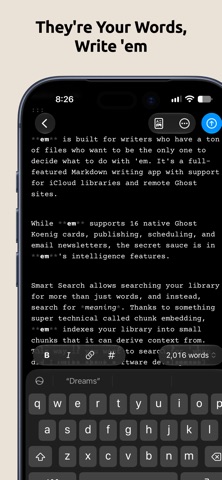
em is a Markdown writing app for Mac, iPad, and iPhone, built on one idea: your writing files are yours, and you're the only one who should decide what to do with 'em. WRITE 'EM WITH MARKDOWN Capture your thoughts in a distraction-free Markdown editor tuned for each device. em counts your words and reading time, but only if you want it to. FIND 'EM WITH SMART SEARCH Smart Search lists every file holding your words, the ones holding all of them first. Use quotes, +, -, OR and * for precision, filter by library, tag, status or year, and save any search as a Smart Folder that stays current. Only remember what a piece was about? Ask em. PROTECT 'EM WITH VERSION HISTORY Every edit is automatically versioned and backed up to iCloud. Compare and restore versions from any device, so an accidental deletion never costs you your writing. PUBLISH 'EM WITH GHOST Connect em to your Ghost site to edit, back up, and publish natively in Markdown that maps to Ghost's cards. em supports 19 Ghost editorial cards, plus drafts, scheduling, and newsletters. EXPLORE 'EM WITH AI (BUT ONLY IF YOU WANT TO) Ask em questions and get answers grounded in your files, not the internet. On OS 27, Siri can search, add, or edit notes in the libraries you approve. Get an Editorial Review from a prompt you can read and edit — it's a document in your library. em doesn't write your drafts; it helps you edit 'em. ALL FEATURES - Smart Search: Search operators, filters, and Smart Folders - Version History: Automatic versioning, stored in iCloud - Ghost Sites: Sync, edit, publish, and send newsletters - AI on Your Terms: On-device Apple Intelligence by default; optionally Claude, ChatGPT, or Gemini with your API key - Siri AI: Search, add, or edit notes in approved libraries (OS 27) - Ask em: Answers from your own archive - Editorial Review: AI feedback from a prompt you control - Apple Shortcuts: Start an AI conversation or publish to Ghost - Journaling Suggestions: Capture memories in Markdown (iOS) - Read Aloud: Hear your draft to catch what your eyes miss - Customization: Reader and Editor fonts and colors - Export: Save any Ghost post as a Markdown file - Offline Editing: Works without an iCloud or Ghost connection - Even More: Printing, word counts, and yes — em dash highlighting PRIVACY, PLAINLY em has no server. That's not a promise about what the developer does with your data — there's no backend, no account, and no company database where your writing could end up. Your writing syncs through your iCloud and nowhere else. AI features are off by default and, if turned on, run on-device with Apple Intelligence. Want a larger model? Connect Claude, ChatGPT, or Gemini with your own API key — your account, your billing, revocable anytime. em names the model answering, every time. Transparency Statement: AI was used in developing this app, but every feature idea, design call, and architectural decision was made by a human.
What's new · 1.3
em is ready for iPhone Duo and enhances the Editorial Review experience. - Feedback and the Editor, Together At Last: The Ask em conversation is now available right inside your current draft and tracks all of your questions and reviews on the current working file. Ask for an Editorial Review and see the response flow in right next to your writing, without ever touching or editing the draft directly. - Built for iPhone Duo: em takes advantage of each screen on the new form factor and focuses on what's most important: your writing. Fold or unfold and em keeps your place exactly where it needs to be. - Your Files, Wherever You Drag Them: Files drag and drop in and out of em, so you can move files where you want ‘em.
Details