

Shortcut Canvas
Pawel Karpinski · Productivity
Independent analytics for this App Store listing. AppTracker is not affiliated with Pawel Karpinski.
Chart standing · US
What changed · US
Listing changes AppTracker has observed for this app in this storefront — new versions, price moves, rating shifts, and store copy.
Now available in German, Polish, Hindi, Simplified Chinese, Spanish, French, and Japanese, alongside English. The interface, template defaults, Shortcuts actions, Siri phrases, and helpful error messages follow your app language. Your own text and existing canvases are preserved.
Screenshots


Keywords this app targets
Search terms AppTracker associates with this app — estimates, not search volume. ❝ = in the app's title; a highlighted number is its current position for that term.
Similar apps
Competitors and close alternatives, as estimated by AppTracker.
 iCanvas - Annotate&ScreenShot
耀 陈
1 shared topic
iCanvas - Annotate&ScreenShot
耀 陈
1 shared topic
 Snap Markup - Annotation Tool
Raghvendra Bhargava
Snap Markup - Annotation Tool
Raghvendra Bhargava
 Image Actions
Wesley de Groot
Image Actions
Wesley de Groot
 JellyCuts
Skyground Media, Inc.
1 shared topic
JellyCuts
Skyground Media, Inc.
1 shared topic
 Screen Shot App: ScreenCraft
Szymon Tadrzak
Screen Shot App: ScreenCraft
Szymon Tadrzak
 App Screenshots: Store Maker
PROGRESSIO STUDIO COMPANY LTD
App Screenshots: Store Maker
PROGRESSIO STUDIO COMPANY LTD
 AI Canvas - AI Image Generator
Engcraft, LLC
1 shared title word
AI Canvas - AI Image Generator
Engcraft, LLC
1 shared title word
 ImageBuddy — One-Click Edits
Benjamin Dansby
ImageBuddy — One-Click Edits
Benjamin Dansby
About
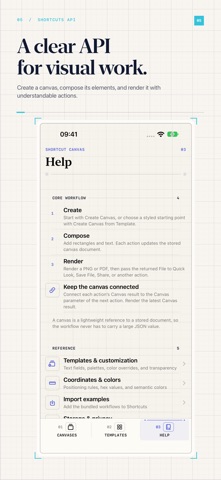
Create images with Apple Shortcuts. Shortcut Canvas turns a sequence of actions into a persistent canvas, a real preview, and a finished PNG or PDF. Start with one of 18 customizable templates: birthday cards, event cards, certificates, quotes, announcements, badges, thank-you cards, tickets, business cards, sales, recipes, agendas, countdowns, and social formats. Change the copy, palette, and background in Shortcuts. Build your own design with rectangles, ellipses, lines, text, images, SF Symbols, progress bars, and QR codes. Position elements with nine anchors, style them with colors and shadows, and fit text into a box. Import a photo or pass an image file directly from another action. Render PNG or single-page vector PDF with scale and file-name controls. Batch-render saved canvases into a ZIP file. Share a portable canvas document with its images, then import it on another device. The companion app lists your canvases with actual rendered previews, lets you inspect and export a document, and includes a template gallery and action reference. Import 23 editable example shortcuts, including four workflows composed from individual drawing actions. The interface, templates, and Shortcuts actions support English, German, Polish, Hindi, Simplified Chinese, Spanish, French, and Japanese. Your custom text stays exactly as you entered it. No accounts, analytics, or in-app networking. Documents and images stay on your device until you share them or pass an exported file to another action.
What's new · 1.2.0
Now available in German, Polish, Hindi, Simplified Chinese, Spanish, French, and Japanese, alongside English. The interface, template defaults, Shortcuts actions, Siri phrases, and helpful error messages follow your app language. Your own text and existing canvases are preserved.
Details