

App Screenshots: Store Maker
PROGRESSIO STUDIO COMPANY LTD · Developer Tools
Independent analytics for this App Store listing. AppTracker is not affiliated with PROGRESSIO STUDIO COMPANY LTD.
Chart standing · US
What changed · US
Listing changes AppTracker has observed for this app in this storefront — new versions, price moves, rating shifts, and store copy.
Version 1.4.0 introduces powerful new canvas editing and automation features: • Single-Canvas Board Editor: Design seamless multi-screen screenshot flows on a single unified canvas with custom crop zones. • 15 Layout Templates: Expanded layout catalogue featuring responsive multi-card arrangements for showcasing app narratives. • Enhanced Typography & SVG: Native iOS typography (SF Pro, SF Pro Rounded, SF Compact, SF Mono, New York) and curated font styles, plus vector SVG paste & 50x overlay scaling. • Store Automation: Direct API integration and streamlined uploads for App Store Connect. • iCloud Sync & Workspace Visibility: Built-in iCloud backup and collaborative workspace accessible via Files app and Finder. • Precise Canvas Controls: Improved hit-testing, image-fit control, and smoother drag interactions.
In-app purchases · US
No in-app purchases.
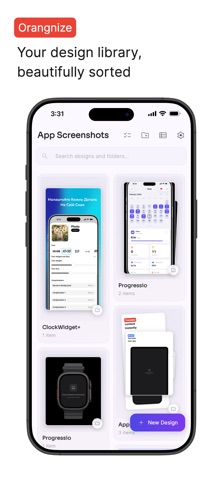
Screenshots


Keywords this app targets
Search terms AppTracker associates with this app — estimates, not search volume. ❝ = in the app's title; a highlighted number is its current position for that term.
Similar apps
Competitors and close alternatives, as estimated by AppTracker.
 App Screenshots Maker
Hanva,LLC
1 shared topic · 4 shared title words
App Screenshots Maker
Hanva,LLC
1 shared topic · 4 shared title words
 Screenshot Studio - App Mockup
Sarun Wongpatcharapakorn
1 shared topic · 1 shared title word
Screenshot Studio - App Mockup
Sarun Wongpatcharapakorn
1 shared topic · 1 shared title word
 Picasso App Screenshot Studio
ASO Ventures LLC
2 shared topics · 1 shared title word
Picasso App Screenshot Studio
ASO Ventures LLC
2 shared topics · 1 shared title word
 Screen Shot App: ScreenCraft
Szymon Tadrzak
Screen Shot App: ScreenCraft
Szymon Tadrzak
 Screenshot Bro: Mockup Maker
Taras Leskiv
Screenshot Bro: Mockup Maker
Taras Leskiv
 Store Screenshot Maker
袁杰 张
Store Screenshot Maker
袁杰 张
 StoreView: App Screenshot Tool
Elshan Aliyev
2 shared topics · 1 shared title word
StoreView: App Screenshot Tool
Elshan Aliyev
2 shared topics · 1 shared title word
 ScreenshotResize
Linosec
ScreenshotResize
Linosec
About
Design stunning App Store screenshots in minutes — no design skills required. App Screenshots is the all-in-one screenshot studio for indie developers and small teams. Create professional, eye-catching App Store listings that help your app stand out and boost downloads. SINGLE-CANVAS BOARD EDITOR - Edit multi-screen layouts on a single canvas with interactive crop zones - 15 layout templates designed for multi-card app store narratives - Seamless canvas panning and zooming for precise design control AI-POWERED DESIGN - AI Design Assistant: describe changes in plain English and watch them happen - AI-Generated Templates: describe your style and get coordinated screenshot designs - Contextual suggestion chips for quick design tweaks 40+ LANGUAGE TRANSLATION - Translate all text overlays to 40+ App Store locales in one tap - Per-locale layout overrides for perfect positioning in every language - Batch multi-locale export to locale-named folders ready for upload POWERFUL DESIGN EDITOR & TYPOGRAPHY - Native iOS fonts (SF Pro, SF Compact, New York) & hundreds of curated fonts - Vector SVG support and clipboard paste integration - Up to 50x overlay scaling with accurate hit-testing and image-fit controls - Gradient, mesh gradient, and solid color backgrounds AUTOMATION & STORE INTEGRATIONS - Direct integration and streamlined uploads for App Store Connect - Upload screenshots directly to App Store Connect - Seamless iCloud sync and Files/Finder workspace visibility Works on iPhone, iPad, and Mac. Privacy-first local storage.
What's new · 1.4.0
Version 1.4.0 introduces powerful new canvas editing and automation features: • Single-Canvas Board Editor: Design seamless multi-screen screenshot flows on a single unified canvas with custom crop zones. • 15 Layout Templates: Expanded layout catalogue featuring responsive multi-card arrangements for showcasing app narratives. • Enhanced Typography & SVG: Native iOS typography (SF Pro, SF Pro Rounded, SF Compact, SF Mono, New York) and curated font styles, plus vector SVG paste & 50x overlay scaling. • Store Automation: Direct API integration and streamlined uploads for App Store Connect. • iCloud Sync & Workspace Visibility: Built-in iCloud backup and collaborative workspace accessible via Files app and Finder. • Precise Canvas Controls: Improved hit-testing, image-fit control, and smoother drag interactions.
Details