

PumpTrack: Fuel Receipts
Avi Shany · Finance
Independent analytics for this App Store listing. AppTracker is not affiliated with Avi Shany.
Chart standing · US
What changed · US
Listing changes AppTracker has observed for this app in this storefront — new versions, price moves, rating shifts, and store copy.
New in PumpTrack 1.4: • Receipt notes: Add a note to any receipt and find it later with search. Free for everyone. • Spending comparisons for Pro: See how this month’s spending compares with the same period last month. Prefer a simpler dashboard? Turn comparisons off in Settings → Appearance. • More station brands: Added recognition and logo support for IOR, Pearl Energy, Enhance, Thorntons, and QuickChek. Thank you for using PumpTrack!
Ratings breakdown · US
The star breakdown behind this app's rating in this storefront.
In-app purchases · US
What this app sells inside itself, grouped by kind and priced for this storefront.
Screenshots



Keywords this app targets
Search terms AppTracker associates with this app — estimates, not search volume. ❝ = in the app's title; a highlighted number is its current position for that term.
Similar apps
Competitors and close alternatives, as estimated by AppTracker.
 Receipts Pro
Tidal Pool Software
2 shared topics · 1 shared title word
Receipts Pro
Tidal Pool Software
2 shared topics · 1 shared title word
 XpenseTracker Pro
Silverware Software, LLC
2 shared topics
XpenseTracker Pro
Silverware Software, LLC
2 shared topics
 Receipt Vault: Expense Scanner
Rafal Zbikowski
2 shared topics
Receipt Vault: Expense Scanner
Rafal Zbikowski
2 shared topics
 Smart Receipt Scan: Receiptly
Karmjit Singh
1 shared topic
Smart Receipt Scan: Receiptly
Karmjit Singh
1 shared topic
 Smart Receipts: Scan & Track
Ramkumar Vellaisamy
1 shared topic · 1 shared title word
Smart Receipts: Scan & Track
Ramkumar Vellaisamy
1 shared topic · 1 shared title word
 XpenseTracker
Silverware Software, LLC
2 shared topics
XpenseTracker
Silverware Software, LLC
2 shared topics
 Smart Receipt: Scan & Track
Glayzer LLC
2 shared topics
Smart Receipt: Scan & Track
Glayzer LLC
2 shared topics
 CarScope: Car Management & MPG
Med Opt, OOO
1 shared topic
CarScope: Car Management & MPG
Med Opt, OOO
1 shared topic
About
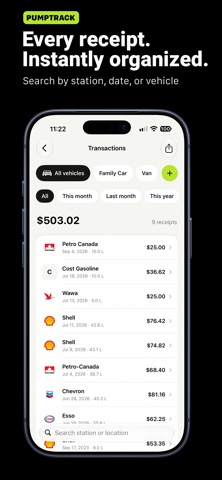
Fuel receipts, finally sorted. PumpTrack helps you scan, save, organize, and export fuel receipts directly from your iPhone. Keep track of your fuel spending, organize receipts by vehicle, and prepare reports when you need them. No account required. SCAN IT. REVIEW IT. SAVE IT. Take a photo, choose an existing receipt image, or enter the details manually. PumpTrack looks for the gas station, transaction date, total amount, and fuel volume. Review the results, make any corrections, and save the receipt to your searchable history. Receipt text recognition runs on your iPhone using Apple’s Vision technology. Your receipt images aren’t uploaded to an external AI scanning service. UNDERSTAND YOUR FUEL SPENDING See spending, fill-ups, fuel volume, average fill-up cost, average fuel price, and spending activity for the selected period. View all time, this month, last month, or this year. With multiple vehicles, switch between individual vehicles and a combined view. KEEP EVERY RECEIPT ORGANIZED Search your transaction history and open any receipt to review or edit its details. Optionally save the original receipt image so you can refer to it later. Track one vehicle for free, or unlock Pro to organize multiple vehicles. Archive a vehicle when you no longer use it while keeping its receipt history. EXPORT THE RECORDS YOU NEED Export CSV spreadsheets for free to use in Excel, Numbers, or Google Sheets. With Pro, create polished PDF reports for your records or business expense reporting. Choose a vehicle and date range, including custom dates, and check the receipt count before exporting. Share or save your report directly from your iPhone. YOUR FUEL, AT A GLANCE Pro widgets bring monthly spending and fuel volume to your Home Screen. Add a quick-scan shortcut to your Home Screen or Lock Screen to open the receipt camera. START FREE. KEEP TRACKING. The free version includes: • Five scanned-and-saved receipts each calendar month • Unlimited manual receipt entries • One active vehicle • Spending summaries and searchable history • Optional receipt-image storage • CSV exports by vehicle and date range Only successfully scanned-and-saved receipts count toward your allowance. Failed scans and cancelled entries do not count. Used your five scans? You can still add receipts manually and access your saved records. Your free scans renew next month. Unused scans do not carry over. UNLOCK PUMPTRACK PRO ONCE One purchase unlocks: • Unlimited receipt scans • Multiple vehicles • PDF reports by vehicle and date range • All Home Screen and Lock Screen widgets Lifetime Pro access. No subscription. MADE FOR EVERYDAY USE • Currency based on your iPhone region • Litres or United States liquid gallons • Light, dark, and system appearance • No account required • No advertising Every receipt is different. Text recognition can be affected by receipt layouts, faded printing, glare, shadows, image quality, and regional formats. Always review the station, date, total amount, and fuel volume before saving.
What's new · 1.4
New in PumpTrack 1.4: • Receipt notes: Add a note to any receipt and find it later with search. Free for everyone. • Spending comparisons for Pro: See how this month’s spending compares with the same period last month. Prefer a simpler dashboard? Turn comparisons off in Settings → Appearance. • More station brands: Added recognition and logo support for IOR, Pearl Energy, Enhance, Thorntons, and QuickChek. Thank you for using PumpTrack!
Details