

visualOS: Infinite Canvas
Dorweiler & Reimertz GbR · Productivity
Independent analytics for this App Store listing. AppTracker is not affiliated with Dorweiler & Reimertz GbR.
Chart standing · US
What changed · US
Listing changes AppTracker has observed for this app in this storefront — new versions, price moves, rating shifts, and store copy.
• Save your own colors and reuse them in the color pickers • Pictures: add a frame, round the corners and flip them • Documents: to-do items, code with syntax colors, math formulas • Syncing starts sooner after you open the app • Long-press the board to paste • Documents: a new toolbar with a Clear formatting button • Paste a table onto the board or into a document, and it stays a real table • Copied elements keep the arrows between them • Pictures and videos keep their proportions when you resize them by a corner • Copy link cards to paste clean links into other apps • Dashed and dotted lines, arrows and shape borders, with more stroke widths • To-do lists: pick a font, size and color, and style the heading • Choose your own grid size • Selections are easier to see in dark mode • Many smaller improvements and fixes Mac app: • Hold Shift to resize a picture or video freely • Zoom to your selection with Shift+2 • Keyboard shortcuts: see every shortcut in Settings and choose your own keys • Hold Shift to drag in a straight line • Hold Option to drag a copy • Press Enter to edit the selected item • Hold Option to resize from the center • Dragging an item right after clicking it no longer opens it • ⌘Z and other shortcuts work right after typing or pressing Esc We're happy you love what we've built! If you are missing something, please contact us anytime.
Price & rating history · US
Reconstructed from the listing changes AppTracker has observed in this storefront. A field is charted once it has changed more than once, and each line starts at the value it moved from.
Average rating · ★ 4.40 now · 5 changes on record
Ratings breakdown · US
The star breakdown behind this app's rating in this storefront.
In-app purchases · US
No in-app purchases.
Screenshots


Keywords this app targets
Search terms AppTracker associates with this app — estimates, not search volume. ❝ = in the app's title; a highlighted number is its current position for that term.
Similar apps
Competitors and close alternatives, as estimated by AppTracker.
 Inkaloo
Zacona L.L.C-FZ
Inkaloo
Zacona L.L.C-FZ
 Notebooks: Write and Organize
Alfons Schmid
1 shared topic
Notebooks: Write and Organize
Alfons Schmid
1 shared topic
 ArtDeck
Alexandre Alves
ArtDeck
Alexandre Alves
 MindNode: Mind Map & Outline
IdeasOnCanvas GmbH
MindNode: Mind Map & Outline
IdeasOnCanvas GmbH
 Outerline
Adam Goehrig-Bawany
Outerline
Adam Goehrig-Bawany
 Noteflow+ Digital Notebook
Qrayon, LLC
Noteflow+ Digital Notebook
Qrayon, LLC
 Offgrid Gallery: Photo Vault
Yanli Wang
Offgrid Gallery: Photo Vault
Yanli Wang
 cyberWriter - Markdown Studio
John Taverna
cyberWriter - Markdown Studio
John Taverna
About
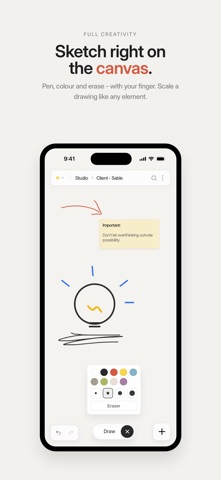
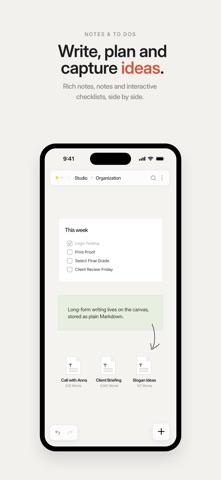
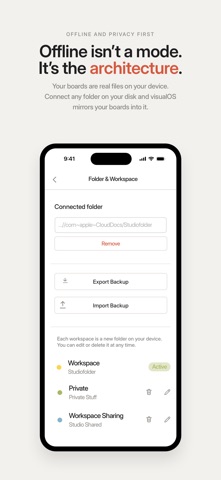
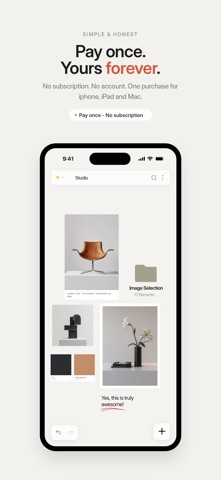
visualOS is an infinite canvas for people who think visually. It is an infinite canvas for notes, folders, images, to-do’s and sketches. It works fully offline and saves to real files in a folder on your device. YOUR DATA IS A FOLDER YOU CAN OPEN Connect any folder on your disk and visualOS mirrors your canvas into it — every folder on the canvas is a real folder, every document a Markdown file, every image an image. Put the folder in iCloud or Dropbox and it syncs through your cloud, not ours. If you ever leave, everything stays readable. Forever. OFFLINE ISN'T A MODE. IT'S THE ARCHITECTURE. On a flight, on the train, in a studio with no signal — visualOS doesn’t care. There is no server to reach, so there is no spinner, no sync wheel, no login wall. Your canvas opens instantly because everything is already here. BOARDS WITHIN BOARDS Any board can hold more boards. A project becomes a world: moodboards inside client boards inside your studio. Drag elements into a board to file them away; breadcrumbs keep you oriented; a double-tap takes you deeper. NO ACCOUNT. NO SUBSCRIPTION. Open it and work. There's nothing to sign up for, nothing to verify, nothing to cancel. Pay once and it's yours forever — one purchase unlocks every Apple device. FREE IN THE BROWSER BUT THE APP GOES FURTHER Try visualOS free in your browser at visualos.app. When you're ready for it everywhere, the app adds what a browser can't: true offline access on the train or a plane, native pan-and-zoom gestures, Apple Pencil drawing, and your boards saved as real files that sync across iPhone, iPad and Mac through your own iCloud. EVERYTHING ELSE • Notes & rich text • Long-form documents stored as plain Markdown • Interactive to-do lists on the canvas • Images & PDFs — drag, paste or drop them in • Freehand drawing • Magnetic arrows that snap and bend • Search every board at once • Groups, locking and a snap grid Your ideas. Your files. ABOUT US As creatives, we’ve always relied on visual canvas tools to organize our thoughts, plan projects, and make sense of ideas. But one thing kept bothering us: our files and knowledge were always tied to cloud-based services. We wanted the freedom to access everything offline, without worrying about losing our work or giving up our privacy. So why can’t our own files on our device be visualized in the same intuitive way? And that’s how the idea for visualOS was born: a visual representation of your internal folder structure — offline, private, and secure. Your data stays on your device, where it belongs. We’re Sarah and Gerald, a husband-and-wife team who have been living, loving, and building things together for more than 20 years. Creating visualOS has been a ton of fun and thanks to AI we were able to push it further than we initially imagined. Now we’d love to hear what you think. If visualOS helps you work a little more creatively or makes your files easier to navigate, we’d be grateful if you shared it with others.
What's new · 1.5.4
• Save your own colors and reuse them in the color pickers • Pictures: add a frame, round the corners and flip them • Documents: to-do items, code with syntax colors, math formulas • Syncing starts sooner after you open the app • Long-press the board to paste • Documents: a new toolbar with a Clear formatting button • Paste a table onto the board or into a document, and it stays a real table • Copied elements keep the arrows between them • Pictures and videos keep their proportions when you resize them by a corner • Copy link cards to paste clean links into other apps • Dashed and dotted lines, arrows and shape borders, with more stroke widths • To-do lists: pick a font, size and color, and style the heading • Choose your own grid size • Selections are easier to see in dark mode • Many smaller improvements and fixes Mac app: • Hold Shift to resize a picture or video freely • Zoom to your selection with Shift+2 • Keyboard shortcuts: see every shortcut in Settings and choose your own keys • Hold Shift to drag in a straight line • Hold Option to drag a copy • Press Enter to edit the selected item • Hold Option to resize from the center • Dragging an item right after clicking it no longer opens it • ⌘Z and other shortcuts work right after typing or pressing Esc We're happy you love what we've built! If you are missing something, please contact us anytime.
Details