

Offgrid Gallery: Photo Vault
Yanli Wang · Photo & Video
Independent analytics for this App Store listing. AppTracker is not affiliated with Yanli Wang.
Chart standing · US
What changed · US
Listing changes AppTracker has observed for this app in this storefront — new versions, price moves, rating shifts, and store copy.
Version 1.4 lets you edit photos and make new pictures out of them, all on your device: • Edit photos: crop, rotate, flip and straighten, adjust, and apply filters. Every edit is saved as a copy, so the original is never changed, and a copy reopens with its edit ready to change. • Change a photo's date, caption or location right in its file. • Live Photos and animated images now play, and Live Photos keep their motion when shared in or out. • New Studio tab: split a photo into pieces, merge photos into a collage, make a wallpaper, or lift a subject. Choose photos from your vault or straight from the Photos app, preview before saving, and optionally save a copy to Photos. • Collages: drag the dividers to resize frames, keep every photo's own shape, and add spacing, rounded corners and a background color. • New Home Screen and Lock Screen widgets: Photo, Album, Photo Grid and Lock Screen Photo. Each shows only the photos or the album you choose in Settings, and four sets let widgets of the same kind show different photos. • Use a keyboard on iPad to move through the grid and the viewer and to drive the editors. The shortcuts are listed in the FAQ. • New Auto-Play and Loop Videos settings, a choice of app icons, and the grid remembers its zoom. • A Select All button in the grid, Add Media and Sort in an album's own menu, and an Info sheet that adds the kind and file size.
In-app purchases · US
No in-app purchases.
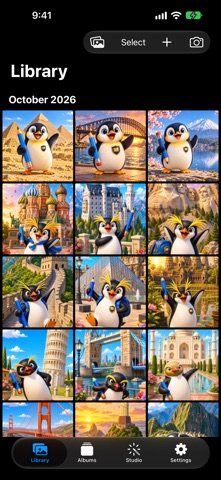
Screenshots


Keywords this app targets
Search terms AppTracker associates with this app — estimates, not search volume. ❝ = in the app's title; a highlighted number is its current position for that term.
Similar apps
Competitors and close alternatives, as estimated by AppTracker.
 LockMyPic Private Photo Vault
Viktor Varadi
2 shared topics · 3 shared title words
LockMyPic Private Photo Vault
Viktor Varadi
2 shared topics · 3 shared title words
 Private Photo Vault - Pic Safe
Legendary Software Labs LLC
3 shared topics · 3 shared title words
Private Photo Vault - Pic Safe
Legendary Software Labs LLC
3 shared topics · 3 shared title words
 Vault: Private Photos & Videos
Piotr Sochalewski
2 shared topics · 1 shared title word
Vault: Private Photos & Videos
Piotr Sochalewski
2 shared topics · 1 shared title word
 Photo Vault: Private Album
Christopher Rutledge
2 shared topics · 3 shared title words
Photo Vault: Private Album
Christopher Rutledge
2 shared topics · 3 shared title words
 Secret Vault - Hide Photos
嘉露 姚
2 shared topics · 1 shared title word
Secret Vault - Hide Photos
嘉露 姚
2 shared topics · 1 shared title word
 Photo Enclave
庆昀 贺
2 shared topics · 1 shared title word
Photo Enclave
庆昀 贺
2 shared topics · 1 shared title word
 Photo Vault-Hide Secret Photos
Shenzhen Ziyun Technology Co.,Ltd
2 shared topics · 3 shared title words
Photo Vault-Hide Secret Photos
Shenzhen Ziyun Technology Co.,Ltd
2 shared topics · 3 shared title words
 Privacy Vault - Photo & Video
NAICAI LI
2 shared topics · 2 shared title words
Privacy Vault - Photo & Video
NAICAI LI
2 shared topics · 2 shared title words
About
Offgrid Gallery is a private photo and video vault for iPhone, iPad, and Mac. Keep separate albums on your device, find memories with on-device Smart Search, and protect access with Face ID or Touch ID — without an account, tracking, or ads. iCloud Drive is optional and off by default. KEEP PHOTOS & VIDEOS LOCAL - Imported photos, videos, thumbnails, full-resolution originals, and metadata all live on your device. - Nothing leaves your device unless you choose to turn on iCloud Drive. - No sign-in, no servers, no analytics — Apple frameworks only. PRIVATE SMART SEARCH - Search by the text inside a photo, by what Vision recognizes in it, or by how it looks. - Analysis runs on your device and every vault keeps its own private index. - Off until you turn it on, and you can delete the index at any time. PRIVATE BY DESIGN - Optional App Lock with Face ID or Touch ID — your albums stay hidden from anyone else who picks up your device. - An app-switcher cover hides your photos when you leave the app. MULTIPLE VAULTS - Keep separate photo libraries side by side — each vault has its own storage and its own iCloud Drive setting, and only the active vault's photos are ever visible. - Create, switch, rename, and delete vaults from Settings; a Default vault is always there to start. OPTIONAL ICLOUD DRIVE - Off by default, set per vault. Turn it on to route that vault's new imports into its own folder in iCloud Drive. - Albums and favorites stay on each device even when iCloud Drive is on. ORGANIZE YOUR WAY - Fast, sectioned library grid with pinch-to-zoom density. - Favorites and custom albums keep each photo or video in exactly one place, with multi-photo collage covers and per-album sorting. IMPORT FROM ANYWHERE - Bring photos in from Photos, Files, or the clipboard, with auto-import of copied images. - Share into Offgrid Gallery from any app, choosing a vault if you keep more than one. BUILT-IN PHOTO & VIDEO CAMERA - Capture photos or record video with audio straight into your local library. - Choose 24 MP or 48 MP photos and 720p, 1080p, or 4K video, with an always-visible Silent/Quality switch. - Multi-lens zoom, tap-to-focus, rule-of-thirds grid, flash, and aspect ratios. - Optional floating, minimizable camera. RECLAIM STORAGE - Find Duplicates groups identical photos and shows reclaimable space. EDIT PHOTOS - Crop, rotate, flip, straighten, adjust and apply filters. Every edit is saved as a copy, so the original is never changed. - Change a photo's date, caption or location right in its file. STUDIO - Split a photo into pieces, or merge photos into a collage with resizable frames, spacing, rounded corners and a background color. - Choose photos from your vault or straight from the Photos app, and preview before saving. SUBJECT STUDIO (iOS 27) - Lift a subject out of a photo and refine it by tapping, then copy or share a transparent PNG, save it to a vault, or make a subject-aware wallpaper. WALLPAPERS - Turn any photo into a device wallpaper with Natural, Gradient, or Solid fills. WIDGETS - Put a photo, an album or a photo grid on your Home Screen, and a photo on your Lock Screen. - A widget shows only the photos or the album you choose for it in Settings, never the rest of your vault. RECENTLY DELETED - Deleted photos and videos stay local and recoverable until you remove them permanently. ACCESSIBILITY - VoiceOver, Dynamic Type, Reduced Motion, and Dark Mode are supported. Offgrid Gallery works on iPhone, iPad, and Mac.
What's new · 1.4.1
Version 1.4 lets you edit photos and make new pictures out of them, all on your device: • Edit photos: crop, rotate, flip and straighten, adjust, and apply filters. Every edit is saved as a copy, so the original is never changed, and a copy reopens with its edit ready to change. • Change a photo's date, caption or location right in its file. • Live Photos and animated images now play, and Live Photos keep their motion when shared in or out. • New Studio tab: split a photo into pieces, merge photos into a collage, make a wallpaper, or lift a subject. Choose photos from your vault or straight from the Photos app, preview before saving, and optionally save a copy to Photos. • Collages: drag the dividers to resize frames, keep every photo's own shape, and add spacing, rounded corners and a background color. • New Home Screen and Lock Screen widgets: Photo, Album, Photo Grid and Lock Screen Photo. Each shows only the photos or the album you choose in Settings, and four sets let widgets of the same kind show different photos. • Use a keyboard on iPad to move through the grid and the viewer and to drive the editors. The shortcuts are listed in the FAQ. • New Auto-Play and Loop Videos settings, a choice of app icons, and the grid remembers its zoom. • A Select All button in the grid, Add Media and Sort in an album's own menu, and an Info sheet that adds the kind and file size.
Details