

Simple Flashcards: Learn Vocab
VAN LANG TECHNOLOGIES COMPANY LIMITED · Education
Independent analytics for this App Store listing. AppTracker is not affiliated with VAN LANG TECHNOLOGIES COMPANY LIMITED.
Chart standing · US
What changed · US
Listing changes AppTracker has observed for this app in this storefront — new versions, price moves, rating shifts, and store copy.
Version 1.7.0: - Discover a new Funny & Jokes collection in Reading, with more short stories and conversations for 5-Minute Reading. - Enjoy smoother study sessions with stacked swipe cards and a refined in-place card flip. - Optionally show the example sentence on the front of study cards, with the vocabulary word highlighted. - Improved example sentence wrapping and card-front layout. - Import Markdown articles into My Articles with headings, lists, and formatting converted for comfortable reading. - Improved article content entry and previews, and refined main-tab accessibility and navigation feedback.
Ratings breakdown · US
The star breakdown behind this app's rating in this storefront.
Screenshots


Keywords this app targets
Search terms AppTracker associates with this app — estimates, not search volume. ❝ = in the app's title; a highlighted number is its current position for that term.
Similar apps
Competitors and close alternatives, as estimated by AppTracker.
 LernStapel
Burak Doelek
LernStapel
Burak Doelek
 VoiceCards - Voice Flashcards
Willow Investments Inc.
VoiceCards - Voice Flashcards
Willow Investments Inc.
 Brainscape - Study Flashcards
Bold Learning Solutions, Inc.
Brainscape - Study Flashcards
Bold Learning Solutions, Inc.
 Q&A Flashcards Maker
Tsukasa Fukagawa
Q&A Flashcards Maker
Tsukasa Fukagawa
 Print Flashcards - FlashPrint
sheeplab LLC
Print Flashcards - FlashPrint
sheeplab LLC
 Studyflash: AI Flashcards
Studyflash GmbH
Studyflash: AI Flashcards
Studyflash GmbH
 Japanese Dictionary - Nihongo
Serpenti Sei Japan LLC
Japanese Dictionary - Nihongo
Serpenti Sei Japan LLC
 COCA
Q.Z.L Corp.
COCA
Q.Z.L Corp.
About
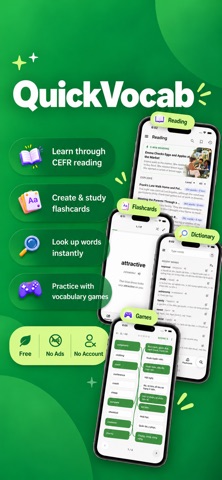
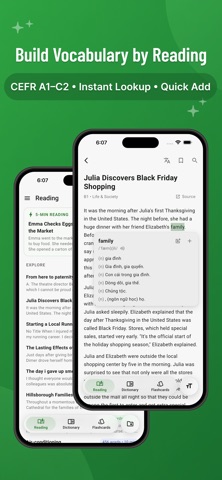
Build your English vocabulary with QuickVocab. Read English articles at your CEFR level, look up words with built-in English–Vietnamese and English–English dictionaries, or create ready-to-study flashcards in seconds. Read. Review. Remember. No ads. No account required. Work offline. LEARN VOCABULARY THROUGH READING - Level-based English reading: Learn with English texts curated from educational resources, Cambridge exams, and research corpora classified by CEFR, covering levels A1–C2 and a wide range of real-world topics. - Instant word lookup: Tap any unfamiliar word while reading to see its meaning, IPA, pronunciation, part of speech, and examples without leaving the article. - Instant translation & pronunciation: Translate or listen to phrases, paragraphs, or entire articles without leaving your reading flow.. - Quick Add: Save useful words directly from articles to your flashcard sets. - Reading tools: Customize text size and line spacing, track your reading progress, and bookmark articles for later. - My Articles: Add your own English articles manually, from files, or from URLs to learn vocabulary from content that interests you. CREATE FLASHCARDS IN SECONDS & REVIEW - Create flashcards in seconds: Paste a list of words or phrases and automatically fill in definitions, IPA, parts of speech, and example sentences. - AI word-list assistant: Generate vocabulary by topic, CEFR level, and list size, then review and add the words you want. - Scan text with offline OCR: Extract vocabulary from books, worksheets, notes, or other images. - Import text files: Turn plain-text word lists (.txt) into study sets. - Quick Add from recent dictionary searches, including multiple words at once, without adding duplicates. - Study with active recall: Tap to reveal meanings, swipe between cards, and mark words as mastered. - Auto-pronunciation: Hear words automatically while studying, with independent pronunciation settings for Flashcards and Dictionary. - Customize your cards: Add or edit your own definitions whenever needed. - Practice with built-in vocabulary games for another way to review your flashcard sets. - Share your flashcard sets with friends. - Choose English–Vietnamese or English–English meanings to match how you want to study. BUILT-IN OFFLINE DICTIONARY - Search anytime with two offline dictionaries: English–Vietnamese and English–English. - View definitions by part of speech, IPA, pronunciation, examples, synonyms, and antonyms. - Save a word directly to any flashcard set with Quick Add. - Add multiple recent searches at once with duplicate protection. - Cross-search as you learn: Look up words from definitions and examples without interrupting your current task. STARTER VOCABULARY SETS Start learning immediately with ready-to-use vocabulary sets including: - CEFR levels (A1, A2, B1, B2, C1) - IELTS & TOEFL core vocabulary - Oxford 3000 / 5000 word lists - Common phrasal verbs & idioms QUICK ADD FROM OTHER APPS Select English text in supported apps such as browsers, eBook readers, or messaging apps and use Quick Add to save vocabulary directly to QuickVocab. DESIGNED FOR SIMPLE, PRIVATE LEARNING - Core learning features and dictionaries work offline. - No account required. - No ads or tracking. - Your flashcards, reading progress, and search history stay on your device. Whether you prefer reading in context, reviewing with flashcards, or simply looking up a word when you need it, QuickVocab gives you the tools to keep building your English vocabulary.
What's new · 1.7.0
Version 1.7.0: - Discover a new Funny & Jokes collection in Reading, with more short stories and conversations for 5-Minute Reading. - Enjoy smoother study sessions with stacked swipe cards and a refined in-place card flip. - Optionally show the example sentence on the front of study cards, with the vocabulary word highlighted. - Improved example sentence wrapping and card-front layout. - Import Markdown articles into My Articles with headings, lists, and formatting converted for comfortable reading. - Improved article content entry and previews, and refined main-tab accessibility and navigation feedback.
Details