

Print Flashcards - FlashPrint
sheeplab LLC · Productivity
Independent analytics for this App Store listing. AppTracker is not affiliated with sheeplab LLC.
Chart standing · US
What changed · US
Listing changes AppTracker has observed for this app in this storefront — new versions, price moves, rating shifts, and store copy.
Performance improvements and bug fixes for a smoother experience.
Screenshots




Keywords this app targets
Search terms AppTracker associates with this app — estimates, not search volume. ❝ = in the app's title; a highlighted number is its current position for that term.
Similar apps
Competitors and close alternatives, as estimated by AppTracker.
 Simple Flashcards: Learn Vocab
VAN LANG TECHNOLOGIES COMPANY LIMITED
Simple Flashcards: Learn Vocab
VAN LANG TECHNOLOGIES COMPANY LIMITED
 VoiceCards - Voice Flashcards
Willow Investments Inc.
VoiceCards - Voice Flashcards
Willow Investments Inc.
 LernStapel
Burak Doelek
LernStapel
Burak Doelek
 Brainscape - Study Flashcards
Bold Learning Solutions, Inc.
Brainscape - Study Flashcards
Bold Learning Solutions, Inc.
 Kyoku Flashcards
David Cordero
Kyoku Flashcards
David Cordero
 Studyflash: AI Flashcards
Studyflash GmbH
Studyflash: AI Flashcards
Studyflash GmbH
 Flashcards Deluxe
OrangeOrApple.com
Flashcards Deluxe
OrangeOrApple.com
 Q&A Flashcards Maker
Tsukasa Fukagawa
Q&A Flashcards Maker
Tsukasa Fukagawa
About
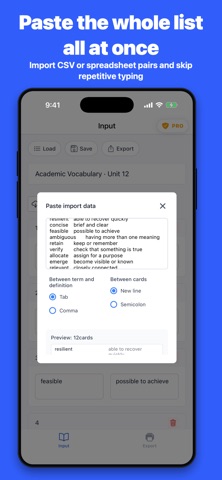
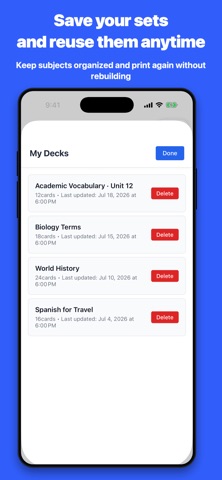
Front and back, perfectly aligned. Printable flashcards. FlashPrint creates double-sided flashcards as A4 or US Letter PDFs. It automatically places each back where its matching front will print, so you can print, cut, and start studying right away. No need to draw card grids in a word processor or spreadsheet, reorder backs one by one, or rebuild the layout for every print job. Use FlashPrint for vocabulary and kanji, exam preparation, classroom materials, homework, and many other ways to study on paper. ■ Start without entering a single card • Choose a starter set and go straight to the print preview. The 1 Times Table, World Flags: 10 Countries, Treble Clef: C to C, and Clock Reading: 1–10 O’Clock sets can be turned into PDFs within the free plan. • Explore ready-made sets covering flags, country shapes, countries and capitals, music notes, music symbols, multiplication, and clocks. Edit the included content to fit your own study goal. • Add text and images to either side of a card. Create visual cards using photos, diagrams, and other images. ■ Finish cards that are ready to print • Fronts and backs are arranged automatically so the matching sides line up when printed. Print double-sided, cut the cards apart, and start studying. • Adjust the layout, paper orientation, rows and columns, font, text size, colors, and margins for your use case. • Correct printer-specific shifts by fine-tuning the front-to-back print position. ■ Create once and use your material again • Paste data from CSV files or spreadsheets to import a large number of cards at once. • Create fill-in, multiple-choice, and matching worksheet PDFs from the same set without entering the content again. • Sets are saved on your device so you can organize, edit, and reprint them whenever you need. No account is required. ■ Free plan and FlashPrint Pro FlashPrint is free to download and lets you create and share PDFs with up to 10 flashcards. Upgrade to FlashPrint Pro to unlock: • PDFs with 11 or more cards • Bulk import from CSV and spreadsheets • Flashcard set export • Practice worksheet PDFs • Detailed layout, font, color, and print-position controls Choose a monthly, annual, or lifetime plan. Prices and available plans are shown in the app before purchase. Monthly and annual plans are charged to your Apple Account when the purchase is confirmed. Subscriptions renew automatically unless auto-renewal is turned off at least 24 hours before the current period ends. Manage or cancel a plan in your App Store account settings at any time. The lifetime plan remains available after a one-time purchase. Terms of Use (EULA): https://www.apple.com/legal/internet-services/itunes/dev/stdeula/
What's new · 1.2.37
Performance improvements and bug fixes for a smoother experience.
Details