

VoiceCards - Voice Flashcards
Willow Investments Inc. · Education
Independent analytics for this App Store listing. AppTracker is not affiliated with Willow Investments Inc.
Chart standing · US
What changed · US
Listing changes AppTracker has observed for this app in this storefront — new versions, price moves, rating shifts, and store copy.
Bug fixes for voice playback, sign-in, and adding photos.
Ratings breakdown · US
The star breakdown behind this app's rating in this storefront.
Screenshots


Keywords this app targets
Search terms AppTracker associates with this app — estimates, not search volume. ❝ = in the app's title; a highlighted number is its current position for that term.
Similar apps
Competitors and close alternatives, as estimated by AppTracker.
 LernStapel
Burak Doelek
LernStapel
Burak Doelek
 Brainscape - Study Flashcards
Bold Learning Solutions, Inc.
Brainscape - Study Flashcards
Bold Learning Solutions, Inc.
 Simple Flashcards: Learn Vocab
VAN LANG TECHNOLOGIES COMPANY LIMITED
Simple Flashcards: Learn Vocab
VAN LANG TECHNOLOGIES COMPANY LIMITED
 Print Flashcards - FlashPrint
sheeplab LLC
Print Flashcards - FlashPrint
sheeplab LLC
 Studyflash: AI Flashcards
Studyflash GmbH
Studyflash: AI Flashcards
Studyflash GmbH
 Retain Cards: AI Flashcards
Retain Labs GmbH
Retain Cards: AI Flashcards
Retain Labs GmbH
 Kyoku Flashcards
David Cordero
Kyoku Flashcards
David Cordero
 AlgoApp - Flashcards
AlgoApp Inc
AlgoApp - Flashcards
AlgoApp Inc
About
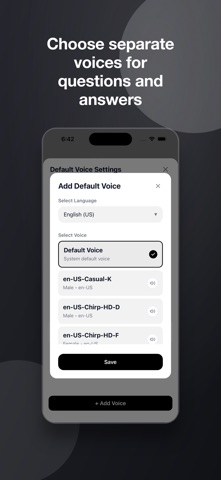
Turn your own study material into flashcards you can speak and hear. VoiceCards has two study modes. Speak mode captures your spoken answer and checks it against the card. Listen mode reads the question and answer aloud and moves through the deck without requiring taps. START WITH YOUR OWN MATERIAL • Enter questions and answers yourself • Create cards with AI from a topic or pasted text • Attach up to 10 photos or a PDF • Import CSV and Excel files • Import a shared Google Sheet • Copy a ready-made template SPEAK OR LISTEN Use your device's speech recognition for a standard answer check. Optional AI grading can evaluate longer answers by meaning and suggest a clearer response. In Listen mode, choose separate voices and speeds for the question and answer. Change the wait before the answer, shuffle the deck, or review only bookmarked cards. Screen-off playback works while you have credits or an active listening period from a credit pack. FOCUS ON HARD CARDS Mark answers right or wrong and bookmark anything you want to revisit. Focus order puts cards you have practiced less or missed more often near the front. You can also create a smaller Focus deck from hard and bookmarked cards. START WITHOUT AN ACCOUNT You can begin without signing in. Free users can keep up to 3 decks. Decks created without signing in are saved on this device. Connect Google when you want to back up decks to Google Drive, edit them in Google Sheets, or continue on another device. VoiceCards only requests access to files it creates or that you select. CREDITS Credits create premium audio, generate cards with AI, and run AI grading. Replaying premium audio already created does not use more credits. After you buy a pack, saved premium audio keeps its original quality at zero credits. Some packs also include a listening period for screen-off playback. VoiceCards works for language practice, exams, certifications, interviews, definitions, formulas, and any other material you can write as a question and answer.
What's new · 1.1.165
Bug fixes for voice playback, sign-in, and adding photos.
Details