

KKCode
军保 张 · Developer Tools
Independent analytics for this App Store listing. AppTracker is not affiliated with 军保 张.
Chart standing · US
What changed · US
Listing changes AppTracker has observed for this app in this storefront — new versions, price moves, rating shifts, and store copy.
1. Official support for OpenCode v2 2. Chat UI improvements: tool calls are now collapsed 3. Need a hand? Reach out to us at support@kkcode.app
Ratings breakdown · US
The star breakdown behind this app's rating in this storefront.
In-app purchases · US
What this app sells inside itself, grouped by kind and priced for this storefront.
Screenshots


Keywords this app targets
Search terms AppTracker associates with this app — estimates, not search volume. ❝ = in the app's title; a highlighted number is its current position for that term.
Similar apps
Competitors and close alternatives, as estimated by AppTracker.


About
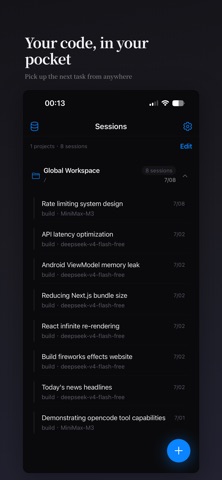
KKCode is the mobile client for OpenCode — the AI coding agent that runs on your Mac. Connect to your local OpenCode server over Wi-Fi or Tailscale, and bring AI-powered coding assistance wherever you go. FEATURES • Multiple AI Models — Switch freely between DeepSeek, Zhipu, Qwen, Kimi, MiniMax, and any model supported by your OpenCode server. Model preferences are remembered per session and persist across conversations. • Streaming Responses — Responses stream in real time. Scroll freely while the AI is generating; KKCode keeps your position and never interrupts your reading experience. • Code & Markdown Rendering — Enjoy full syntax highlighting for code blocks, inline formatting, and rich markdown display. • Tool Call Transparency — See exactly which tools the AI invoked, review file changes, and inspect inputs and outputs for every tool call. • Image Attachment — Send screenshots or design mockups directly from your photo library. • Session Management — Organize conversations by project directory. Rename, swipe to delete, or bulk remove sessions whenever you need. • Split View Support — Keep your session list and active chat side by side for a desktop-class multitasking experience. • Offline-Safe Draft — Your unfinished messages are automatically saved per session and restored when you return. • Multi-language Support — English, 简体中文, 繁體中文, 日本語, 한국어, Deutsch, Français, Português, Русский. • Dark & Light Mode — Automatically follows your system appearance. HOW IT WORKS KKCode connects to the OpenCode server running on your Mac. Start the server with: opencode serve –hostname 0.0.0.0 –port 4096 Then add your server connection in KKCode and start chatting. For remote access outside your home network, Tailscale is recommended. KKCode requires an OpenCode server to function. It does not include built-in AI inference or AI models.
What's new · 1.0.7
1. Official support for OpenCode v2 2. Chat UI improvements: tool calls are now collapsed 3. Need a hand? Reach out to us at support@kkcode.app
Details