

Remote for OpenCode Agents
Tim Williams · Developer Tools
Independent analytics for this App Store listing. AppTracker is not affiliated with Tim Williams.
Chart standing · US
What changed · US
Listing changes AppTracker has observed for this app in this storefront — new versions, price moves, rating shifts, and store copy.
Manage your MCP servers from your phone. Add, edit, or remove the servers in OpenCode's global config, and choose which ones a new conversation starts with. A server you add connects right away. Also new in 1.5: - New Chat: start a conversation that belongs to no project. It runs in a scratch folder on your Mac, so nothing the agent writes lands in your code. - Ask the agent to do it: in a New Chat, the agent can add or remove an MCP server for you. - Scheduled Tasks and MCP Servers now sit in the launcher list, so the top bar is no longer cramped. Update the Mac companion to 1.7 for the new features.
In-app purchases · US
No in-app purchases.
Screenshots


Similar apps
Competitors and close alternatives, as estimated by AppTracker.
 Remote Pi - Coding Agent
Jacob Moura
Remote Pi - Coding Agent
Jacob Moura
 Remodex - Remote AI Coding
Emanuele Di Pietro
Remodex - Remote AI Coding
Emanuele Di Pietro
 Port22: Coding Agents Anywhere
Harsha Chaganti
Port22: Coding Agents Anywhere
Harsha Chaganti
 AgentsRoom: Dev Remote Control
CHAUVIN Jean-Baptiste Thibault
AgentsRoom: Dev Remote Control
CHAUVIN Jean-Baptiste Thibault
 CosmoRemote AI Control
Matheus Weber
CosmoRemote AI Control
Matheus Weber
 OpenCodeM
CometDust Technology (Guangzhou) Co., Ltd
OpenCodeM
CometDust Technology (Guangzhou) Co., Ltd
 Tactic Remote: AI Coding
Shanghai TacticSpace Technology Co., Ltd.
Tactic Remote: AI Coding
Shanghai TacticSpace Technology Co., Ltd.
 RemoteIDE : Code From Anywhere
Challa Somesh
RemoteIDE : Code From Anywhere
Challa Somesh
About
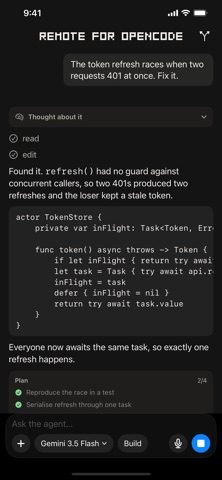
Run OpenCode on your Mac, then connect with this client from anywhere to get the full OpenCode harness. Remote for OpenCode connects your iPhone to the OpenCode coding agent running on your own Mac, so you can start work, watch it happen, and approve what it wants to do, from the sofa, the bus, or anywhere else. ZERO NETWORK SETUP No VPN, no port forwarding, no IP addresses to type. Your devices find each other through your own iCloud account and talk directly, end-to-end encrypted. There is no server in the middle because there is no server at all. YOUR CODE STAYS YOURS The agent runs on your Mac, against your repositories, using your model credentials, which never leave it. Nothing is collected, no analytics, no third-party SDKs. APPROVE FROM ANYWHERE When the agent wants to run a command, you see the exact command and decide. Risky actions look different from routine ones, so a destructive command never gets waved through out of habit. Face ID confirms it's you. PLAN MODE Switch the agent to Plan mode and it cannot edit anything at all, explore a codebase and get a plan back with a hard guarantee that nothing changed. REVIEW BEFORE YOU SIGN OFF See every accumulated change with per-file diffs, either against your last commit or against your default branch, the way a reviewer would. ALSO - Watch the agent think, live - Dictate prompts, transcribed on-device - Send screenshots and files as context - Run your own slash commands - Pick any model your OpenCode is configured with OPEN SOURCE The iPhone app, the Mac companion, and the protocol between them are public at github.com/tjameswilliams/remote-for-opencode under the PolyForm Noncommercial license. Every privacy claim on this page is something you can verify by reading the code instead of taking it on trust. REQUIRES a Mac running the free Remote for OpenCode companion and OpenCode. Get the companion at https://remoteforopencode.com. Not affiliated with, endorsed by, or sponsored by the OpenCode project.
What's new · 1.5
Manage your MCP servers from your phone. Add, edit, or remove the servers in OpenCode's global config, and choose which ones a new conversation starts with. A server you add connects right away. Also new in 1.5: - New Chat: start a conversation that belongs to no project. It runs in a scratch folder on your Mac, so nothing the agent writes lands in your code. - Ask the agent to do it: in a New Chat, the agent can add or remove an MCP server for you. - Scheduled Tasks and MCP Servers now sit in the launcher list, so the top bar is no longer cramped. Update the Mac companion to 1.7 for the new features.
Details