

Kodo: AI Code Editor & IDE
THEODOR TIBERIUS STEFAN · Developer Tools
Independent analytics for this App Store listing. AppTracker is not affiliated with THEODOR TIBERIUS STEFAN.
Chart standing · US
What changed · US
Listing changes AppTracker has observed for this app in this storefront — new versions, price moves, rating shifts, and store copy.
Kodo 4.0 • Create and edit PDFs: type on the page, draw, highlight, and insert, move or resize images. • Ask the shared AI assistant questions about PDF text and OCR, or request a summary. • Print and export to PDF, Word, EPUB, Markdown, TXT, HTML and RTF. • Improved file history, project snapshots and recovery; more consistent renaming and moving. • More reliable remote saving and deployment, GitHub conflict checks, undo/redo and trash recovery.
Ratings breakdown · US
The star breakdown behind this app's rating in this storefront.
In-app purchases · US
No in-app purchases.
Screenshots


Keywords this app targets
Search terms AppTracker associates with this app — estimates, not search volume. ❝ = in the app's title; a highlighted number is its current position for that term.
Similar apps
Competitors and close alternatives, as estimated by AppTracker.
 Web IDE - AI Code Editor
Tahmiez Sandaim
2 shared topics · 6 shared title words
Web IDE - AI Code Editor
Tahmiez Sandaim
2 shared topics · 6 shared title words
 Visual Code Editor - vCode
Devang Samirbhai Shah
2 shared topics · 3 shared title words
Visual Code Editor - vCode
Devang Samirbhai Shah
2 shared topics · 3 shared title words
 Code IDE: Python Java C++ Html
Mohammad Abdul Malik
2 shared topics · 2 shared title words
Code IDE: Python Java C++ Html
Mohammad Abdul Malik
2 shared topics · 2 shared title words
 DraftCode: Code & Text Editor
献慧 陈
2 shared topics · 2 shared title words
DraftCode: Code & Text Editor
献慧 陈
2 shared topics · 2 shared title words
 Koder Code Editor
Reny Mustika
2 shared topics · 3 shared title words
Koder Code Editor
Reny Mustika
2 shared topics · 3 shared title words
 Code Develop IDE
铖 邢
3 shared topics · 2 shared title words
Code Develop IDE
铖 邢
3 shared topics · 2 shared title words
 Mobile IDE for Antigravity AI
Uladzsislau Luchkouski
3 shared topics · 2 shared title words
Mobile IDE for Antigravity AI
Uladzsislau Luchkouski
3 shared topics · 2 shared title words
 Spck Editor
Zeb Zhao
2 shared topics · 1 shared title word
Spck Editor
Zeb Zhao
2 shared topics · 1 shared title word
About
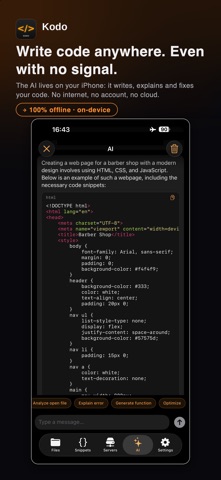
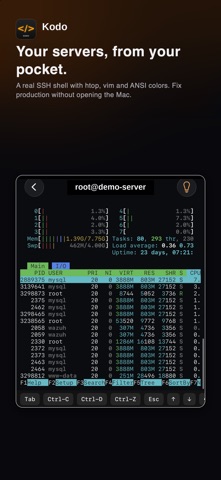
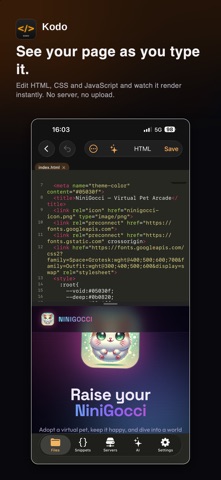
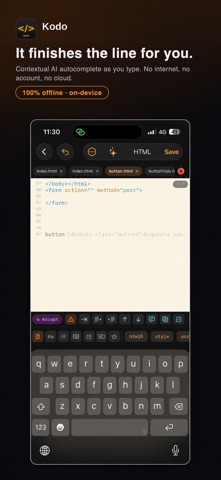
Edit code on iPhone and iPad with an on-device AI assistant, project workspaces and an interactive SSH terminal. Download an AI model once to use it offline; speed and model availability depend on your device. PROJECTS AND AI • Organize files, documentation and saved project versions in one workspace. • Start with six HTML, CSS and JavaScript templates. • Ask the AI to explain or change code, review proposed changes across multiple files and choose when to apply them. • Get inline code suggestions and recover interrupted AI edit operations. EDIT AND PREVIEW • Syntax highlighting for Python, JavaScript, TypeScript, Swift, HTML, CSS, SQL, Markdown and many other languages and formats. • Multiple tabs, find and replace, snippets, formatting tools and Emmet abbreviations. • Preview HTML and Markdown, inspect the web preview console and edit CSV tables with sorting and filtering. DATABASES AND REMOTE TOOLS • Open SQLite databases, explore tables and run SQL with autocomplete. • Connect to PostgreSQL databases and work with query results. • Use an interactive SSH terminal and transfer files with SFTP or FTP. • Manage npm and Python jobs on your own remote server. • Download GitHub repositories, update linked copies and push files. Local editing and downloaded AI models work offline. GitHub, remote databases, SSH and file transfers require a connection and the relevant server or service credentials. Files you choose to transfer are sent to those services. Kodo does not include a local Python, Node.js, PHP or Swift runtime. Remote commands run on your configured server; the local workspace terminal provides Kodo's built-in file and project commands.
What's new · 4.0
Kodo 4.0 • Create and edit PDFs: type on the page, draw, highlight, and insert, move or resize images. • Ask the shared AI assistant questions about PDF text and OCR, or request a summary. • Print and export to PDF, Word, EPUB, Markdown, TXT, HTML and RTF. • Improved file history, project snapshots and recovery; more consistent renaming and moving. • More reliable remote saving and deployment, GitHub conflict checks, undo/redo and trash recovery.
Details