

Drivehub App
Hobbies Consulting · Utilities
Independent analytics for this App Store listing. AppTracker is not affiliated with Hobbies Consulting.
Chart standing · US
What changed · US
Listing changes AppTracker has observed for this app in this storefront — new versions, price moves, rating shifts, and store copy.
Your car’s health, week after week. • See what changed: Car Health now compares each check with the last one — new problems, ones that came back, ones that are gone — and charts your battery voltage so a fading battery or alternator shows up early. • Weekly check-in: an optional reminder a week after each check. It’s a local notification; nothing leaves your phone. • Safety recalls: see recall notices issued for your vehicle and get a heads-up when a new one appears (US-market vehicles). • Car Health widget: your score, next service due and recalls on your Home Screen. • Smarter service reminders: DriveHub now estimates your odometer from your recorded trips and warns you before a logged service falls due, by distance as well as by date. • New to OBD? Open a sample report and the new adapter guide before you buy hardware. • Add Maintenance now has an odometer field. • Clearer plans: annual first, with the per-month price shown. Fixes • Vehicle years show as 2012, not 2,012. • New vehicles with no service history no longer show every service as due. • Recall lookups for cars with no recalls no longer show a connection error. • Report and layout polish.
In-app purchases · US
What this app sells inside itself, grouped by kind and priced for this storefront.
Screenshots




Keywords this app targets
Search terms AppTracker associates with this app — estimates, not search volume. ❝ = in the app's title; a highlighted number is its current position for that term.
Similar apps
Competitors and close alternatives, as estimated by AppTracker.
 DrivePulse: Car Companion
Davide Guida
DrivePulse: Car Companion
Davide Guida
 OBD Connect
Alphabit Software Inc.
OBD Connect
Alphabit Software Inc.
 FamilyGuard by Trisha AI
William Moss
FamilyGuard by Trisha AI
William Moss
 EV Dashboard
Gregory Burlingame
EV Dashboard
Gregory Burlingame
 Waze Navigation & Live Traffic
Waze Inc.
Waze Navigation & Live Traffic
Waze Inc.
 Traffie Navigation & Traffic
Appie s.r.o
Traffie Navigation & Traffic
Appie s.r.o
 MapFactor Navigator - GPS Maps
MAPFACTOR, s.r.o.
MapFactor Navigator - GPS Maps
MAPFACTOR, s.r.o.
 TomTom - Maps & Traffic
TomTom
TomTom - Maps & Traffic
TomTom
About
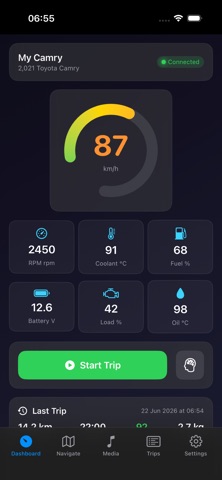
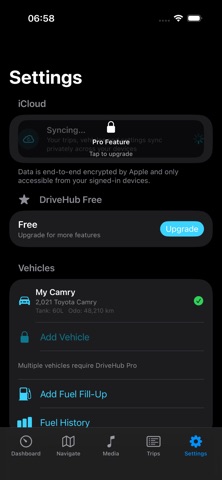
DriveHub — the AI mechanic that actually explains your car Your check engine light comes on. DriveHub tells you what it means, why it happened, and what it's likely to cost — in plain English, not mechanic jargon. Plug in a $15–25 Bluetooth or Wi-Fi OBD-II adapter and your iPhone becomes a real diagnostic tool, for any car, truck, or motorcycle with OBD-II — no proprietary dongle required. AI COPILOT Ask DriveHub about your fault codes, live data, or driving habits and get a context-aware answer from your vehicle's actual data — not a generic chatbot reciting a code lookup table. LIVE DIAGNOSTICS Real-time speed, RPM, coolant temperature, fuel level, battery voltage, and more. Read and clear Diagnostic Trouble Codes directly from your phone. Decode SAE J1979 emission readiness monitors so you know if your vehicle will pass inspection before you go. GO DEEPER, WHERE YOUR VEHICLE ALLOWS IT Full Vehicle Health Scan, Module Discovery, and On-Board Monitor tests reach beyond the basics into your vehicle's individual control modules. How much they find depends on your manufacturer — some share a lot with a generic tool, some restrict it to their own dealer software. DriveHub always tells you plainly which one your vehicle is, instead of guessing. CARPLAY A live vehicle status screen on your car's display — speed, RPM, coolant, fuel, and battery, refreshed twice a second — with one-tap access to trip history and SOS. WORKS WITH ANY VEHICLE Any ELM327-compatible Bluetooth or Wi-Fi adapter. No brand lock-in, no proprietary hardware. Cars, trucks, and motorcycles of any make and year with OBD-II. ALSO INCLUDED Driving Score & Trip History — every trip scored 0–100 on Safety, Efficiency, and Smoothness, with route playback and personal records. Fuel Tracking — log fill-ups in seconds; cost-per-litre and efficiency trends tracked automatically. Navigation — turn-by-turn with live traffic, toll estimates, and along-route points of interest. Dashcam — continuous loop recording; a crash automatically locks the last 30 seconds. Crash Detection & SOS — automatic alerts to your emergency contacts with your exact location; one-tap manual SOS with confirmation. Drive Mode & Apple Watch — auto-silence notifications while driving with a customizable auto-reply; live speed and ETA on your wrist; active navigation on your Lock Screen and Dynamic Island. PRICING Free: navigation, manual dashcam, limited AI assistant, one vehicle profile Pro ($6.99/mo or $49.99/yr): everything unlocked, unlimited vehicles, full diagnostics, CarPlay, unlimited AI Pro Lifetime ($59.99 one-time): everything in Pro, forever, with your first year of AI Copilot included Note: DriveHub requires a separate Bluetooth or Wi-Fi OBD-II adapter (sold separately) to access live vehicle diagnostics. Terms of Use: https://www.apple.com/legal/internet-services/itunes/dev/stdeula/
What's new · 1.4.0
Your car’s health, week after week. • See what changed: Car Health now compares each check with the last one — new problems, ones that came back, ones that are gone — and charts your battery voltage so a fading battery or alternator shows up early. • Weekly check-in: an optional reminder a week after each check. It’s a local notification; nothing leaves your phone. • Safety recalls: see recall notices issued for your vehicle and get a heads-up when a new one appears (US-market vehicles). • Car Health widget: your score, next service due and recalls on your Home Screen. • Smarter service reminders: DriveHub now estimates your odometer from your recorded trips and warns you before a logged service falls due, by distance as well as by date. • New to OBD? Open a sample report and the new adapter guide before you buy hardware. • Add Maintenance now has an odometer field. • Clearer plans: annual first, with the per-month price shown. Fixes • Vehicle years show as 2012, not 2,012. • New vehicles with no service history no longer show every service as due. • Recall lookups for cars with no recalls no longer show a connection error. • Report and layout polish.
Details