

Chart standing · US
What changed · US
Listing changes AppTracker has observed for this app in this storefront — new versions, price moves, rating shifts, and store copy.
FamilyGuard now drives with you. CARPLAY, REBUILT - Full turn-by-turn navigation on the car screen, with a heads-up map that follows the road - Trisha speaks your directions, speed alerts, and road hazards out loud through the car - Live posted speed limits and your current speed, right on the dash - Search any destination from the car and go, hands free - Road-hazard warnings ahead, live weather, and one-tap mute NEW: WHERE'S FAMILY - A dedicated screen to see everyone at a glance, live - Know who is driving, who is stopped, and where, without digging through menus ALSO IN THIS UPDATE - Faster, smoother live map and vehicle tracking - Sharper safety alerts with fewer false alarms - Stability and polish throughout Thanks for driving with FamilyGuard. Trisha is watching the road with you.
Ratings breakdown · US
The star breakdown behind this app's rating in this storefront.
Screenshots





About
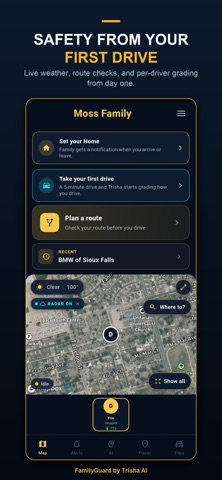
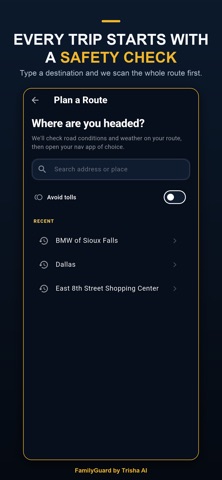
FamilyGuard by Trisha AI Your family's AI co-pilot now drives with you. FamilyGuard brings real turn-by-turn navigation to Apple CarPlay and Android Auto, while Trisha watches how everyone actually drives and speaks up before a bad moment becomes a tragedy. FULL NAVIGATION ON CARPLAY AND ANDROID AUTO Real turn-by-turn navigation with a heads-up map that follows the road. Trisha speaks your directions, speed alerts, and road hazards out loud, and the posted speed limit and your current speed stay on the dash. Search any destination from the car and go, hands free. Most family apps stop at your phone. FamilyGuard works on the screen you are already looking at. CATCHES WHAT OTHER APPS MISS Trisha analyzes real driving patterns, including erratic speed, weaving, and clusters of hard braking, then alerts your family the moment a drive looks impaired, so you can check in before it is too late. AI CRASH DETECTION AND FORENSICS If a crash is detected, FamilyGuard alerts your whole family instantly and reconstructs what happened, so help and answers come fast. WHERE'S FAMILY One clean screen shows everyone at a glance, in real time. See who is driving, who is stopped, and where, without digging through menus or asking someone to text when they arrive. EVERYDAY PROTECTION - Speed alerts measured against the real posted limit, spoken aloud - Weather and road-hazard warnings along your route - School-zone alerts - Family-to-driver messaging that is safe to hear while driving - Trip history with event markers for every drive FOR PARENTS OF TEENS - Teen speed gates and per-member roles - A personal AI Driver Profile for every driver that improves over time - A Sunday recap that names the safest driver of the week PLANS -Basic (Free): live family map and the core safety essentials. -Pro ($9.99/month or $99.99/year): CarPlay and Android Auto navigation, speed, weather, and road-hazard alerts, family-to--driver messaging, a Trisha AI Driver Profile per driver, the Sunday safest-driver recap, 14-day trip history, and up to 5 family members. -Family ($15.99/month or $159.99/year): everything in Pro, plus AI Crash Forensics, predictive AI calibrated to each driver, member roles and teen speed gates, 30-day trip history, and up to 10 family members. Your family's safety should not depend on hoping everyone drives carefully. Let Trisha watch the road with you. Download FamilyGuard and give everyone who drives, and everyone who worries, real peace of mind. Terms of Use (EULA): https://familyguardsafety.com/terms Privacy Policy: https://familyguardsafety.com/privacy Questions? Reach us at familyguardsafety.com/contact. FamilyGuard by Trisha AI. Patent Pending. Protection Powered by Prediction.
What's new · 1.7.3
FamilyGuard now drives with you. CARPLAY, REBUILT - Full turn-by-turn navigation on the car screen, with a heads-up map that follows the road - Trisha speaks your directions, speed alerts, and road hazards out loud through the car - Live posted speed limits and your current speed, right on the dash - Search any destination from the car and go, hands free - Road-hazard warnings ahead, live weather, and one-tap mute NEW: WHERE'S FAMILY - A dedicated screen to see everyone at a glance, live - Know who is driving, who is stopped, and where, without digging through menus ALSO IN THIS UPDATE - Faster, smoother live map and vehicle tracking - Sharper safety alerts with fewer false alarms - Stability and polish throughout Thanks for driving with FamilyGuard. Trisha is watching the road with you.
Details