

EV Dashboard
Gregory Burlingame · Utilities
Independent analytics for this App Store listing. AppTracker is not affiliated with Gregory Burlingame.
Chart standing · US
What changed · US
Listing changes AppTracker has observed for this app in this storefront — new versions, price moves, rating shifts, and store copy.
Version 3.0 Name and languages - The app is now called EV Dashboard, with a new icon - Japanese joins as the tenth language CarPlay, rebuilt - Rebuilt from the ground up — the long-standing "music notes" bug is gone - Full-screen grid grows to 2x8 tiles - Split screen(1) gets its own 2x4 layout - Customize Tiles — choose which tiles appear and where, in separate Full Screen, Split Screen(1) and Maps layouts - Full support for CarPlay's Dashboard — a live charger map beside up to two tiles you choose - Help pages for every one of the 20 available tiles, with live preview NEW: Range and distance - View remaining range and recent drive efficiency - Trip distance is now measured from GPS and vehicle speed, not read in whole-mile steps - Range comes from a long-term average of your efficiency and the energy the battery reports NEW: Speed tile - Your current speed, with the last two minutes drawn behind it - White indicates when power was being drawn, green when regenerating NEW: Dynamic Nearest DC Charger / Arrive time tile - At a glance, the distance and location of the nearest DC charger - Quick visual of nearby traffic conditions Compass - The compass tile now uses your GPS course rather than the device magnetometer - It now points reliably in your direction of travel, whatever way your device is lying NEW: Navigation - A full-screen charger finder map — pan, zoom, filter, and an arrow to the nearest DC fast charger - Filter by DC power level or preferred network operator - Turn-by-turn navigation inside the app — navigate to a charger, or anywhere you choose - Spoken guidance in a voice you pick, ducking music and speaking over other apps - Turn directions in your instrument cluster(1) and head-up display(1) - Estimated charge on arrival, colored green, amber or red - Saved and recent destinations — up to 10 named addresses, plus your last 10 trips - Up to two chosen tiles sit beside the map while guidance runs NEW: DC Fast Charger finder - More than 59,000 DC fast-charge sites ship inside the app — worldwide, instant, offline - US and Canadian sites come from the official DOE / NRCan registry, with per-port power - Every site lists its connectors - You control charger database updates, under Settings → Navigation - The network filter follows the map worldwide, tailored to your region Charging - FIX: three-phase AC power was understated — now phase-aware, verified against the car's own display, and History reads "AC 3-phase" - "Requested Current" now reads what your vehicle asks the charger for over the CCS link Vehicles - The Kia EV3 and Genesis GV60 are now fully supported - FIX: IONIQ 5 N gains a working odometer - FIX: Japan-market 2024 IONIQ 5 gains working 12V, lights, and DC charge session reporting Connection - NEW: Adapter Interference detection spots another OBD app sharing your adapter, and disconnects rather than show data it cannot trust - NEW: Two shareable on-device recorders in Settings → Diagnostics — the App Activity Log and Drive Diagnostics Recorder (1) where supported by the vehicle
Price & rating history · US
Reconstructed from the listing changes AppTracker has observed in this storefront. A field is charted once it has changed more than once, and each line starts at the value it moved from.
Average rating · ★ 4.80 now · 7 changes on record
Ratings breakdown · US
The star breakdown behind this app's rating in this storefront.
In-app purchases · US
No in-app purchases.
Screenshots




Keywords this app targets
Search terms AppTracker associates with this app — estimates, not search volume. ❝ = in the app's title; a highlighted number is its current position for that term.
Similar apps
Competitors and close alternatives, as estimated by AppTracker.
 EV Monitor
Viacheslav Bykov
EV Monitor
Viacheslav Bykov
 OBD Connector - OBD-II, ELM327
Karina Balkarova
2 shared topics
OBD Connector - OBD-II, ELM327
Karina Balkarova
2 shared topics
 EV Companion
AppBytes, LLC
1 shared title word
EV Companion
AppBytes, LLC
1 shared title word
 Hyundai App
Yerzhan Tleuov
1 shared topic
Hyundai App
Yerzhan Tleuov
1 shared topic
 OBD Fusion
OCTech, LLC
1 shared topic
OBD Fusion
OCTech, LLC
1 shared topic
 EEVEE - Track charging costs
EEVEE
EEVEE - Track charging costs
EEVEE
 OBD Connect
Alphabit Software Inc.
1 shared topic
OBD Connect
Alphabit Software Inc.
1 shared topic
 ChargeHub EV Charge Point Map
Mogile Technologies
ChargeHub EV Charge Point Map
Mogile Technologies
About
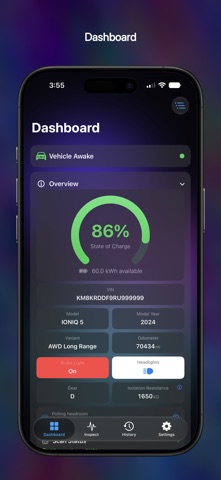
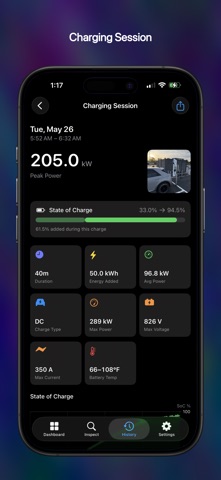
EV Dashboard is an independent OBD-II diagnostic tool for E-GMP electric vehicles: the Hyundai IONIQ 5, IONIQ 5 N, IONIQ 6 and IONIQ 9, the Kia EV3, EV6 and EV9, and the Genesis GV60. REQUIREMENTS - An ELM327-compatible BLE OBD-II adapter is required (see https://www.theburl.com/ioniq-app/support.html for tested adapters) - Signal coverage varies by model, year and trim CARPLAY - A dashboard of live tiles you arrange yourself — 2x8 in full screen, 2x4 in split screen, where supported - Power, state of charge, range, speed, tires, climate, compass, cell voltage delta and 12V, each with its own Help page - A graphics-rich charging page appears when you plug in: session power, pack voltage and current - Full support for CarPlay's Dashboard — a live charger map beside two tiles of your choosing NAVIGATION & CHARGERS - More than 59,000 DC fast-charge sites ship inside the app — worldwide, instant, offline - US and Canadian sites come from the official DOE / NRCan registry; the rest of the world from Open Charge Map - Filter by power level or network operator, anywhere in the world - Turn-by-turn navigation to a charger or any address, with spoken guidance in a voice you choose - Turn directions in your instrument cluster and head-up display, where supported - Your estimated state of charge on arrival, so you know if you will make it IN-DEPTH DATA - State of charge, available energy, voltage, current, power, regeneration, and 12V and DC-DC telemetry - Per-cell voltages and temperatures as color-coded heatmaps, with min, max and delta - Tire pressures and temperatures, with per-axle warnings from your door placard, temperature-compensated - Vent and floor air temperatures, cabin and outside temperature, humidity, motor RPM, gear, battery warmer and lighting indicators CHARGING - Live AC and DC session detection - Charts for power, pack voltage, requested against delivered current and battery temperature - The charging station's published maximum power, voltage and current (J1772 + CCS) - Live "Time to 70°F / 21°C" battery ETA for DC fast charging HISTORY & ICLOUD - Every drive and charge recorded, with measured trip distance and efficiency - 50+ signals on charts you can pinch, pan and scrub - Optional iCloud sync keeps your history in step across iPhone, iPad and Mac - Attach a photo, share a report card, or export any session to CSV DIAGNOSTICS - Enhanced DTC Scan sweeps the whole vehicle bus, names every module that responds and reads its fault codes - Connection Report, ICCU Information, J1979 Scanner, ECU Finder and DID Range Scan, with CSV and image sharing PRIVACY BY DESIGN No analytics, ads or accounts, and the app uploads nothing. Vehicle data stays on your device and your private iCloud; logs are exported only when you tap Share. The one thing it downloads is the charger database, when you ask. Privacy policy: https://www.theburl.com/ioniq-app/privacy.html NOT AFFILIATED EV Dashboard is not affiliated with, endorsed by or sponsored by Hyundai, Kia or Genesis. IONIQ, EV3, EV6, EV9 and GV60 are trademarks of their respective owners. This independent tool reads your own vehicle's data using open OBD-II and UDS standards (ISO 15031, ISO 14229). Charger data from Open Charge Map contributors (CC BY-SA 4.0) and the U.S. DOE / NRCan Alternative Fuels Data Center.
What's new · 3.0
Version 3.0 Name and languages - The app is now called EV Dashboard, with a new icon - Japanese joins as the tenth language CarPlay, rebuilt - Rebuilt from the ground up — the long-standing "music notes" bug is gone - Full-screen grid grows to 2x8 tiles - Split screen(1) gets its own 2x4 layout - Customize Tiles — choose which tiles appear and where, in separate Full Screen, Split Screen(1) and Maps layouts - Full support for CarPlay's Dashboard — a live charger map beside up to two tiles you choose - Help pages for every one of the 20 available tiles, with live preview NEW: Range and distance - View remaining range and recent drive efficiency - Trip distance is now measured from GPS and vehicle speed, not read in whole-mile steps - Range comes from a long-term average of your efficiency and the energy the battery reports NEW: Speed tile - Your current speed, with the last two minutes drawn behind it - White indicates when power was being drawn, green when regenerating NEW: Dynamic Nearest DC Charger / Arrive time tile - At a glance, the distance and location of the nearest DC charger - Quick visual of nearby traffic conditions Compass - The compass tile now uses your GPS course rather than the device magnetometer - It now points reliably in your direction of travel, whatever way your device is lying NEW: Navigation - A full-screen charger finder map — pan, zoom, filter, and an arrow to the nearest DC fast charger - Filter by DC power level or preferred network operator - Turn-by-turn navigation inside the app — navigate to a charger, or anywhere you choose - Spoken guidance in a voice you pick, ducking music and speaking over other apps - Turn directions in your instrument cluster(1) and head-up display(1) - Estimated charge on arrival, colored green, amber or red - Saved and recent destinations — up to 10 named addresses, plus your last 10 trips - Up to two chosen tiles sit beside the map while guidance runs NEW: DC Fast Charger finder - More than 59,000 DC fast-charge sites ship inside the app — worldwide, instant, offline - US and Canadian sites come from the official DOE / NRCan registry, with per-port power - Every site lists its connectors - You control charger database updates, under Settings → Navigation - The network filter follows the map worldwide, tailored to your region Charging - FIX: three-phase AC power was understated — now phase-aware, verified against the car's own display, and History reads "AC 3-phase" - "Requested Current" now reads what your vehicle asks the charger for over the CCS link Vehicles - The Kia EV3 and Genesis GV60 are now fully supported - FIX: IONIQ 5 N gains a working odometer - FIX: Japan-market 2024 IONIQ 5 gains working 12V, lights, and DC charge session reporting Connection - NEW: Adapter Interference detection spots another OBD app sharing your adapter, and disconnects rather than show data it cannot trust - NEW: Two shareable on-device recorders in Settings → Diagnostics — the App Activity Log and Drive Diagnostics Recorder (1) where supported by the vehicle
Details