

Transmission Pocket
Vanmo IT AB · Utilities
Independent analytics for this App Store listing. AppTracker is not affiliated with Vanmo IT AB.
Chart standing · US
What changed · US
Listing changes AppTracker has observed for this app in this storefront — new versions, price moves, rating shifts, and store copy.
You can save more than one server now — the seedbox and the NAS at home — and switch between them with a tap. Labels show up on every row, and you can filter and edit them. You can reorder the queue, set priorities, rename transfers and the files inside them, and repair tracker lists that have gone stale. Speed limits are all here too: global caps, what Slow Mode actually enforces, and a schedule so it turns itself on in the evening. Plus statistics, a peer-port test, blocklist updates, magnet sharing, and Shortcuts actions for adding a magnet or flipping Slow Mode from an automation. It can also tell you when a download finishes, as reliably as background wake-ups allow. The list is more honest now: tracker errors, stalled swarms, and verification progress show up without tapping in. Polling got much lighter, so it stays smooth and goes easier on the battery. iPad gets a real split view.
Screenshots


Keywords this app targets
Search terms AppTracker associates with this app — estimates, not search volume. ❝ = in the app's title; a highlighted number is its current position for that term.
Similar apps
Competitors and close alternatives, as estimated by AppTracker.





About
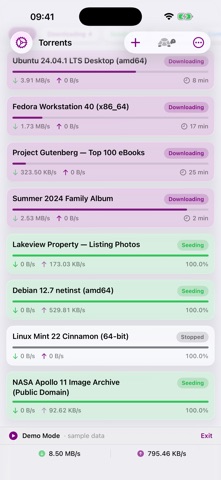
Transmission Pocket is a fast, remote control for your own Transmission torrent server. Connect to a Transmission server running on your home server, NAS, or Raspberry Pi and manage everything from your iPhone or iPad. FEATURES • Live dashboard — see every torrent with real-time download and upload speeds, progress, ETA, and status at a glance. • Add from anywhere — tap a magnet link in your browser, paste one from the clipboard, or open a .torrent file from Files or the web. Then pick the destination folder and add labels. • Full control — start, stop, and remove torrents individually or in bulk. • Torrent details — inspect files, trackers, and peers; set per-file priority and choose which files to download. • Fine-tune — per-torrent speed and seed ratio/idle limits, plus move a torrent's download location. • Search, filter, and sort — quickly find what you need and filter by downloading, seeding, stopped, completed, or active. Transmission Pocket is a remote control for a Transmission server that you own and operate. It does not download or share content on its own and includes no built-in content, search, or trackers.
What's new · 2.2
You can save more than one server now — the seedbox and the NAS at home — and switch between them with a tap. Labels show up on every row, and you can filter and edit them. You can reorder the queue, set priorities, rename transfers and the files inside them, and repair tracker lists that have gone stale. Speed limits are all here too: global caps, what Slow Mode actually enforces, and a schedule so it turns itself on in the evening. Plus statistics, a peer-port test, blocklist updates, magnet sharing, and Shortcuts actions for adding a magnet or flipping Slow Mode from an automation. It can also tell you when a download finishes, as reliably as background wake-ups allow. The list is more honest now: tracker errors, stalled swarms, and verification progress show up without tapping in. Polling got much lighter, so it stays smooth and goes easier on the battery. iPad gets a real split view.
Details