

qBitRemote
Mykola Kholtobin · Utilities
Independent analytics for this App Store listing. AppTracker is not affiliated with Mykola Kholtobin.
Chart standing · US
What changed · US
Listing changes AppTracker has observed for this app in this storefront — new versions, price moves, rating shifts, and store copy.
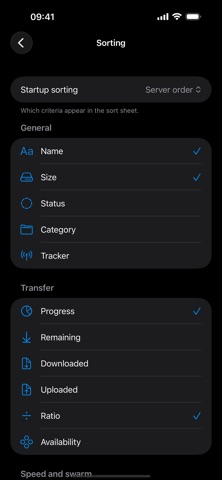
Sorting is here. • Tap the list title to sort — 20 criteria across General, Transfer, Speed and Time. Tap the active one again to reverse the order. • Each torrent now shows the value it is sorted by, so sorting by ratio or ETA is actually readable. • Your choice is remembered between launches, and "Default" returns to the server's own order. • Settings → Sort lets you choose which criteria appear in the menu and which one the app starts with. • Search now tells the truth: if your filter hid the matches, it says so, shows how many were found elsewhere, and offers to search everywhere.
In-app purchases · US
No in-app purchases.
Screenshots





Keywords this app targets
Search terms AppTracker associates with this app — estimates, not search volume. ❝ = in the app's title; a highlighted number is its current position for that term.
Similar apps
Competitors and close alternatives, as estimated by AppTracker.


About
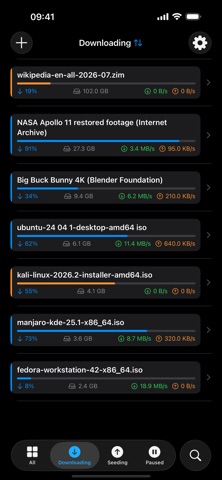
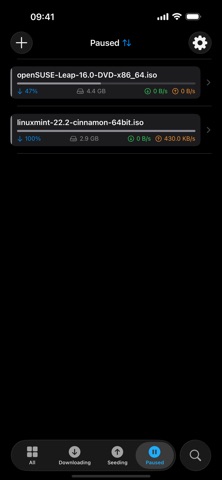
qBitRemote — qBittorrent Remote Control Take full control of your qBittorrent client right from your iPhone or iPad. qBitRemote connects directly to your qBittorrent Web UI, giving you a native iOS experience to manage all your downloads without ever touching a browser. MANAGE YOUR DOWNLOADS • View all torrents with real-time status, progress, speed, and size • Auto-refreshes every 3 seconds so you always see the latest state • Filter by status: All, Downloading, Seeding, Paused • Pause, resume, or delete individual torrents with ease ADD TORRENTS ON THE GO • Add torrents by opening .torrent files from Files, Mail, or Safari — sent directly to your own server • Set save path, category, and tags when adding • Manage categories and tags to keep your library organized FULL TORRENT DETAILS • Inspect individual files inside each torrent • Set per-file download priorities • View detailed info: tracker status, ratio, ETA, and more SECURE & PRIVATE • Passwords stored in iOS Keychain — never exposed in plain text • Connects to your own self-hosted qBittorrent instance • No cloud, no accounts, no third-party servers — your data stays yours NATIVE iOS EXPERIENCE • Built entirely with SwiftUI for a smooth, modern interface • Optimized for both iPhone and iPad REQUIREMENTS • qBittorrent with Web UI enabled on your server or home network • Access to your qBittorrent host via local network qBitRemote is the simplest way to keep your downloads under control.
What's new · 1.02
Sorting is here. • Tap the list title to sort — 20 criteria across General, Transfer, Speed and Time. Tap the active one again to reverse the order. • Each torrent now shows the value it is sorted by, so sorting by ratio or ETA is actually readable. • Your choice is remembered between launches, and "Default" returns to the server's own order. • Settings → Sort lets you choose which criteria appear in the menu and which one the app starts with. • Search now tells the truth: if your filter hid the matches, it says so, shows how many were found elsewhere, and offers to search everywhere.
Details